Published on
January 6, 2026

Growing businesses often face challenges with outdated bookkeeping systems that can't handle increasing transaction volumes. Issues like manual data entry, errors, and disconnected tools can slow operations and hinder decision-making. The solution? Modern bookkeeping systems that use cloud-based platforms, automation, and integration to streamline processes and support growth.
Here’s what you’ll learn:
Example: Farmgirl Flowers increased revenue by 53% after adopting QuickBooks, reducing their month-end close from 10 days to 4 and saving $96,000 annually.
These steps help businesses scale their bookkeeping without starting from scratch, ensuring efficiency, compliance, and financial clarity as they grow.
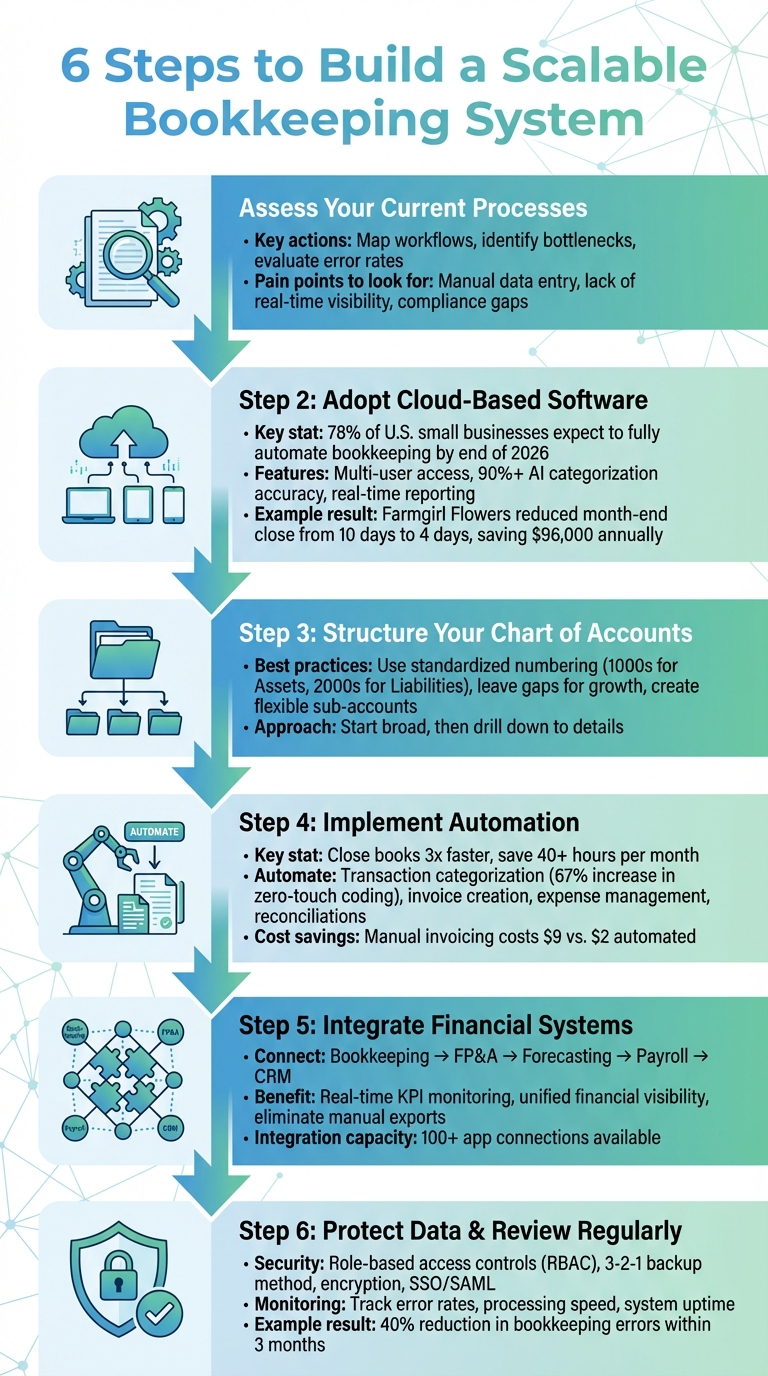
6 Steps to Build a Scalable Bookkeeping System for Growing Businesses
To create a bookkeeping system that can grow with your business, you first need to understand the weak points in your current setup. This means taking a hard look at your existing processes to identify inefficiencies, bottlenecks, and limitations. As Ed Brooks from Navan explains:
"When businesses grow, their bookkeeping requirements evolve and become more complex and demanding." [1]
This assessment doesn’t have to be overwhelming. Begin by mapping out your workflows step by step. For example, trace the path of an invoice - from data entry to payment - and see where delays or redundancies occur. This kind of analysis can uncover where manual tasks slow things down, where duplicate efforts waste time, and where your current software might be holding you back. Once you’ve identified these problem areas, you’ll have a clearer picture of what needs fixing.
Bookkeeping challenges tend to show up in predictable ways. Manual data entry for expenses, invoices, or bank reconciliations often becomes a bottleneck as your business grows. If your team frequently has to correct errors, it’s a red flag that your processes aren’t working efficiently. These mistakes not only waste time but also undermine the accuracy of your financial data.
Another common issue is a lack of real-time visibility into your financials, which can delay critical decision-making. Pay attention to error rates - if your team spends too much time fixing mistakes, your manual processes may be failing. Similarly, if your accounting software struggles to keep up with transaction volumes or slows down during busy periods, it’s a sign that it won’t scale well. Compliance gaps are another serious concern. If your system isn’t updated with the latest tax laws and regulations, it could lead to costly legal and financial risks as your business expands.
Your bookkeeping system should align with where your business is headed. For example, if you’re gearing up for a funding round, your system needs to provide accurate, real-time financial data to meet investor expectations. Planning to expand into new markets? You’ll need tools that can handle multi-currency transactions and comply with regional tax laws. And as transaction volumes grow, your platform should be able to handle the load without slowing down or crashing.
Don’t forget to review your internal controls during this process. As your team grows, it’s crucial to establish clear roles and approval workflows to prevent fraud and reduce errors. Streamlining redundant tasks now will help ensure your bookkeeping system can meet future demands as your business scales.
After reviewing your current processes, moving to a cloud-based accounting platform can address many of the challenges that come with scaling a business. Unlike traditional desktop software, which requires manual updates and isn’t designed for remote access, cloud-based platforms offer automatic updates, seamless integration with financial institutions, and the ability for your team to access data from anywhere. For instance, QuickBooks Online connects with over 750 third-party apps, while Xero links to more than 21,000 financial institutions for automatic bank feeds [6]. This shift not only simplifies your operations but also sets the stage for automation and real-time insights.
Here’s a telling statistic: 78% of U.S. small businesses expect to fully automate their bookkeeping by the end of 2026 [5]. And the results speak for themselves. In 2024, Farmgirl Flowers scaled its revenue from $60 million to $92 million after adopting QuickBooks Online Advanced. They also reduced their month-end close process from 10 days to just 4, saving approximately $96,000 annually [5]. Similarly, Tattly, a design agency in NYC, implemented FreshBooks' auto-time tracking in late 2024. This change cut their weekly invoice prep time from 3 hours to just 35 minutes and reduced their Days Sales Outstanding by 32% [5].
When choosing a cloud-based platform, focus on features that support growth and efficiency. Multi-user permissions and high transaction volume support are essential, especially when paired with AI-driven coding that achieves over 90% accuracy while maintaining robust security [5]. Many leading platforms boast 93% categorization accuracy within 60 days of training, meaning less manual work as your business grows [5].
Integration is another critical factor. The platform should connect effortlessly with banks, e-commerce platforms, payment processors, payroll systems, and CRMs [4][5]. Check the provider’s integration page to ensure compatibility with your current and future tools [4]. Planning to expand internationally? Features like multi-entity and multi-currency support become indispensable [5].
Advanced platforms also stand out with real-time reporting and predictive analytics. For example, AI-powered dashboards can provide cash-flow forecasts that project your financial runway up to 90 days ahead [5]. Some systems, like QuickBooks, even offer GenAI "FinAssist" panels to answer plain-English questions about financial trends or anomalies [5]. This eliminates the need for manual data exports and ensures you’re always working with up-to-date information.
A scalable platform grows with your business without requiring a complete system overhaul. Look for software with tiered options, allowing you to upgrade to more advanced versions as your needs evolve - saving time and money in the long run [4]. For example, Fertile Mind, a manufacturer based in Sydney, switched to Xero and Hubdoc in 2024. This move cut manual data entry by 630 hours annually, improved supplier payment accuracy from 88% to 99%, and earned them $18,400 in early-payment discounts [5].
To ensure the platform is the right fit, take advantage of a 7-day trial using 6–12 months of historical data (or at least 300–500 entries) to test the user interface, AI accuracy, and customer support responsiveness [5]. Schedule a weekly 15-minute review to address any exceptions during the trial. Lastly, confirm that your vendor holds SOC 2 Type II and ISO 27001 certifications to protect your sensitive financial data [5].
After choosing the right cloud-based platform, the next step is setting up a Chart of Accounts (CoA) that can grow alongside your business. A poorly designed CoA can lead to constant account adjustments or even complete overhauls as your company expands. Jason Berwanger from HubiFi explains it well:
"Your Chart of Accounts (CoA) is that cataloging system. It's the organized framework that gives every single transaction a specific home." [7]
A well-structured CoA ensures your financial data stays organized and easy to navigate. Start by implementing a standardized numbering system. Assign distinct number ranges to major account categories - for instance, 1000s for Assets, 2000s for Liabilities, and so on [7]. This approach helps your team quickly identify the type of transaction. Leave gaps in the numbering (e.g., 1110, 1120) to add sub-accounts later without disrupting the entire system [12,15]. Begin with broad categories and then drill down into more detailed sub-accounts.
Organize your accounts so they flow from general to detailed. For example, "Assets" can branch into "Current Assets", which can then include subcategories like "Business Checking" [7]. This structure provides a clear overview for executives while allowing managers to dig into specific details as needed. Avoid unnecessary complexity - grouping all office supplies under one account rather than separating pens, paper, and ink keeps your financial reports clean and easy to read [7].
As your business grows, you might need to monitor new revenue streams, expenses, or departments. Design your CoA with a consistent naming convention, such as "Marketing - Social Media Ads", and document the purpose of each account [12,15]. Plan an annual review to deactivate accounts you no longer use and ensure the structure still fits your current operations [12,15]. For more advanced tracking needs, consider using multi-dimensional segments. These allow you to track performance by department, project, or region without overloading your primary ledger [8].
Once your Chart of Accounts is in place, it's time to tackle repetitive tasks that eat up time and often lead to errors. As your business grows, transaction volumes can skyrocket, making manual processes inefficient and overwhelming. Automation steps in to turn bookkeeping from a tedious chore into a smooth, background operation.
For instance, platforms like Ramp can close books three times faster, saving businesses over 40 hours a month. For companies with around 200 employees, this translates to reclaiming more than 330 hours annually - time that would otherwise be spent on manual processes [3]. Plus, automation can significantly cut costs; invoicing a customer manually costs about $9, while automation can lower that to just $2 [2].
Next, let’s look at how automating transactions and reconciliations can further reduce manual input.
Start by automating transaction categorization and coding. AI-powered tools can learn your coding habits and automatically assign transactions to the right General Ledger accounts, departments, or classes [3]. This approach improves efficiency, with a 67% increase in “zero-touch” codings compared to traditional rule-based systems [3]. Beyond categorization, these systems can handle tasks like creating invoices, tracking due dates, scheduling payments, and even following up on overdue amounts [2].
Expense management automation is another game-changer. It can match receipts, route approvals, and handle travel reimbursements, significantly reducing the workload for employees and finance teams alike [3][2]. Even month-end processes can be automated - things like accruals, reversals, and data verification - cutting close times by up to 22% [3].
David Eckstein, CFO at Vanta, highlights the benefits of automation:
"Ramp gives us one structured intake, one set of guardrails, and clean data end‑to‑end - that's how we save 20 hours/month and buy back days at close" [3].
Payroll and tax compliance can also be streamlined with automation. Software can handle payroll processing, update tax documents, and even pre-fill tax returns based on regional requirements [2].
Automation doesn’t stop with workflows - it extends to real-time data synchronization. By integrating API-enabled software with your accounting platform, you can connect directly to banks, payment processors, payroll systems, and expense tools [3]. This setup pulls transaction data as it happens, eliminating the delays and errors that come with manual uploads or batch processing.
Real-time syncing ensures your financials reflect the current state of your business. Your bookkeeping system updates instantly to show your actual bank position, giving you a clear view of cash flow at any moment. This immediate visibility is crucial for decision-making. When you can monitor spending patterns and cash positions as they unfold, you’re better equipped to seize opportunities or address challenges.
Before diving into automation, document your existing workflows in detail. Identify bottlenecks where manual steps slow things down [2][9]. Assign a project owner to oversee the transition, set up rules, and address any issues that automation tools might miss [2]. To make the switch smoother, roll out automation in phases, allowing your team to adapt while keeping cash flow steady [9].
While automation can handle your routine transactions, the real value of bookkeeping emerges when it connects with broader financial platforms. If your bookkeeping operates in a vacuum, it leaves you with fragmented data that complicates forecasting, tracking KPIs, and planning for growth. By integrating your bookkeeping system with other financial tools, you can turn raw data into actionable insights. This connection bridges the gap between daily operations and long-term financial strategy.
Linking your bookkeeping platform to tools like FP&A software, cash flow models, and forecasting systems provides a unified view of your financial health. With integration, revenue, expenses, and cash flow data sync automatically into budgets, KPI dashboards, and forecasting models. This eliminates the need for manual exports and allows for real-time updates, making it easier to adjust strategies as performance metrics evolve.
When systems work together seamlessly, you can monitor variances between forecasts and actual results, refine assumptions on a weekly basis, and adapt strategies to current trends. This centralized approach eliminates the hassle of switching between tools or reconciling conflicting data, offering instant insight into key metrics like customer acquisition costs, lifetime value, cash conversion cycles, and working capital - all derived from your bookkeeping data.
Modern platforms offer integrations with over 100 apps [10], covering everything from payroll and inventory management to CRM systems and payment processors.

Phoenix Strategy Group specializes in helping growth-stage companies create integrated financial systems. Their expertise goes beyond basic bookkeeping, offering tools like Integrated Financial Models, Monday Morning Metrics, and KPI frameworks that connect bookkeeping data directly to strategic planning resources. They excel at synchronizing financial tools and teams to ensure smooth, effective communication across systems.
Their services include bookkeeping, fractional CFO support, FP&A system implementation, and data engineering. This full-stack approach ensures all business systems are interconnected, which is especially critical during scaling, fundraising, or preparing for M&A. Since 1998, Phoenix Strategy Group has supported over 240 portfolio companies and managed more than 100 M&A transactions [10], making them a trusted partner in the integration process.
"If you're looking for unparalleled financial strategy and integration, hiring PSG is one of the best decisions you can make" [10].
- David Darmstandler, Co-CEO of DataPath
For companies ready to move beyond disconnected systems, working with experts who understand both the technical and strategic aspects of integration can streamline the transition. With the right solutions in place, your bookkeeping can scale effortlessly alongside your business growth.
As your business grows, safeguarding sensitive data and ensuring compliance become critical to maintaining smooth operations. With an expanding bookkeeping system, the amount of financial data increases, bringing heightened exposure to security threats and regulatory challenges. One effective way to mitigate these risks is by implementing role-based access controls (RBAC). RBAC ensures that only authorized individuals can access or modify key financial data within your ERP and accounting platforms [13]. This becomes even more essential as your team spans multiple departments - Finance managing month-end close, FP&A handling forecasts, Revenue Operations overseeing contracts, and leadership monitoring risks.
Encrypting data during transfers is another key measure to preserve its integrity. Features like SSO/SAML authentication, advanced user permissions, and detailed audit logs allow you to track every update to your financial records [14]. Brad Silicani, Chief Operating Officer at Anrok, aptly describes the importance of these controls:
"Effective controls should feel like guardrails on a highway: they keep you safe while allowing you to move fast" [13].
Strong security practices also align with compliance requirements, helping you maintain accurate records for audits, tax filings, payroll, and financial reporting as your business scales [15].
RBAC is a cornerstone of data security, preventing fraud, revenue leaks, and operational hiccups by ensuring employees can only access the information relevant to their responsibilities [13]. Start by centralizing your data within an ERP system that enforces consistent access rules. Develop a tiered documentation approach: Tier 1 outlines high-level risk objectives, while Tiers 2 and 3 detail specific procedures. Regularly evaluate these controls through automated daily exception reports, monthly reconciliation reviews, quarterly testing of high-risk areas, and annual internal audits. Review and adjust your RBAC framework during key growth moments, like doubling revenue or launching new product lines, to ensure it keeps pace with increasing complexity.
For example, Phoenix Strategy Group's Enterprise Tier ($384/year) includes features like enterprise-grade security, SSO/SAML authentication, advanced permissions, and unlimited user audit logs [14].
While access restrictions protect data, having a solid backup plan ensures you're prepared for the unexpected.
A reliable backup strategy is essential for protecting against data loss. The 3-2-1 backup method is a proven approach: maintain three copies of your data (one original and two backups), store them on two different media types to avoid a single point of failure, and keep at least one copy offsite or in a separate cloud region [17]. With threats like malware and hardware failures, redundancy is non-negotiable [17].
Define your Recovery Point Objectives (RPOs) and Recovery Time Objectives (RTOs) to determine acceptable levels of data loss and downtime [16]. Automate backups daily or weekly through your accounting software, ensuring all backup data is encrypted both in storage and during transmission [17][18]. For added security, implement continuous data protection (CDP) to record changes in real time [17][18]. Disconnect removable storage devices when not in use to shield backups from ransomware attacks, and regularly test your recovery procedures to ensure quick restoration when needed [17][16].
Once you've integrated your financial systems, it's crucial to perform regular reviews to maintain efficiency and scalability. What works perfectly for a small team may falter as your business grows. These reviews help ensure your bookkeeping processes keep pace with increased transaction volumes, the addition of new entities, and shifting compliance requirements.
Keeping an eye on key metrics allows you to catch problems early. For instance, a café owner who transitioned to QuickBooks Online saw a 40% reduction in bookkeeping errors within three months simply by tracking error rates and processing times [11]. This approach not only improved accuracy but also highlighted areas where automation could eliminate manual inefficiencies.
Pay attention to metrics that reflect how well your system is handling the increasing demands of your business. Metrics like transaction processing speed can reveal whether your system is keeping up with higher volumes. Error rates help identify potential data accuracy problems that could snowball over time. And system uptime ensures your platform remains reliable during critical periods, such as month-end closings [12].
Real-time dashboards can make monitoring these metrics more manageable. For example, daily reconciliation reports can quickly flag errors or delays, while monthly reviews of uptime and response times can uncover performance issues before they disrupt operations. Automated alerts for anomalies - like spikes in transaction errors or compliance issues - allow you to act swiftly, rather than discovering problems during an audit down the line.
While ongoing monitoring is essential for catching immediate issues, annual audits provide a broader assessment of your system's health.
Set aside time each year for a thorough audit of your bookkeeping infrastructure. This ensures your systems remain aligned with your growth and can handle the demands of scaling. These audits should check for data accuracy, review documentation, and confirm compliance with accounting standards. It's also a good opportunity to evaluate your chart of accounts, automation workflows, and system integrations to identify areas needing updates.
To minimize disruptions, schedule major system upgrades during slower business periods. Before rolling out changes, test them in a controlled environment to ensure everything - from account balances to transaction counts - remains consistent and accurate. This careful approach helps maintain stability while improving your system's capacity to support future growth.
Building a scalable bookkeeping system lays the groundwork for your business to grow without being bogged down by financial inefficiencies. By evaluating your current processes, embracing cloud-based solutions, organizing a flexible chart of accounts, and automating repetitive tasks, you’re creating systems that can handle a growing workload without adding unnecessary manual effort.
Here’s a real-world example: In 2023, a café owner in Pembroke Pines switched from Excel to QuickBooks Online. The result? Bookkeeping errors dropped by 40% in just three months. This change also enabled real-time reporting, leading to smarter decisions about inventory management [11].
To ensure your systems keep pace with growth, regular monitoring and audits are essential. Keeping an eye on metrics like transaction speed, error rates, and system uptime helps you identify and resolve issues early. Scheduled reviews ensure your financial infrastructure evolves alongside your business.
When it’s time to take your financial systems to the next level, expert support can make all the difference. Phoenix Strategy Group (PSG) specializes in helping businesses implement scalable financial practices. With over 25 years of experience, they’ve supported 240+ portfolio companies and facilitated more than $200 million in funding in the last year alone. From basic bookkeeping to fractional CFO services and data engineering, PSG’s full-stack approach ensures your financial systems are not only scalable but also aligned with your business goals [10].
"As our fractional CFO, they accomplished more in six months than our last two full-time CFOs combined. If you're looking for unparalleled financial strategy and integration, hiring PSG is one of the best decisions you can make." - David Darmstandler, Co-CEO, DataPath [10]
Ready to turn your bookkeeping into a growth engine? Visit Phoenix Strategy Group and take the first step toward financial clarity and sustainable growth.
Cloud-based bookkeeping platforms give growing businesses a convenient and secure way to manage their finances. By storing financial data in the cloud, these systems allow users to access information instantly from any device. Features like real-time reporting, automated bank reconciliations, and simplified processes for handling invoices and expenses make financial management much more efficient. This reduces the need for manual data entry, cuts down on errors, and keeps operations running smoothly as the volume of transactions increases.
These systems are also designed to grow with your business. You can easily add new users, entities, or subsidiaries while maintaining clear financial oversight across the entire organization. Plus, they integrate seamlessly with other tools, such as payroll, ERP, and CRM systems, to create a unified flow of data. This supports more accurate cash-flow forecasting and enables quicker, more informed decision-making. With built-in security measures and compliance tools, businesses can safeguard sensitive information and meet regulatory standards - all while staying focused on key growth strategies.
Automating bookkeeping brings a host of advantages that can reshape how your business handles its finances. For starters, it cuts down on time spent on repetitive tasks, allowing you to focus on more strategic activities. Plus, it minimizes the chances of human error, resulting in more accurate financial records.
Another big win? Real-time financial insights. Automation keeps you updated with the latest numbers, enabling quicker, well-informed decisions. On top of that, it simplifies compliance by keeping your records aligned with regulatory requirements - making it much easier to expand your operations as your business grows.
Integrating bookkeeping with financial systems turns your financial records into a powerful decision-making tool. Syncing data from sources like bank accounts, payroll, invoicing platforms, and forecasting tools gives you a real-time snapshot of your finances. This means you can make quicker, more informed choices - whether it’s spotting cash flow challenges, analyzing product profitability, or running "what-if" scenarios - all without relying on outdated reports.
Automation takes it a step further by cutting down on manual tasks such as data entry and reconciliations. This not only saves time but also reduces errors. Features like invoice matching, multi-currency conversions, and tax compliance checks ensure your financial data is consistent and reliable - a single source of truth. With accurate, audit-ready records, businesses can generate detailed reports, monitor KPIs, and evaluate performance across teams or locations, giving growth-focused companies the confidence to scale efficiently and strategically.