Published on
June 26, 2026

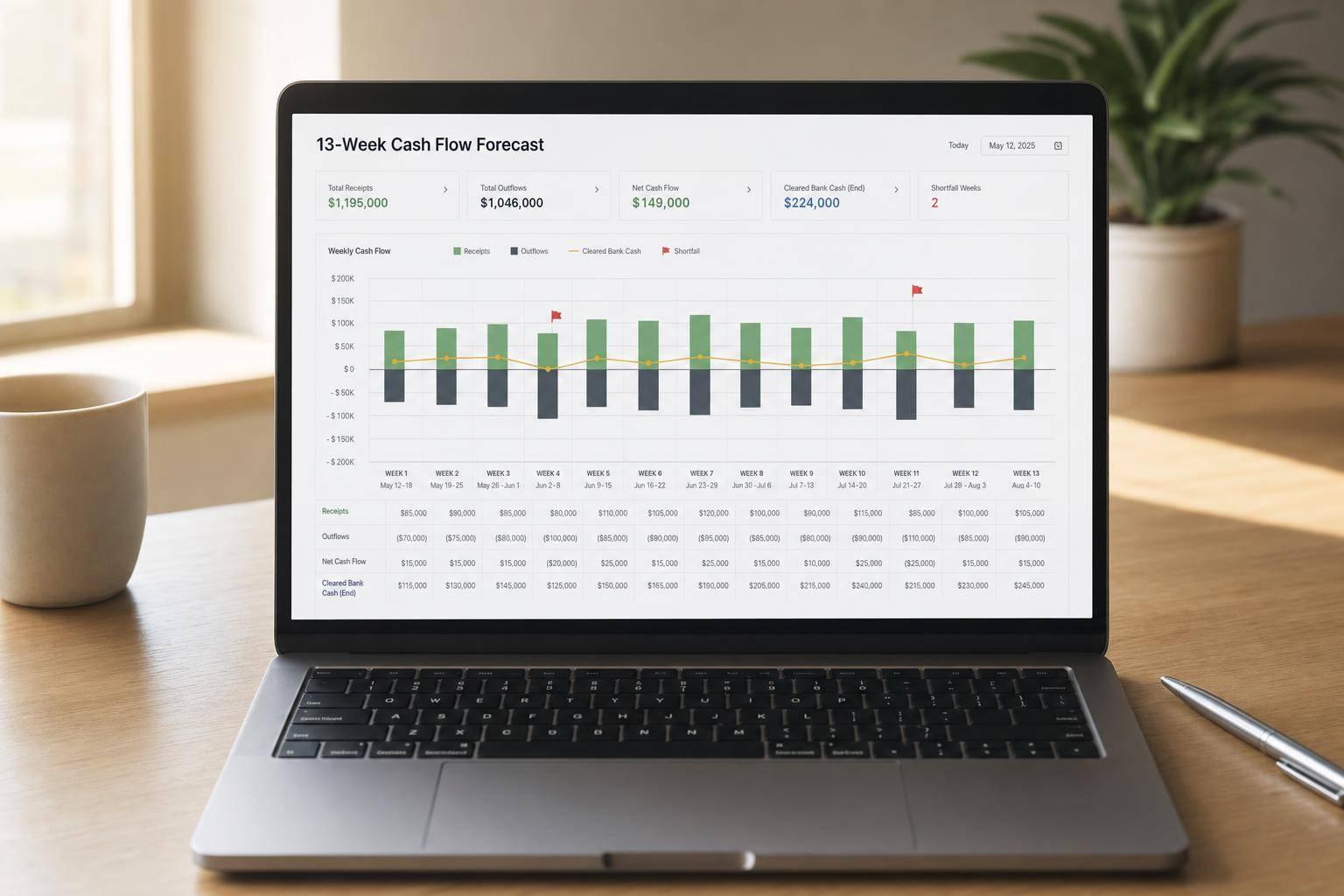
A 13-week cash flow forecast tells me one thing fast: whether my business can cover the next 13 weeks of cash out. It starts with cleared bank cash, then maps when money comes in and when it leaves. That matters because many small businesses have only 27 days of cash on hand, and 25% have less than 13 days.
Here’s the short version:
The main point is simple: profit does not mean cash is there when I need it. This model helps me see a shortfall early enough to cut spending, speed up collections, or line up funding before cash gets tight.
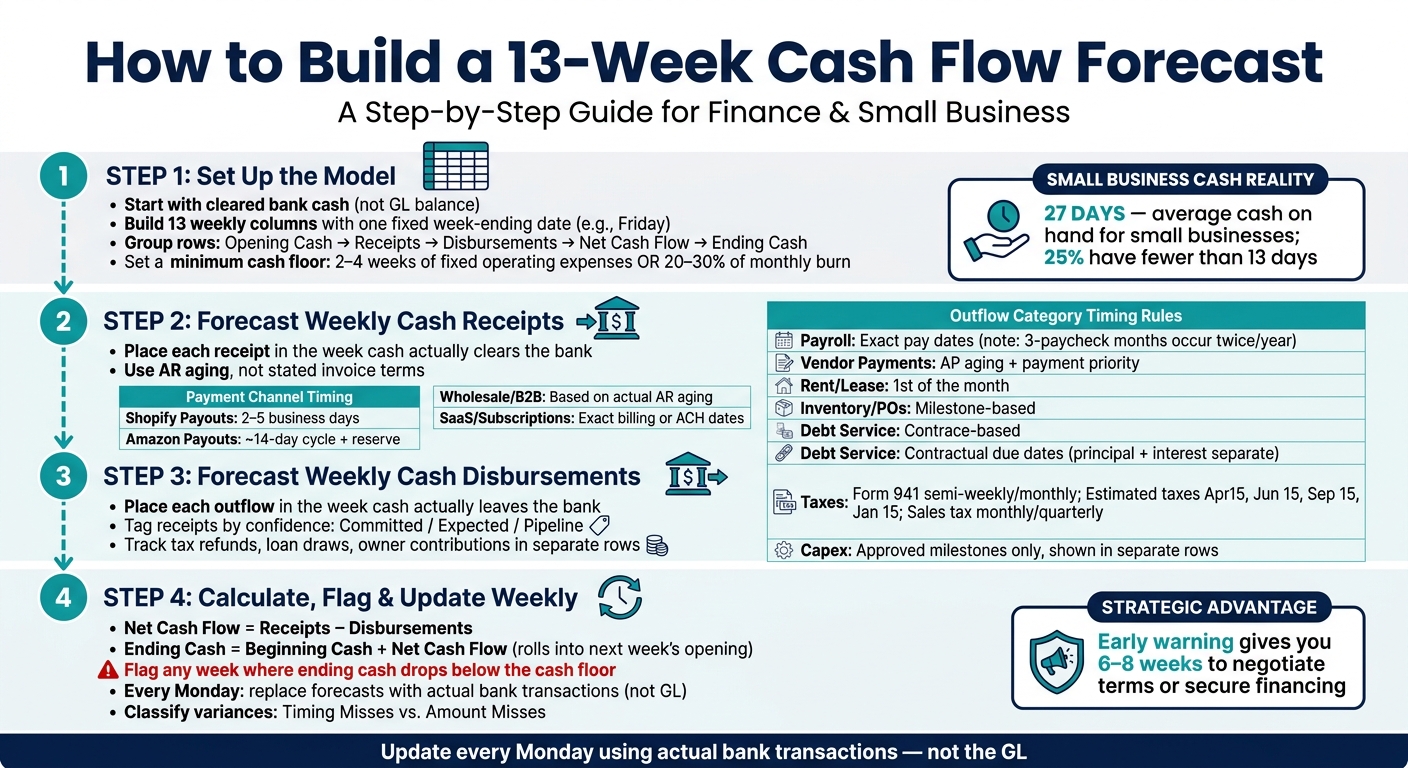
How to Build a 13-Week Cash Flow Forecast: Step-by-Step
Start with a clean weekly frame before you plug in assumptions. Then tie the model to actual bank cash before you map weekly inflows and outflows.
Start with cleared bank cash at the start of Week 1. Use live bank balances, then adjust for checks and deposits in transit that should clear in Week 1.
Add balances from all accounts that support day-to-day operations:
Include processor balances only if settlement is confirmed. Leave out restricted cash, escrow balances, and suspense accounts. That money may show up on paper, but you can’t spend it. Undrawn credit lines stay out too. Track those on a separate liquidity line.
If the opening balance is wrong, every week that follows will be off too.
Use one label column and 13 weekly columns. Pick one week-ending date and stick with it, such as Friday. Each column should show one week of cash activity.
Group the rows into five sections: opening cash, cash receipts, cash disbursements, net cash flow, and ending cash balance. Keep the categories detailed enough to show where pressure is building, but simple enough that the file doesn’t turn into a chore to update.
The ending cash balance in each column should flow straight into the opening cash of the next column. That roll-forward is what makes the model useful.
Add a minimum cash target row right below the ending balance. This is your cash floor. A practical place to start is two to four weeks of fixed operating expenses. For faster-growing companies, 20%–30% of monthly burn is a solid benchmark [5][1].
This line shows when cash is getting tight and when a shortfall is on the way. If the projected ending balance drops below the floor in any week, flag it right away. When the model is current, it can give you six to eight weeks to negotiate terms or line up financing.
Next, map customer collections to the week cash actually hits the account.
A 13-week forecast is about cash timing only: the week money actually hits your bank account. Use the weekly columns from Step 1 and place each receipt in the week the cash clears.
Start with your Accounts Receivable aging report. Then assign each open invoice to a week based on how that customer actually pays, not just what the invoice terms say. If a customer is on Net 30 but keeps paying on day 45, put that receipt in Week 7, not Week 5.
Payment channels clear on different schedules, and that matters more than many teams think.
| Channel | Timing Rule |
|---|---|
| Shopify Payouts | 2 to 5 business days (U.S.) [1] |
| Amazon Payouts | ~14-day settlement cycle + reserve [1] |
| Wholesale / B2B | Based on actual AR aging, not stated terms |
| Subscriptions / SaaS | Exact billing or ACH settlement dates |
| New Sales Pipeline | Apply a conservative close rate and assume only the cash that can realistically collect within 13 weeks [3] |
For example, Shopify payouts for U.S. merchants often land in 2 to 5 business days, so last week's sales are often this week's cash. Amazon is slower, with a roughly 14-day settlement cycle, and it may hold a reserve. Wholesale and B2B customers need to be mapped one by one using AR aging history. Recurring or SaaS receipts are often the easiest to predict, so tie those to exact billing dates or ACH settlement dates.
This matters because it stops collections from making near-term liquidity look better than it is.
When receipt timing is mapped well, you can see which weeks look safe and which ones may be exposed.
For deals that aren't closed yet, use a conservative close rate and include only the cash that can realistically be collected within 13 weeks [3]. It also helps to tag each receipt line by confidence:
That simple label makes the forecast more honest and makes risk easier to spot [2].
Other inflows belong in the forecast too: tax refunds, interest income, owner contributions, loan draws, and proceeds from asset sales. But they shouldn't be mixed in with customer receipts.
Keep three rules in place:
That separation keeps the picture clean. Customer collections should still do the heavy lifting.
Once inflows are mapped, forecast disbursements by the date cash leaves the bank.
Use the same week-by-week approach for cash going out. Once receipts are mapped, place each outflow in the week the money actually leaves the bank. Monthly averages can blur short-term pressure. They smooth over spikes and make it harder to spot the exact weeks when cash gets tight. This is where you can see which weeks are most likely to go red.
Start with your AP aging report. Map each vendor payment to the week the cash is expected to leave the bank. That timing should match payment terms and your payment priority.
Payroll needs its own calendar. Biweekly payroll creates three-paycheck months twice a year, and those weeks carry a much larger cash hit than a simple monthly average would show. Include gross pay, employer payroll taxes, and benefits premiums [3]. For inventory POs, split payments into the weeks when deposits, final balances, and freight or duty charges hit the account [1].
Then layer in fixed outflows like debt service, taxes, and capex.
Debt service should follow your loan amortization schedule, with principal and interest shown separately. Put each one on its contractual due date [3][4].
Taxes run on a set calendar. Federal payroll tax (Form 941) deposits are semi-weekly or monthly, based on payroll size. Quarterly estimated income tax payments fall on April 15, June 15, September 15, and January 15. Sales tax is due monthly or quarterly, depending on revenue volume and state rules [3]. Put each payment into the model on the date it is due.
| Outflow Category | Timing Rule | Forecast Driver |
|---|---|---|
| Payroll | Exact pay dates | Payroll calendar; include three-paycheck months |
| Vendor Payments (AP) | Based on terms and priority | AP aging and vendor classification |
| Rent / Lease | 1st of the month | Lease agreements and contracts |
| Inventory / POs | Milestone-based | Purchasing schedule and supplier terms |
| Debt Service | Contractual due dates | Loan amortization schedules |
| Taxes | Statutory deadlines | Tax calendar: Form 941, sales tax, estimated payments |
| Capital Expenditures | Approved milestones or delivery dates | Confirmed purchase schedules only |
Only include capex if it has been approved and the payment date is confirmed. Keep capex on its own rows, separate from operating outflows. That way, it's easier to see whether the core business is producing enough cash on its own, apart from one-time investment spending [4].
Once you've mapped weekly cash in and cash out, the next step is to finish the model with ending cash. Keep it simple: calculate weekly net cash flow as receipts minus disbursements, add that number to beginning cash, and then carry the ending balance into the next week all the way through Week 13.
This roll-forward is what gives the model its day-to-day use. Each week feeds the next, which means the forecast can show a cash dip before it shows up in your bank account.
Add a minimum cash threshold - usually 20% to 30% of monthly burn - and use conditional formatting to flag any week where ending cash falls below that mark [1][4]. That flag works like an early warning light. It tells you there's a problem coming while you still have time to do something about it.
Of course, that signal is only useful if the model stays current.
Each week, swap forecasted numbers with actual results. Then review the variances and sort them into two buckets:
Don't stop at logging the miss. Use variance analysis to adjust the remaining weeks in the forecast. That's where the model starts helping with actual decisions. A revised view can push you to delay hiring, speed up collections, or protect liquidity before the shortfall week lands.
Update the forecast every Monday using actual bank transactions, not the GL, so you keep a current 13-week view and enough lead time to act before cash gets tight. Done weekly, the forecast becomes a decision tool instead of just another spreadsheet.
If your 13-week cash flow forecast shows a cash gap, spotting it early gives you room to act before it turns into a crisis.
Common moves include speeding up customer collections, renegotiating vendor payment terms, using a line of credit, and delaying discretionary or non-essential payments. Protect payroll first.
It should be accurate enough to give you clear day-to-day visibility. It doesn’t need perfect precision.
A good rule of thumb is this:
If week 1 comes in within 3% of the forecast, the model is usually useful. If the variance is more than 15%, it often means your inputs need work, or your accounts receivable timing is off.
Leave out inflows you hope will happen but that aren’t locked in.
That means financing inflows like new equity or possible debt should stay out unless the funds are firmly secured. The same goes for accrual-based revenue or any amount that doesn’t reflect cash actually landing in your bank account.
Stick to expected receipts with a clear basis, such as a solid payment history or direct commitments.