Published on
July 7, 2026


If I need a fast answer, it’s this: Xero is for short-term cash checks. Fathom is for longer-range planning and reporting.
If I’m asking, “Can I cover payroll next week?”, Xero is often enough. It tracks expected cash from current invoices, bills, bank balances, and recurring items, with forecast views of 7, 30, or 90 days.
If I’m asking, “What happens to cash over the next 12 to 36 months if sales slow, hiring goes up, or debt payments change?”, Fathom is the better fit. It supports forecasts up to 5 years, uses a 3-way model across the P&L, balance sheet, and cash flow, and allows unlimited what-if scenarios.
Here’s the short version:
Quick Comparison
| Criteria | Xero | Fathom |
|---|---|---|
| Main use | Short-term cash visibility | Long-range forecasting and reporting |
| Forecast range | 7, 30, or 90 days | Up to 5 years |
| Scenario planning | Limited | Unlimited what-if scenarios |
| Model type | Based on current ledger activity | 3-way forecast |
| Reporting | Standard accounting views | Board-ready reports and KPI dashboards |
| Setup | Lower | More setup work |
| Best fit | Founder or bookkeeper | CFO, controller, or fractional CFO |
| Price | Included in Xero plan | Starts at $53/month |
So when I compare Xero vs Fathom, I don’t see two direct substitutes. I see one tool for near-term cash awareness and one add-on for planning, reporting, and finance team use.
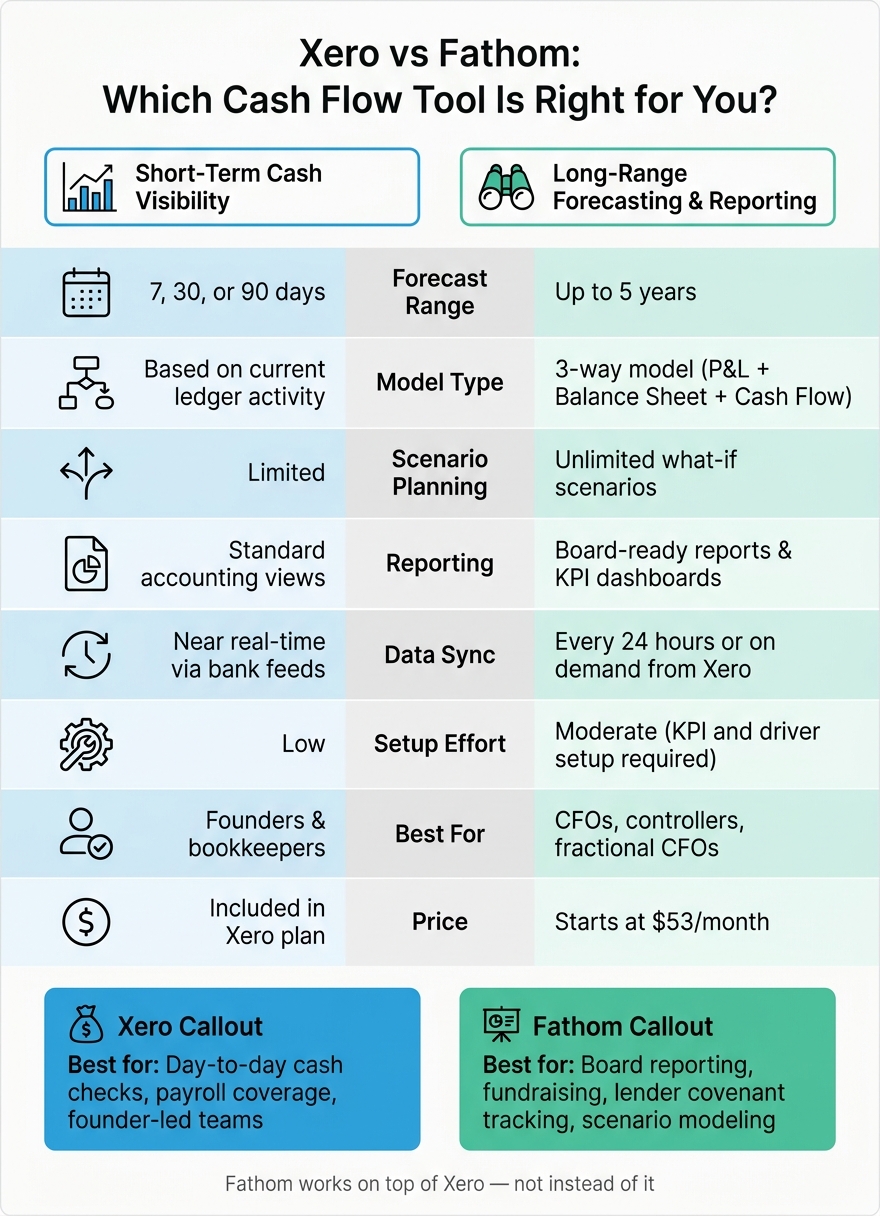
Xero vs Fathom: Cash Flow Forecasting Tool Comparison

Xero’s cash forecast is built for near-term bank balance checks. Depending on your plan, it shows expected cash movement over 7, 30, or 90 days [2]. The forecast estimates closing cash based on your current bank balance, due invoices, due bills, and recurring items. It pulls from current transactions, not future planning inputs. So it’s fast and handy for short-range visibility, but it only goes as far as the data already in the books.
The standard forecast view covers 7 or 30 days, while Analytics Plus adds a 90-day window [2]. That gives Xero a solid role for checking the next few weeks, even if the forecast range stays short.
The accuracy of that forecast depends on clean, current transaction data [2][5]. In plain English, your books need to be in good shape. That means:
That setup makes Xero most useful when cash movement is already visible in the system. If your planning goes past current receivables and payables, the issue shifts. At that point, you’re not just checking what’s already in motion. You’re trying to model what comes next.
Xero works best for founder-led teams with steady cash cycles and fairly limited forecasting needs [2]. It helps answer the day-to-day questions that matter in that stage, like Can we make payroll this Friday? But once the business needs scenario planning or multi-period modeling, Xero’s built-in forecast starts to feel narrow.
Xero shows the cash activity that’s already underway. It does not model new hiring plans, revenue swings, or other future assumptions. That makes it useful for short-term cash checks, but not for broader forward planning. When a company needs to look past what’s already in the ledger, longer-range forecasting tools start to make more sense. This is often the stage where businesses benefit from fractional CFO services to manage complex financial modeling.
Where Xero focuses on short-term visibility, Fathom pushes that same data into longer-range planning. It extends forecasting out to five years and can import up to 96 months of Xero history for trend analysis[3][4].
Fathom uses a three-way forecast that ties the profit and loss statement, balance sheet, and cash flow statement into one model[3][4]. That model projects up to five years ahead, which makes it a better fit for monthly, quarterly, or annual planning than for daily or weekly cash checks.
It also goes past the core model. Fathom supports unlimited what-if scenarios and planning views like Business Roadmap, Microforecasts, and rolling forecasts that update as actuals sync from Xero each day[1][3][4][6]. So if you want to test slower collections, a new hire, or a major asset purchase, you can do that without rebuilding the whole model.
Fathom’s reporting layer is where the gap with Xero becomes much more obvious. It doesn’t just extend the forecast window. It turns those forecasts into board-ready output. You can build custom board packs and board reports, then share them as links or PDFs[3].
Its KPI dashboards can track both financial and nonfinancial metrics, including:
That extra depth comes with more setup work, so Fathom is usually best handled by a controller, CFO, or fractional CFO instead of a founder working alone[3][6]. In most cases, it fits best once financial reporting has been handed off to a finance lead. That team-fit difference shows up even more clearly in the side-by-side comparison below.
The table below lays out the day-to-day split between setup, reporting, and planning.
Here’s the practical split.
| Feature | Xero (Native) | Fathom (Add-on) |
|---|---|---|
| Short-term Cash Visibility | Near real-time - bank feeds and invoice tracking | Scheduled sync - every 24 hours or on demand [1][3] |
| Multi-year Forecasting | Limited - basic budgeting only | Up to 5 years via 3-way model [1] |
| Planning Flexibility | Low - static budgets | High - unlimited what-if scenarios and Microforecasts [4] |
| Dashboard Quality | Functional - standard accounting views | Visual, customizable, board-ready reports [3] |
| Maintenance Effort | Low - runs alongside daily bookkeeping | Moderate - requires KPI and driver setup upfront; Fathom is read-only and syncs from Xero every 24 hours or on demand [3] |
| Typical primary user | Founder or bookkeeper | Finance lead, CFO, or fractional CFO [3][6] |
| Pricing | Included in Xero subscription [7] | Starts at $53/month for one company [6] |
The bigger issue isn’t just what each tool can forecast. It’s also who’s going to use it.
| Business Situation | Better Fit | Why |
|---|---|---|
| Founder-led team, limited finance support | Xero | Covers compliance and cash balance checks at no extra cost [7] |
| Finance-led team preparing for fundraising | Fathom | Produces multi-year projections and professional investor packs [3] |
| Debt-backed company | Fathom | Provides the 3-statement modeling often required by lenders for covenant tracking [6] |
Fathom makes more sense for teams that need board reporting and scenario planning, not just a quick look at cash.
For many founder-led teams, Xero handles the daily work just fine. Adding Fathom starts to make more sense when a finance lead joins, a board wants reporting, or a lender asks for covenant tracking.
After looking at forecast depth, setup, sync, and reporting, the choice is pretty clear. Xero is a good fit for short-term cash checks. Fathom is a better fit for longer-range planning, scenario modeling, and board reporting.
In plain English: this comes down to your planning horizon and how your team works.
If you need short-term cash visibility tied to live accounting data, Xero does that well. If you need multi-year projections, scenario planning, or board-ready reporting packs, Fathom is the stronger pick - and it works on top of Xero, not instead of it.
Team structure matters too. Founder-led teams usually don't need the extra setup or the deeper reporting layer.
Xero for short-term cash visibility. Fathom for multi-year planning and reporting.
Yes. Fathom connects directly with Xero and works as a reporting and forecasting layer on top of your accounting platform.
Once you authorize the connection, Fathom pulls in your financial data, budgets, and tracking categories in read-only mode. It then syncs automatically every 24 hours and uses that data for cash flow forecasts, KPI dashboards, and custom management reports.
Consider upgrading when Xero no longer covers your reporting and planning needs.
A few signs tend to show up fast: you need three-way cash flow forecasting, consolidated multi-entity reporting, custom KPI dashboards, or what-if scenario modeling. At that point, Xero can start to feel a bit tight.
If your operation is getting more complex, you may also run into manual reconciliation bottlenecks and data scattered across different places. That makes it harder to see what's going on and plan ahead with confidence. In those cases, Fathom can give you better visibility for strategic planning.
Setup is usually pretty simple: connect Fathom to your Xero organization, approve access, and Fathom will pull in your past financial data. In most cases, that happens within a few minutes.
Before you connect anything, reconcile your Xero file and make sure your coding stays consistent. That step matters more than it might seem. If the source data is messy, the reports will be too.
Once the import is done, you can set up your reporting templates, KPIs, and budgets.
For forecasting, you’ve got a few options: