Published on
July 8, 2026


If finance access lives in four places, offboarding, reviews, and audit prep get messy fast. I’d fix that with one identity source, SSO + MFA for every human user, least-privilege roles across AWS/Azure/GCP/SaaS, and scheduled access reviews with audit logs to prove changes happened.
Here’s the short version:
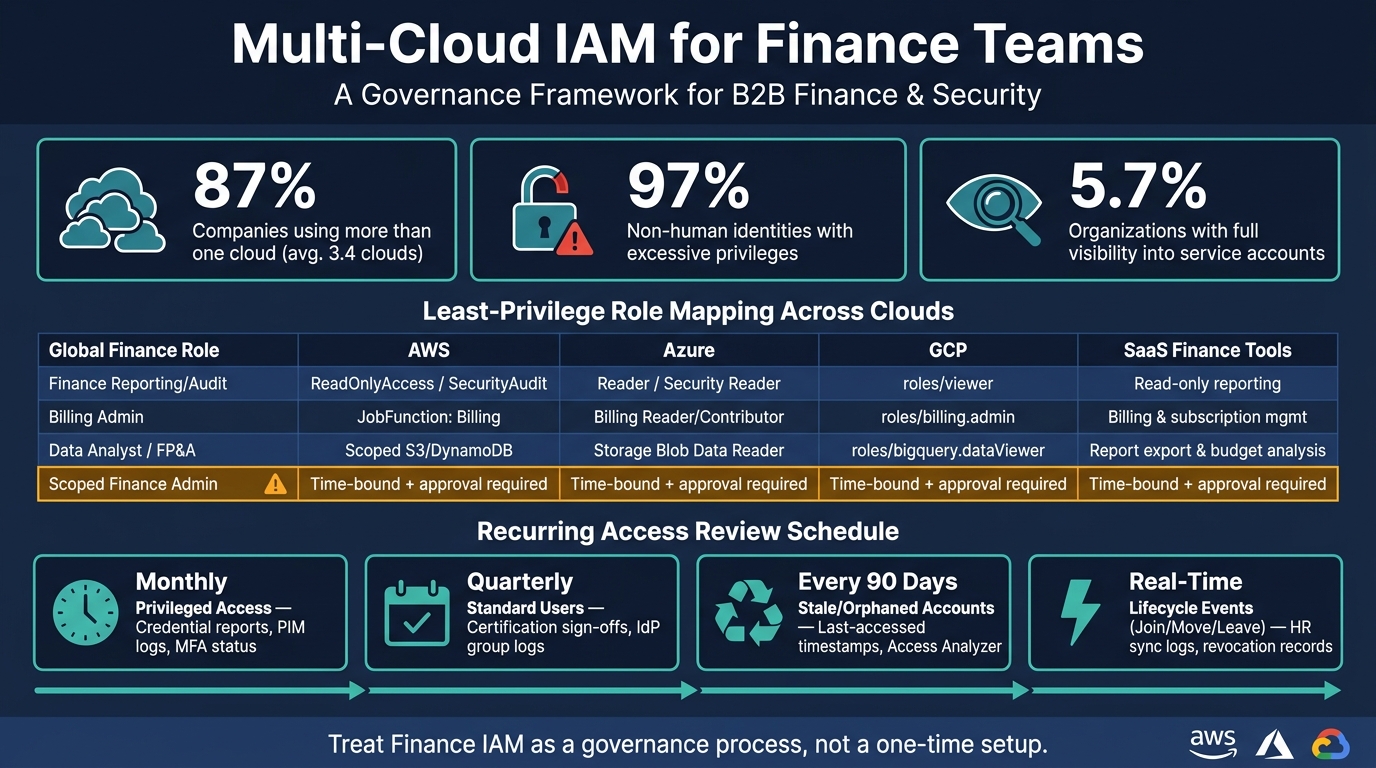
A few numbers stand out. The article notes that 97% of non-human identities have too much access, and only 5.7% of companies have full visibility into service accounts. That’s a big issue for finance teams because one missed key, one shared admin login, or one old contractor account can turn into an audit problem or a direct money risk.
If I had to sum up the article in one line, it would be this: treat finance IAM as a governance process, not a one-time setup.
Multi-Cloud IAM for Finance Teams: Roles, Access & Review Schedule

| Area | What I’d do |
|---|---|
| Identity inventory | List users, service accounts, API keys, roles, owners, last login, and purpose |
| Sign-in | Use one IdP, SSO, SCIM where possible, MFA for all finance users |
| High-risk access | Use hardware keys for payment or billing admins; avoid SMS MFA |
| Role design | Keep a small role set: read-only, operator, billing admin, admin |
| Privileged work | Use just-in-time access with approval and short access windows |
| Offboarding | Disable in the IdP first so access drops across cloud and SaaS tools |
| Reviews | Run monthly, quarterly, and 90-day reviews; keep logs as proof |
| Audit evidence | Send AWS, Azure, and GCP logs to one SIEM and confirm revocation worked |
This article is about building a finance IAM model that your team can run without chaos at month-end, during offboarding, or during an audit.
Start with a full inventory of every identity across AWS, Azure, Google Cloud, and finance apps. This inventory is your baseline for every control that comes next.
Use built-in audit reports to collect users and permissions in AWS, Azure, and Google Cloud.
Record these fields for each account:
| Detail to Document | Description | Cloud-Native Source Example |
|---|---|---|
| Owner | Named individual or team responsible for the account | Tags (AWS/Azure/GCP) |
| Privilege Level | Admin, Reader, Contributor | IAM Policy / Role Definition |
| Auth Method | SSO, SAML/OIDC federation, or native login | IdP logs |
| Last Login | Date of last successful authentication or API call | AWS Credential Report / Azure Sign-in Logs |
| Linked Systems | Cross-account trust or SaaS integrations | Trust Policy / Workload Identity Pool |
| Business Purpose | The specific workload or finance function served | Metadata/Tags (e.g., "Payroll-API") |
Non-human identities, like service accounts, API keys, and automation credentials, often outnumber human users. Keep them in a separate inventory with assigned owners and clear removal rules. Each one needs a named human owner and a documented purpose. If you can't answer what this account does, who owns it, and why it exists, that's a warning sign.
Finance-critical SaaS tools also belong in this inventory. That includes your ERP, payroll system, and billing tools, especially if finance bought them outside central IT or they don't use SSO.
Once the list is complete, start looking for accounts that should not still be there. Orphaned accounts from former contractors, shared credentials used for month-end close or payment workflows, and API keys that haven't been rotated in more than 90 days should be checked first.
Pay close attention to Segregation of Duties conflicts. This happens when one user has both "create" and "approve" access for payments, or both "provision" and "pay" permissions across separate platforms like your ERP and banking SaaS. These cross-platform issues are easy to miss when each system is reviewed on its own.
"You can't govern what you can't see, and most teams have three blind spots at once: Unseen apps... Unseen identities... Unseen permissions." - Lumos Team [5]
The numbers make the problem hard to ignore: 97% of non-human identities carry excessive privileges, and only 5.7% of organizations have full visibility into their service accounts [7]. Use what you find here to decide which accounts need SSO, removal, or tighter controls.
Use this inventory to standardize sign-in and remove standing access next.
After you finish your identity inventory, the next step is to clean up where authentication happens. A lot of finance teams still deal with separate passwords and different login flows across AWS, Azure, Google Cloud, and finance SaaS tools. That split setup slows down offboarding and makes mistakes more likely.
Use one IdP as the single authentication source for all cloud and SaaS access. When sign-in runs through one IdP, access is easier to manage and offboarding can happen right away. That’s why standardized sign-in should be one of the first controls you put in place.
Use your current identity provider as the single login source. Connect AWS with SAML 2.0 and SCIM, GCP with Workforce Identity Federation, and Azure with trusted external IdP group mapping to Azure RBAC.
Enable SCIM provisioning wherever you can so user and group changes move automatically from the IdP to connected systems. Keep cloud-only break-glass accounts outside federation and conditional access so emergency access still works if the IdP goes down.
SSO by itself isn’t enough. Enforce MFA at the IdP level so the policy applies the same way across every connected system. For finance teams, use app-based TOTP as the baseline. Then require hardware security keys (FIDO2/WebAuthn) for anyone who can approve payments, change billing details, or manage admin consoles. Avoid SMS-based MFA for finance roles.
After that, add conditional access on top of MFA. Use report-only mode first so you can see what would be blocked before you enforce policies across the board. Conditional access should check device posture, location, and IdP risk signals. For sensitive finance tasks, use just-in-time access through time-bound AWS permission sets, Azure PIM, or GCP PAM.
With sign-in standardized, map each finance role to least-privilege access.
Before you assign permissions, spell out what each finance role actually needs to do. Start with the IdP groups you already have in place, then map finance duties to cloud and SaaS permissions [1]. After those duties are locked in, map each one to AWS, Azure, Google Cloud, and your finance SaaS apps.
This step matters more than many teams expect. Finance roles often carry 2–3x more access than they need [12]. That extra access is where risk tends to hide. In finance, a bad permission setup can affect billing, exports, and access to sensitive data fast.
Build a small set of global finance roles based on business function, often defined by a fractional CFO. Then map each role to AWS permission sets, Azure RBAC role assignments, and GCP IAM role bindings [1]. Keep the role model simple and use one shared taxonomy: read-only, operator, billing admin, and admin [1].
| Global Finance Role | AWS | Azure | GCP | SaaS Finance Tools |
|---|---|---|---|---|
| Finance Reporting / Audit | ReadOnlyAccess / SecurityAudit |
Reader / Security Reader |
roles/viewer / roles/iam.securityReviewer |
Read-only reporting and security review access |
| Billing Admin | JobFunction: Billing |
Billing Reader / Contributor |
roles/billing.admin |
Billing and subscription management |
| Data Analyst / FP&A | Scoped S3/DynamoDB access | Storage Blob Data Reader |
roles/bigquery.dataViewer |
Report export and budget analysis |
| Scoped Finance Admin | Time-bound admin access; approval required | Time-bound admin access; approval required | Time-bound admin access; approval required | Time-bound admin access; approval required |
The matrix should also call out prohibited SoD pairs. A simple example is approve + execute payment. Those pairings should be checked during every access review [11].
People and systems shouldn't share the same access model. Automated processes should use managed identities or workload identity federation, not long-lived static credentials [1][3][6]. That makes non-human access easier to audit and easier to revoke when something changes.
High-risk finance access should never sit there forever. If someone needs to change billing settings or export sensitive data, use just-in-time elevation, require approval, and make the access time-bound [1][3][4].
A short activation window works well. On Azure, Privileged Identity Management (PIM) is a good fit with a 4-hour activation window plus justification. On AWS, use Identity Center permission sets or a custom JIT flow. On GCP, use IAM Conditions or JIT access so privileges are active only when needed. Apply that same time-bound model across AWS, Azure, GCP, and finance SaaS tools.
Use this role matrix to drive provisioning, offboarding, and access reviews.
Turn the role matrix into a live process. Pick one central IdP as the source of truth, then sync users and groups to AWS, Azure, Google Cloud, and SaaS apps with federation and SCIM. That way, joiners, movers, and leavers update everywhere from one change. When someone joins, their IdP group membership can trigger automatic provisioning. If they move into a different role, group updates change permissions across platforms. And when they leave, disabling the account in the IdP revokes access everywhere at once [1][9].
Clear ownership is a big deal here. Finance, IT, and system admins each need a defined part in the workflow. If that handoff is fuzzy, critical systems get missed. Routine access should be provisioned automatically. Delays push people toward workarounds, and workarounds often end with shared logins.
Keep one monitored break-glass account per cloud provider for IdP outages [1][9].
Once provisioning and offboarding are automated, review access on a set schedule. The table below shows a practical cadence for audit-ready reviews:
| Review Type | Frequency | Primary Evidence |
|---|---|---|
| Privileged Access | Monthly [3][13] | Credential reports, PIM activation logs, MFA status [3][13] |
| Standard User Access | Quarterly [3][8] | Certification sign-offs, IdP group membership logs [3][8] |
| Stale / Orphaned Accounts | Every 90 days [3][8] | Last-accessed timestamps, Access Analyzer findings [3][8] |
| Lifecycle Events (JML) | Real-time / event-based [7][14] | HR sync logs, ticket closure records, revocation logs [7][14] |
Access reviews shouldn't sit only with IT. Business owners and team leads should certify access too, because they're usually the people who know whether a role is still needed for day-to-day work [10][8]. HR changes and ticket approvals should drive access updates, so reviews tie back to actual business events.
For stale accounts, disable first and delete after one week. That's a simple buffer, but it matters. It helps catch quiet dependencies like batch jobs before they fail [8].
Send AWS CloudTrail, Azure Activity Logs, and GCP Cloud Audit Logs to one SIEM to verify revocation across every system [1][2]. Then use those audit logs to confirm the change didn't just get requested - it actually took effect.
Multi-cloud IAM is a governance process that needs steady upkeep. The core pieces are simple: centralize identity, map least-privilege access, separate human and machine accounts, and review access on a set schedule. Skip just one of those controls, and you open the door to audit issues and security gaps.
Once inventory, SSO, role mapping, and access reviews are in place, the model comes down to one thing: ownership. Controls only work when governance has a clear owner. That means naming the people responsible for approvals, certifications, and offboarding.
The end goal is a model finance teams can actually run: one identity source, least privilege, clear ownership, and audit-ready reviews.
Start with a single source of truth for identity. Put workforce access in one IdP, then federate AWS, Azure, GCP, and your SaaS tools through SAML or OIDC.
That gives you one place to manage who gets in, what they can use, and when access should end. It also cuts down on the mess that builds up when every platform handles identity on its own.
From there, audit accounts, roles, and orphaned credentials across each platform. Use CIEM to spot effective permissions, not just the ones listed on paper. That’s where teams often find the gap between what they think users can do and what users can actually do.
It also helps to swap long-lived credentials for time-bound access and set up automated de-provisioning. If someone changes roles or leaves, access shouldn’t hang around for days or weeks. It should shut off fast and with as little manual work as possible.
Finance roles that touch sensitive systems or financial data need the tightest controls. That includes people who approve transactions, manage production databases, handle customer records, or oversee encryption keys.
Use least privilege so each person gets only the access they need to do their job. For highly privileged roles, require multi-factor authentication and just-in-time access so elevated permissions are temporary and tied to a specific task.
Finance teams should move away from static, scheduled access reviews and shift to continuous verification. In fast-moving SaaS and cloud setups, reviews done on a fixed schedule often miss privilege sprawl and shadow IT.
When reviews do take place, they should focus on risk and identity type. They also need a single inventory of entitlements across cloud and SaaS systems, so access removal can be proven and linked to current business needs.