Published on
June 12, 2026


If you run more than one entity, manual consolidation breaks down fast. In most cases, the fix is simple in concept: standardize your chart of accounts, set intercompany rules early, automate data flow and eliminations, and review exceptions instead of rebuilding reports by hand every month.
Here’s the short version:
What I take from this article is straightforward: the tool matters, but setup matters more. If you want clean consolidated financials, you need clear entity rules, one reporting structure, monthly intercompany discipline, and a close process that your team can repeat without patchwork fixes.
| Area | What matters most | Why it helps |
|---|---|---|
| Entity setup | Separate ledgers and clear ownership/control map | Keeps reporting lines clean |
| COA structure | One master chart with mapping rules | Cuts manual cleanup |
| Intercompany | Counterparty coding and elimination rules | Stops mismatches and double counting |
| FX | Account-based translation rules | Keeps USD reporting consistent |
| Close workflow | Automated imports, tasks, and exception review | Reduces manual close work |
| Oversight | Drill-back and audit trail | Makes review and lender reporting easier |
If you are past two or three entities, this is less about bookkeeping software alone and more about building a system your finance team can trust each month.
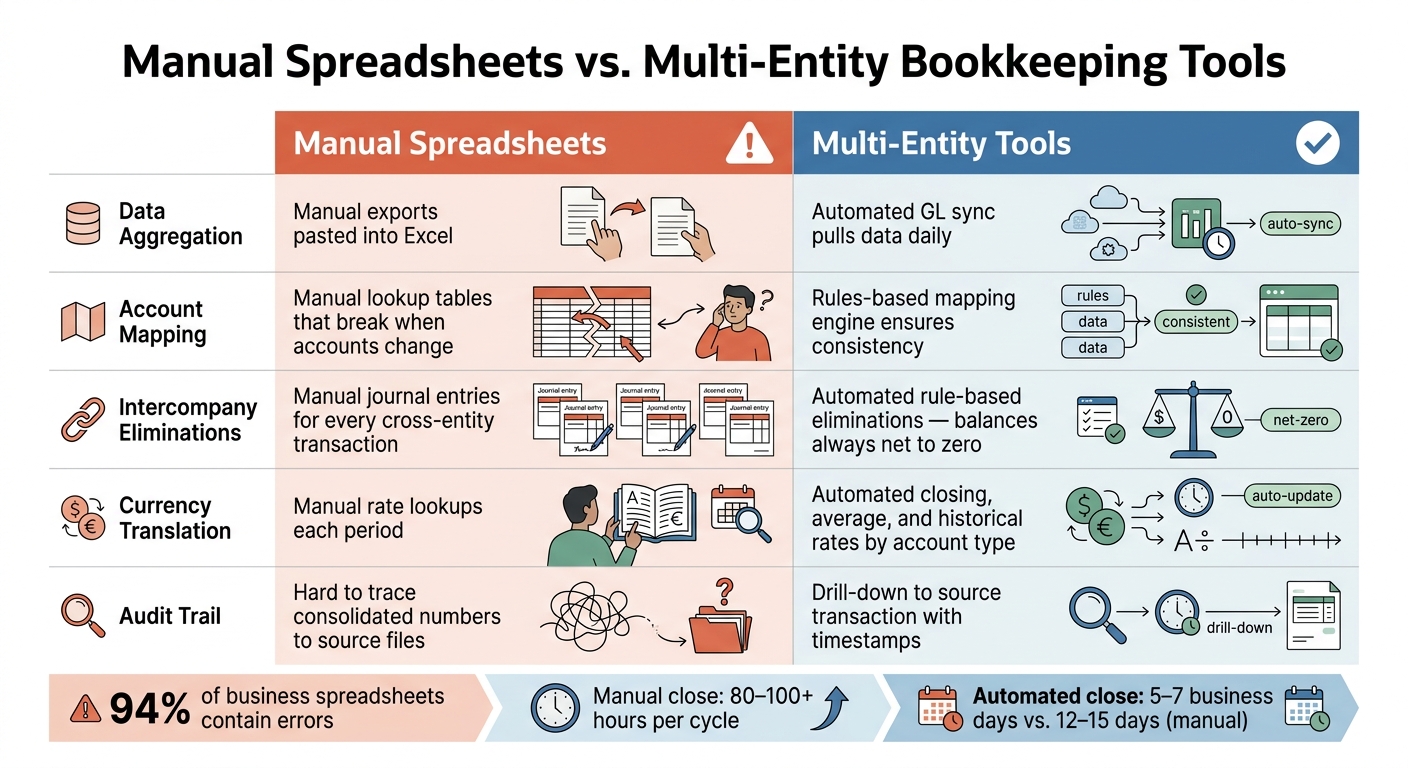
Manual Spreadsheets vs. Multi-Entity Tools: Consolidation at a Glance
Before you compare platforms, get clear on what your group needs to produce. “Consolidated financials” sounds fine at first, but it’s too broad. You need to spell out the exact statements and reporting views the business expects.
Start by listing every legal entity in the group: parent companies, subsidiaries, LLCs, and any holding structures. Use the control test under ASC 810 to set the consolidation perimeter [4]. For each entity, document the ownership percentage and flag any non-controlling interests (NCI). Those need separate equity allocations on the consolidated balance sheet [4][1]. If any entity operates outside the U.S., note whether its books need currency translation into USD [7].
Then map the reports your stakeholders expect to see. Entity-level P&Ls and balance sheets help local teams run operations and meet tax obligations [5]. Consolidated statements combine entity books into group-level financials and remove intercompany activity [1]. Management views by department, project, or location call for dimensional reporting, not a bloated chart of accounts [5][7]. And if you want audit-ready output, the system should let users drill back from group totals to the source transactions [7][4].
Once the reporting map is on paper, turn it into a feature checklist. The items that do the most work here are a standardized chart of accounts (COA), automated intercompany matching, rule-based eliminations, dimensional reporting, entity-level permissions, and a full audit trail. Each one ties back to common pain points: account mapping issues, intercompany timing gaps, and weak traceability.
A unified chart of accounts does a lot of the heavy lifting. A unified master COA can remove 70% to 80% of consolidation friction before a reporting tool is even in place [2]. If two entities use different names for the same account, cleanup shows up every single close. Set the master COA template first, then map each entity to it.
It also helps to check whether the system can add new entities without forcing you to rebuild the model each time.
Use this checklist to standardize the system before monthly close.
The biggest difference between spreadsheets and purpose-built tools is repeatability. Manual consolidation usually starts to crack at around 3 to 4 entities [5][6]. After that, the workload piles up fast. Finance teams running manual multi-entity processes often spend 80 to 100+ hours per close cycle just wrangling data [7]. The table below shows where that time gets spent and what shifts when you use a tool built for the job.
| Process Step | Manual Spreadsheet Effort | Tool-Enabled Workflow | Impact |
|---|---|---|---|
| Aggregate | Manual exports from multiple systems, pasted into Excel | Automated GL sync pulls data from all entities daily [7] | Eliminates manual entry errors |
| Map | Manual lookup tables and formulas that break when accounts change | Rules-based mapping engine [8] | Prevents misclassification; ensures consistency |
| Eliminate | Manual identification and journal entries for every cross-entity transaction | Automated, rule-based elimination of revenue/COGS and receivables/payables [1] | Balances always net to zero |
| Translate | Manual rate lookups each period | Automated application of current, average, and historical rates by account type [7] | Reduces calculation errors |
| Trace | Difficult to trace consolidated numbers back to source files | Drill-down to source transaction with timestamps [7][3] | Reduces audit prep time significantly |
Next, turn these requirements into entity standards, account mappings, and elimination rules.
Picking the software is only half the work. The way you set it up decides whether consolidation runs smoothly each month or falls apart into manual fixes during close. Use the entity map, COA template, and reporting needs from Step 1 as the source of truth.
Start with a separate ledger for each legal entity. Then create a master chart of accounts (COA) template with the same numbering logic across all entities. For example, use 1000–1999 for assets and 2000–2999 for liabilities. If an entity needs extra accounts, add them to the template instead of replacing group accounts. When the same account type uses different numbers across entities, automated mapping gets shaky and close becomes harder than it should be.
If some entities must keep local codes, use a central mapping table. That table converts local codes into group reporting codes, so "Marketing – Online" in one entity and "Digital Marketing" in another still roll up to the same group line [4][2].
Keep the COA lean. Use tags for department, location, or product line instead of piling on more accounts or setting up extra entities. That gives you clean group reporting without turning the chart of accounts into a junk drawer.
Write these rules down in a shared reference. When a new entity comes in, the onboarding team should be able to follow the same setup from day one.
After the structure is in place, set the rules for intercompany activity.
This is the part that keeps close under control. The setup itself isn't hard, but it needs to happen before the first close, not as a patch job later.
Create dedicated "Due to/Due from [Entity Name]" accounts for each entity pair that transacts with one another. Every intercompany entry should be recorded on both sides with the same amount, a counterparty entity code, and a clear reference. Counterparty coding at the time of entry helps stop mismatches before they start.
Set elimination rules for three areas:
Reconcile intercompany balances every month, not every quarter. If you wait until year-end, a small timing issue can snowball into a much bigger reconciliation job.
For entities that report in another currency, set FX translation rules by account type. Use closing rates for balance sheet accounts, average rates for P&L, and historical rates for equity. When this is configured upfront, the foreign currency translation reserve can calculate correctly without manual rate lookups each period.
| Configuration Area | Objective | Setup Actions | Impact on Consolidation Speed & Accuracy |
|---|---|---|---|
| Entities | Legal and financial segregation | Set up separate ledgers per entity | Prevents commingling; ensures clean statutory reporting |
| Chart of Accounts | Data comparability | Build a master COA template with consistent numbering; map local codes to group codes | Eliminates 70%–80% of manual mapping friction [2] |
| Dimensions | Granular reporting | Standardize department, location, and product line tags across all entities | Enables cross-entity analysis without COA bloat |
| Intercompany Workflows | Automated eliminations | Configure "Due to/Due from" accounts; enforce counterparty coding at entry | Prevents out-of-sync balances; reduces reconciliation time |
| Elimination Settings | Remove internal activity | Set rules for intercompany sales, loans, and unrealized inventory profit | Automates removal of self-trading; helps prevent revenue overstatement |
| FX Translation | Currency normalization | Set closing, average, and historical rate rules by account type | Ensures accurate translation reserves; removes manual rate lookups |
These settings are what make monthly close repeatable.
With the system set up, the monthly close turns into a repeatable workflow. The point isn't to automate judgment. It's to stop your team from burning hours on work the software can already do.
Once your rules are set, you run the same close sequence every month. Modern multi-entity tools pull transaction data straight from source systems - bank feeds, payroll platforms, and expense tools - through scheduled API syncs. That cuts out the 2 to 5 days that manual extraction adds to the close [9].
The system routes standard transactions on its own and flags the exceptions. So the finance team only deals with what doesn't fit:
You can also add task tracking with automated checklists and real-time dashboards to monitor reconciliation and approval status across each entity. Teams with the most automation close in 5 to 7 business days, while the median sits at 12 to 15 days [9]. That gap comes from automation level, not entity count [9].
Once capture and coding run on autopilot, the work moves to eliminations, translation, and reporting.
After entity-level books are closed, local entities submit their trial balances, and intercompany balances are confirmed against counterparty records. From there, the system posts eliminations, translates balances, and produces consolidated financials and KPI views - without manual assembly.
At that stage, finance isn't stuck rekeying data. The job is to review exceptions and variances. That means digging into flagged items, checking variance against budget and prior periods, and signing off on finished workpapers. Platforms with drill-back to source transactions speed up that review and help keep the process audit-ready [4].
| Consolidation Task | Automation Method | Manual Review |
|---|---|---|
| Data Capture/Import | Scheduled API sync from ERPs and bank feeds | Review sync logs for connection errors or unmapped accounts |
| Transaction Coding | Auto-categorization via master COA rules | Investigate flagged or uncategorized exceptions |
| Intercompany Posting | Auto-posting matching entries in both entities simultaneously | Resolve timing differences or disputed amounts above defined thresholds |
| Eliminations | Rule-based posting removes intercompany balances at close | Spot-check high-value journals and review non-routine adjustments |
| Currency Translation | Rate engine applies account-based rates automatically | Verify period-end rates are current and review CTA movements |
| Close Task Tracking | Automated checklists with real-time status dashboards | Final sign-off and approval of completed workpapers |
| Reporting | Real-time aggregation into consolidated financials and KPI views | Variance analysis and management commentary on KPI trends |
Once the monthly workflow is stable, the next challenge is scaling judgment and oversight.
Once the monthly workflow is automated, the main risk usually shifts away from data entry. It becomes a governance, exceptions, and scale problem.
When routine close work is under control, outside advisory support starts to make sense if entity growth, intercompany volume, or acquisition integration begins to outpace internal controls. Mid-market groups often hit that complexity point somewhere between 3 and 10 entities [2].
A few signs tend to stand out. Acquisitions with fragmented ERPs can create friction fast. Close cycles that stretch past 10 to 15 business days are another clear signal that the current setup needs outside advisory support [2][9].
The most common breakdown is a data standardization issue that gets worse as more entities are added [2]. It usually shows up in familiar ways:
Those gaps create repeat errors, surface during audits, and slow down reporting. And that lag matters. Investors and acquirers expect consolidated management accounts within 10 working days [2]. If a company misses that window, it's usually seen as an infrastructure gap, not just a staffing problem [2]. Mid-market companies often trail large enterprises here in day-to-day operating discipline [2].

At that stage, advisory support can help turn a fragile process into a repeatable operating system.
Phoenix Strategy Group helps growth-stage companies build scalable bookkeeping, FP&A, data, and M&A workflows so consolidated reporting stays accurate as the group expands.
The setup decisions that matter most are pretty straightforward: standardize first, automate repeatable work second, and bring in advisory support when consolidation complexity outgrows internal capacity.
Spreadsheets tend to break down for consolidation once a company grows past two or three entities. That’s especially true when intercompany transactions get messy, teams work across multiple systems, or finance needs up-to-date, accurate, audit-ready numbers.
At that stage, manual work often turns into a source of errors and simply doesn’t hold up.
Before you pick a multi-entity bookkeeping tool, get a few basics in place first:
That prep work makes implementation, reconciliation, and consolidation much smoother.
Clear, automated intercompany rules help teams close the books faster and with fewer mistakes. They match and eliminate internal transactions in real time, which cuts down on manual reconciliation, keeps receivables and payables aligned, and helps stop errors before they spread.
They also handle eliminations during consolidation, so you can avoid double-counting and spend less time on manual adjustments. The result is a faster, more reliable, audit-ready close, especially as intercompany activity gets more complex.