Published on
December 12, 2025

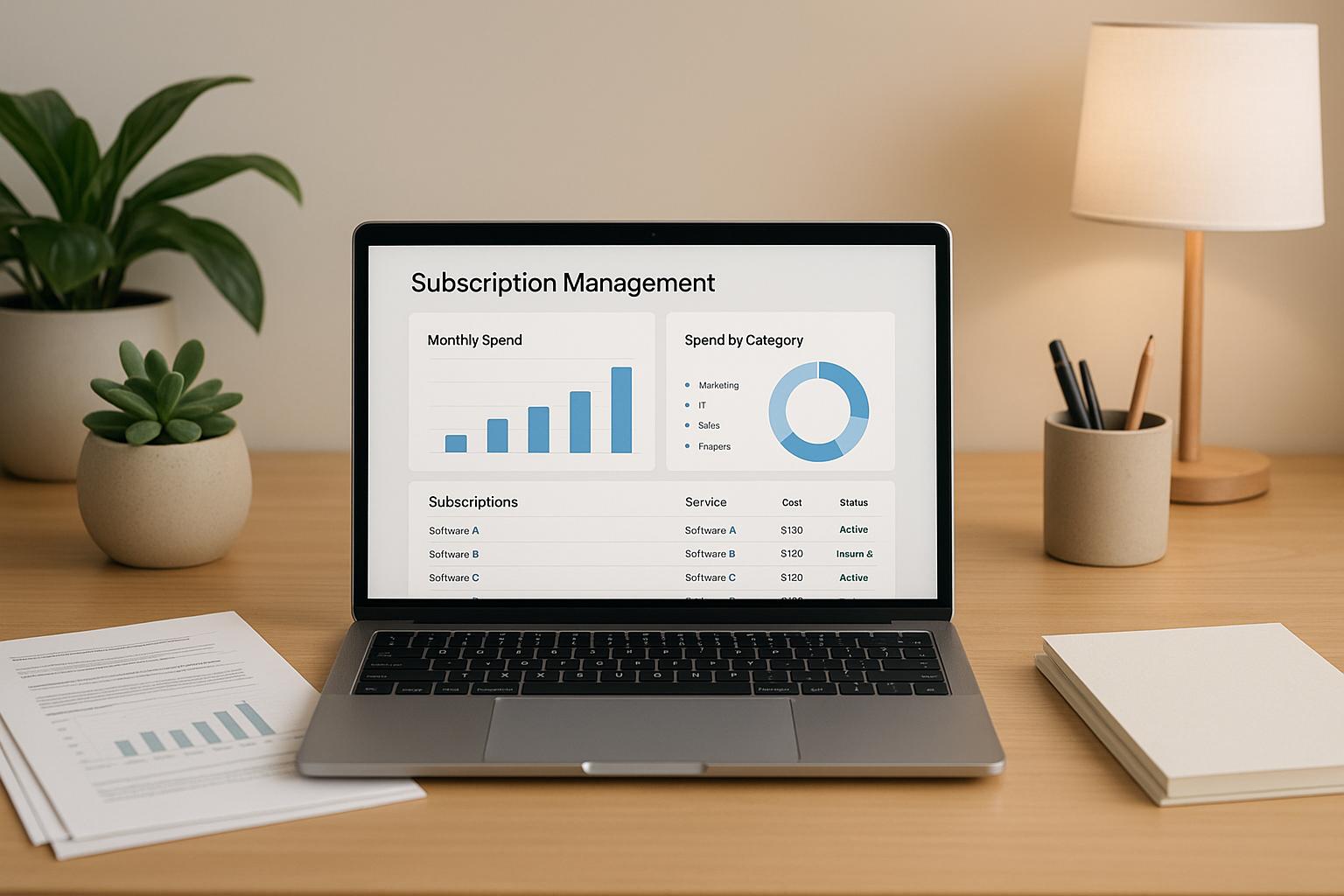
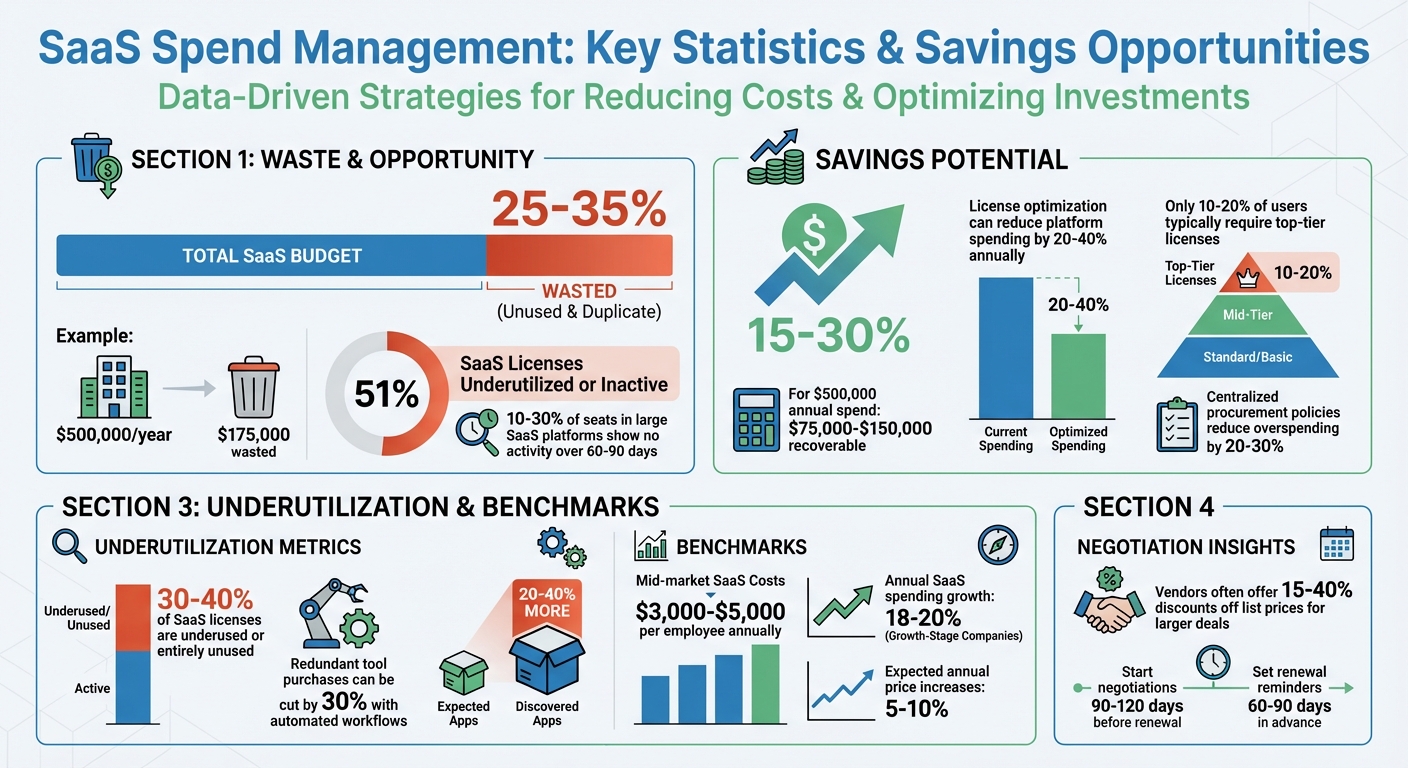
Managing SaaS costs can save companies thousands annually. On average, mid-market businesses waste 25–35% of their SaaS budgets on unused licenses and duplicate tools. For a company spending $500,000 yearly, that’s up to $175,000 wasted.
Here’s how to fix it:
SaaS Spend Management Statistics and Savings Opportunities
Start by creating a comprehensive list of all your subscriptions. Assemble a cross-functional team that includes representatives from Finance, IT, and operations. Designate a primary SaaS inventory owner - usually someone from IT or Finance - who will oversee visibility and accountability for the entire portfolio[1][4]. Once your team is in place, break down the inventory by identifying active subscriptions, assigning costs, and tracking renewal dates.
To locate all active subscriptions, gather payment data from various sources like your general ledger, accounting systems, credit card and expense reports, identity provider logs, and SaaS marketplaces. Export the last 12 months of credit card statements and search for keywords like "subscription", "SaaS", or "cloud", as well as specific vendor names. Many smaller tools, such as a $29.99/month design or AI subscription, often go unnoticed in card statements rather than appearing in official accounts payable records[1][3].
Review employee expense reports for reimbursed subscriptions or trial upgrades purchased with personal cards. Check identity provider logs (e.g., Okta, Azure AD, Google Workspace) to identify tools accessed through single sign-on, even if their costs are minimal and don’t show up in financial data[2][3]. Additionally, explore SaaS marketplaces such as Salesforce AppExchange or Google Workspace Marketplace, where subscriptions may be billed through a master invoice.
Standardize vendor names to eliminate duplicate entries and calculate total spend per vendor on a monthly or yearly basis. Share your preliminary list with department leaders to verify which subscriptions are active, which are still in testing phases, and which can be retired. Be sure to document the purpose of each tool.
Allocate each subscription to a specific department and assign an accountable owner - typically a manager or director responsible for deriving the primary value from the tool. For instance, assign your CRM to the VP of Sales or your HRIS to the Head of People. Record the owner’s name, role, and a backup contact for each tool[1][4].
Link tools to cost centers or distribute shared tool costs based on usage by department. This allows you to calculate metrics like cost per employee and overall SaaS spend. For example, if 40% of a tool’s users belong to the Sales team, allocate 40% of the cost to that department[2][4].
Centralize tracking of renewal dates and contract terms to prevent unwanted renewals. Document key details like start dates, renewal dates, contract terms, and auto-renewal status. Set a 90-day reminder before each renewal to give your team enough time to evaluate usage, negotiate better terms, or cancel subscriptions that are no longer needed[2][3][5].
Store this information in a shared spreadsheet or a SaaS management platform accessible to Finance, IT, and relevant business owners. Your tracking system should include the vendor name, product, owner, department, annual cost (formatted as $125,000.00), billing frequency, license counts, and a criticality rating[1][2][5].
One of the most effective ways to cut unnecessary SaaS costs is by aligning licenses with actual usage. Studies reveal that 51% of SaaS licenses in most portfolios are either inactive or underutilized, and companies that actively manage this can reduce their SaaS expenses by 15–30% within a year [1][2]. For a growth-stage business spending $500,000 annually on SaaS, this means reclaiming $75,000–$150,000 - funds that could be redirected to hire new talent or extend operational runway. These adjustments pave the way for smarter license management.
Start by pulling login and activity reports from tools like Okta, Microsoft Entra ID, or Google Workspace to identify active users. Vendor admin consoles can also provide detailed usage metrics.
Set clear usage thresholds based on how often tools are meant to be used. For instance, flag daily-use apps when inactive for 30 days and monthly-use apps after 90 days of inactivity [2]. Break down the data by department and role to avoid mistakenly revoking access from executives, service accounts, or seasonal staff whose low usage might be valid [4]. Share the list of inactive users with app owners and confirm whether licenses can be removed or reassigned. Many companies discover that 10–30% of seats in large SaaS platforms show no activity over a 60–90 day span, offering immediate opportunities to cut costs [1][2].
Usage isn’t just about logins - it’s also about how users interact with features. SaaS vendors often offer tiered pricing plans (e.g., basic, professional, enterprise), with higher tiers providing advanced features like automation, analytics, or admin controls [2][4]. Use feature-usage reports to determine who’s actually using these premium tools and who’s sticking to basic functions.
Group users into personas: power users who need advanced features should stay on higher tiers; standard users can move to mid-tier plans; and light users can switch to basic or viewer-only licenses [2][4][7]. Before rolling out downgrades across the board, test changes with a small group for 30–60 days [4]. It’s common to find that only 10–20% of users require top-tier licenses, while the rest can safely transition to lower-cost plans. This shift can reduce spending on a platform by 20–40% annually [1][4][7]. Once user tiers are sorted, you can focus on reallocating or eliminating unused licenses to maximize savings.
Unused licenses represent untapped potential. Start by offering surplus licenses to teams that are waiting for access or planning new hires. Create a shared pool of reclaimed licenses that can be easily assigned to new users [5][6]. Automate this process by integrating your SaaS inventory with your HRIS, so licenses are reclaimed when employees leave or change roles [3][5].
Implement a straightforward governance policy: licenses should be tied to specific users and cost centers, with automatic reclaim triggers after 60–90 days of inactivity (subject to owner approval) [4][5]. Use a shared dashboard to track active and unused licenses, and display the annualized savings for each reallocated seat [2][5]. Ensure that reclaimed licenses are updated in your central inventory for accurate tracking. By embedding license reviews into regular processes - such as monthly audits, quarterly business reviews, and annual renewals - you can sustain these savings over time, preventing waste from creeping back in [1][3][5].
After conducting a thorough audit, the next step is to establish strong procurement and governance policies to prevent unnecessary spending. Without clear, centralized systems, SaaS expenses can quickly spiral out of control. In fact, companies that implement centralized procurement policies often reduce SaaS overspending by 20–30%. This is achieved by eliminating duplicate purchases and improving visibility across departments [1][4]. The trick is creating workflows that strike a balance - teams can get the tools they need without finance losing oversight.
A centralized portal for SaaS purchase requests is a must. This portal should require details like the tool's purpose, cost, and expected user count. By doing this, you can avoid duplicate subscriptions and ensure that requesters justify their expenses before company funds are spent.
Set up a multi-level approval process based on cost thresholds. For smaller purchases, a manager's approval might be enough. For higher-cost tools, requests could go through IT, finance, or even executive leadership. Automated workflows can also help by flagging similar tools already in use, which can cut redundant spending by as much as 30%, according to industry audits [1][4]. Additionally, use platforms that offer real-time spending dashboards and alert you to requests that exceed budgets or duplicate existing tools [1][2][8]. Clear workflows and well-defined roles are essential to ensure accountability and prevent unnecessary expenses.
Every SaaS subscription needs a designated owner who is responsible for monitoring usage, managing renewals, and keeping costs in check. Subscriptions without clear ownership often lead to waste, as no one is tracking whether licenses are actively used or if renewals should be canceled [1][4]. Assign each subscription to a specific department or individual and link ownership to performance metrics.
To avoid last-minute decisions, subscription owners should receive automated reminders 60–90 days before renewal dates. This gives them enough time to review usage data and decide whether to renew, downgrade, or cancel [8][3]. Tag subscriptions by department and cost center using a standardized format (e.g., $1,234.56) [4][5]. This system ensures accountability and keeps everyone on top of the value each tool provides to the organization.
Governance rules help standardize how your organization handles SaaS subscriptions - from procurement to tracking and management. Key policies should include mandatory pre-purchase audits to check for existing tools, limits on subscription lengths (e.g., requiring finance approval for annual contracts), vendor data security standards, and consistent tagging requirements across departments [2][4]. These measures ensure centralized oversight and transparency.
Introduce tracking protocols that mandate usage reviews before renewals and automate the reclamation of licenses when employees leave the company [4][5]. A centralized dashboard can also be invaluable, displaying metrics like cost per user, total ownership costs, renewal compliance rates, and license utilization percentages [2][3]. Reviewing these metrics quarterly can help identify areas for improvement and ensure governance policies are effective. When policies are consistently enforced and teams understand their importance, compliance becomes second nature rather than a tedious task. This fosters a culture of accountability and efficiency.
Once you've established governance, the next step is integrating SaaS costs into your financial planning. SaaS is more than just another expense - it plays a key role in shaping cash flow and driving growth. For growth-stage companies, where SaaS spending often increases by 18–20% annually, treating software as just another miscellaneous expense can lead to forecasting errors and miscalculated runway projections. By tying SaaS spending to financial outcomes, you can build on your governance efforts and create a more accurate financial picture.
To effectively manage SaaS costs, start by gathering 12–24 months of payment data from your financial records. Sort each application by department (e.g., Sales, Marketing, Product, General & Administrative) and its specific function (like CRM, collaboration, or security). Incorporate contract details - such as monthly or annual payment terms and prepayments - into your forecast to predict monthly cash outflows. Break down costs into categories like recurring subscription fees, usage-based charges, and implementation or add-on services. This allows you to model various growth scenarios for each expense type.
Plan SaaS expenses on a per-employee basis and allocate a monthly cost for tools that new hires will need, such as CRM software, sales enablement platforms, or e-signature tools. This ensures that as your team grows, software costs remain proportional and don’t result in unexpected cash burn. Create a SaaS budget for each department - for instance, linking the Sales department’s SaaS budget to either revenue or headcount - and require that any new tools or upgrades fit within this budget unless explicitly approved as a strategic exception.
Incorporate renewal payments into your cash flow forecast, scheduling them for their actual due dates and accounting for an expected annual increase, typically 5–10%, or growth in user seats. For companies reliant on venture funding, large annual prepayments can significantly affect cash flow, making it essential to plan for these spikes. Integrating a renewal calendar into your financial model ensures you’re prepared for major costs, giving you time to negotiate terms or adjust spending as needed.
Budgeting is just the start - tracking metrics turns raw spending data into actionable insights. Key metrics include total SaaS spend, spend as a percentage of revenue, cost per user, and total cost of ownership (covering fees, implementation, support, add-ons, and integrations). Additionally, monitor license utilization rates (e.g., the percentage of paid licenses actively used), renewal rates with pricing or seat adjustments, and a redundancy index that measures overlapping tools (like multiple collaboration platforms per employee).
Research shows that 30–40% of SaaS licenses are underused or entirely unused, often due to over-provisioning or delays in deactivating accounts when employees leave [1][2]. High costs per user combined with low utilization can indicate the need to cut licenses or downgrade plans. Similarly, if SaaS spending grows as a percentage of revenue during flat growth periods, it may be time for a spending review. In mid-market companies, SaaS costs typically range from $3,000 to $5,000 per employee annually, making it essential to monitor departmental costs and benchmark them against targets or industry standards [1].
Centralize your data by pulling information from accounts payable systems, corporate cards, and SaaS management tools into a unified dashboard. Use vendor names and general ledger codes to automatically tag expenses and integrate them with HR data (such as headcount, department, and roles) and, when available, usage data from SSO logs or vendor APIs. Dashboards should display metrics like total SaaS spend, departmental breakdowns, cost per user, upcoming renewals, and utilization rates. Automated alerts can notify you of threshold breaches or upcoming renewals (60–90 days in advance), giving you time to renegotiate terms or adjust your spending [2][3][5].
Once your financial forecasts and metrics are in place, financial advisory services can help you optimize SaaS investments further. For many growth-stage companies, developing sophisticated financial planning and analysis (FP&A) systems that account for SaaS-specific dynamics - like seat-based growth, multi-year contracts, and usage-driven fees - requires specialized expertise. Phoenix Strategy Group (PSG) offers tailored FP&A solutions that integrate SaaS costs into U.S. GAAP financials and cash flow forecasts. Their team combines FP&A and data engineering expertise to centralize SaaS expense and usage data, build forecasting models based on key drivers, and create dashboards that link SaaS spending to revenue, headcount, and unit economics - all formatted for U.S. standards (USD, monthly calendars, and departmental structures).
PSG also provides application-level profit and loss (P&L) views that combine each tool’s total cost with measurable business outcomes, such as pipeline contributions, tickets resolved, or hours saved. They benchmark your SaaS spending against similar companies, help set departmental budget limits, and deliver board-ready reports showing how software investments contribute to growth, fundraising goals, or exit strategies. Additionally, they assist in designing approval workflows and governance policies to ensure future SaaS purchases align with both financial and strategic goals, rather than being driven by ad hoc decisions.
"As our fractional CFO, they accomplished more in six months than our last two full-time CFOs combined. If you're looking for unparalleled financial strategy and integration, hiring PSG is one of the best decisions you can make." - David Darmstandler, Co-CEO, DataPath
Turn your portfolio insights into cost savings by negotiating smarter vendor contracts. In the SaaS world, vendors often expect some back-and-forth - initial quotes and list prices are rarely set in stone, especially for contracts exceeding $10,000–$20,000 annually. To make the most of this, start negotiating well before renewal deadlines, arm yourself with solid usage data, and allow time to explore alternatives. This approach, rooted in financial visibility and governance, can lead to meaningful operational savings.
Your contract repository is a goldmine for uncovering renegotiation opportunities. Begin reviewing contracts 90–120 days before their renewal dates. During this window, analyze usage patterns, gather competitive quotes, and identify areas for better terms. Pay close attention to contracts with these red flags:
Other signs to watch for include agreements where your user count or spending has significantly increased since the original deal. These situations often justify volume discounts or upgraded tiers. Also, be wary of auto-renewal clauses requiring 30–90 days' notice to cancel - missing these deadlines can lock you into another term at higher rates. If only a small percentage of users (say, 10–15%) are utilizing advanced features, consider downgrading to a lower-tier plan. Consolidation opportunities, such as migrating multiple tools onto a single platform, can also give you leverage to negotiate portfolio-wide discounts in exchange for expanding your vendor relationship.
Concrete usage data can be your best ally during vendor discussions. Pull login and feature usage stats directly from vendor platforms. Break down users into heavy, moderate, and light categories, and present the data clearly. For example, you might highlight that only 63 out of 120 licensed users logged in more than five times in the past 90 days, or that only 15% of users are tapping into advanced analytics features included in your Enterprise plan. This kind of evidence can support requests to reduce seat counts, downgrade plans, or switch to a usage-based pricing model.
Track metrics like license utilization rates (active users divided by paid seats) and spend per user. Compare these figures to internal benchmarks or industry standards. If utilization is low - say, only 65% of paid seats were active in the last 30 days - you have a strong case for reducing seat counts or moving to a lower tier at renewal. If you're considering consolidating tools, use the potential migration of users and budgets as a bargaining chip to secure better discounts from your preferred vendor. Vendors often offer discounts of 15–40% off list prices for larger deals or multi-year commitments when presented with credible alternatives.
Centralize all contract information in one system - whether that's a SaaS management platform, a contract repository, or your FP&A tool. Track key details like start dates, end dates, renewal dates, auto-renewal deadlines, and payment schedules (formatted as MM/DD/YYYY). Set up automated alerts to stay ahead of renewals:
These reminders ensure you never miss a negotiation window, which could lead to better pricing or terms. Make sure alerts are sent to budget owners, IT or procurement teams, and finance to avoid any gaps in communication.
For self-serve subscriptions, require company emails and payment methods to ensure everything syncs into your central system, reducing the risk of silent renewals. Establish a governance policy that mandates formal reviews for any contract exceeding a set threshold (e.g., $10,000–$25,000 annually) before auto-renewal. This ties back to earlier governance efforts, ensuring consistent oversight across all SaaS investments.
Many growth-stage companies collaborate with fractional CFOs or FP&A services, like Phoenix Strategy Group, to formalize renewal calendars and align them with cash flow planning and board reporting. This proactive approach minimizes surprises and ensures no negotiation opportunity slips through the cracks.
Managing SaaS spending effectively is an ongoing effort that safeguards your financial runway and ensures capital is used wisely. The process revolves around a continuous cycle: conducting regular audits to maintain accurate tracking, trimming unused licenses, consolidating overlapping tools, implementing procurement and governance policies to curb shadow IT, integrating SaaS costs into budgets and forecasts (in USD), renegotiating contracts based on actual usage data 60–90 days before renewals, and keeping a close eye on performance through dashboards and alerts. Together, these steps ensure SaaS spending aligns with both revenue and headcount, driving measurable value from every dollar.
Interestingly, finance leaders often discover 20–40% more applications than expected during audits [9]. This added visibility not only reveals immediate savings opportunities but also helps avoid unexpected renewals that could disrupt quarterly budgets. The key is to make the process repeatable: check usage monthly, review your SaaS portfolio quarterly, and plan annual contract renegotiations to align with your fiscal calendar (e.g., Q1: Jan–Mar, Q2: Apr–Jun).
For growth-stage companies balancing fundraising, hiring, and product launches, resources are often stretched thin. That’s where expert assistance can make a real difference. Phoenix Strategy Group offers fractional CFO and FP&A services that incorporate SaaS spend into a broader financial strategy. They help businesses develop forecasting models, renewal calendars, and approval workflows that grow alongside the company. Their range of services - including bookkeeping, data engineering, and strategic advisory - helps founders move from reactive, spreadsheet-based tracking to a structured, tech-driven framework. Industry leaders have shown that expert FP&A support can transform SaaS spend management into a strategic advantage.
To get started, inventory your active subscriptions, assign ownership, and set up renewal alerts 60–90 days in advance. Look for quick wins, like canceling unused licenses or eliminating duplicate tools, and establish an approval policy for new SaaS requests. If building a scalable system feels overwhelming, consider partnering with a financial advisory service to create a repeatable process tailored to your needs. This shift from oversight to actionable steps completes the SaaS spend management cycle.
Companies that successfully control SaaS costs without losing flexibility treat spend management as more than just a cost-cutting measure - it becomes a strategic tool. With the right visibility, governance, and expert guidance, every software dollar can fuel growth, allowing your finance team to actively support your company’s success.
To keep SaaS subscriptions under control and cut down on waste, businesses should begin by consolidating subscription tracking. This means using tools specifically designed for SaaS management or setting up internal systems to keep tabs on all active subscriptions in one central location. From there, conducting regular audits is crucial. These reviews help pinpoint software that's either not being used or isn't fully utilized, allowing you to cancel or renegotiate contracts for better deals.
Another smart move is setting clear budgets and approval processes for purchasing new software. This helps curb unnecessary expenses right from the start. On top of that, scheduling regular reviews of vendor contracts ensures you're continually getting good value for what you're spending. These straightforward steps can simplify SaaS spending and improve overall efficiency.
To get more favorable terms from SaaS vendors, consider strategies like asking for volume discounts, bundling several services together, or agreeing to longer contracts in exchange for reduced rates. Another option is to request flexible payment plans or discounts for paying upfront.
Do your homework by researching market rates so you can compare pricing and ensure you're not overpaying. Building a solid relationship with your vendor and showing that you're committed for the long haul can also work in your favor. Approach negotiations with clear objectives and a cooperative attitude to land the best deal possible.
To make SaaS expenses a seamless part of your financial plan, think of them as operational costs. Use your current usage patterns and growth forecasts to predict future spending. This ensures these costs align with your company’s goals, supporting both scalability and efficiency over time.
Keep budgets up to date by regularly reviewing your SaaS subscriptions and usage. Don’t hesitate to negotiate with vendors for better deals, and use financial dashboards to track key SaaS spending metrics in real time. By consistently analyzing and fine-tuning these expenses, you can keep operations running smoothly and maintain your business’s financial stability.