Published on
January 4, 2026


Cloud spending is a growing financial concern, with nearly $1 trillion spent annually and 33% of it wasted. For fractional CFOs, managing these costs is critical to protecting profit margins and ensuring investor confidence. Traditional budgeting methods fall short in addressing the dynamic nature of cloud expenses, making a hands-on approach essential. Key takeaways:
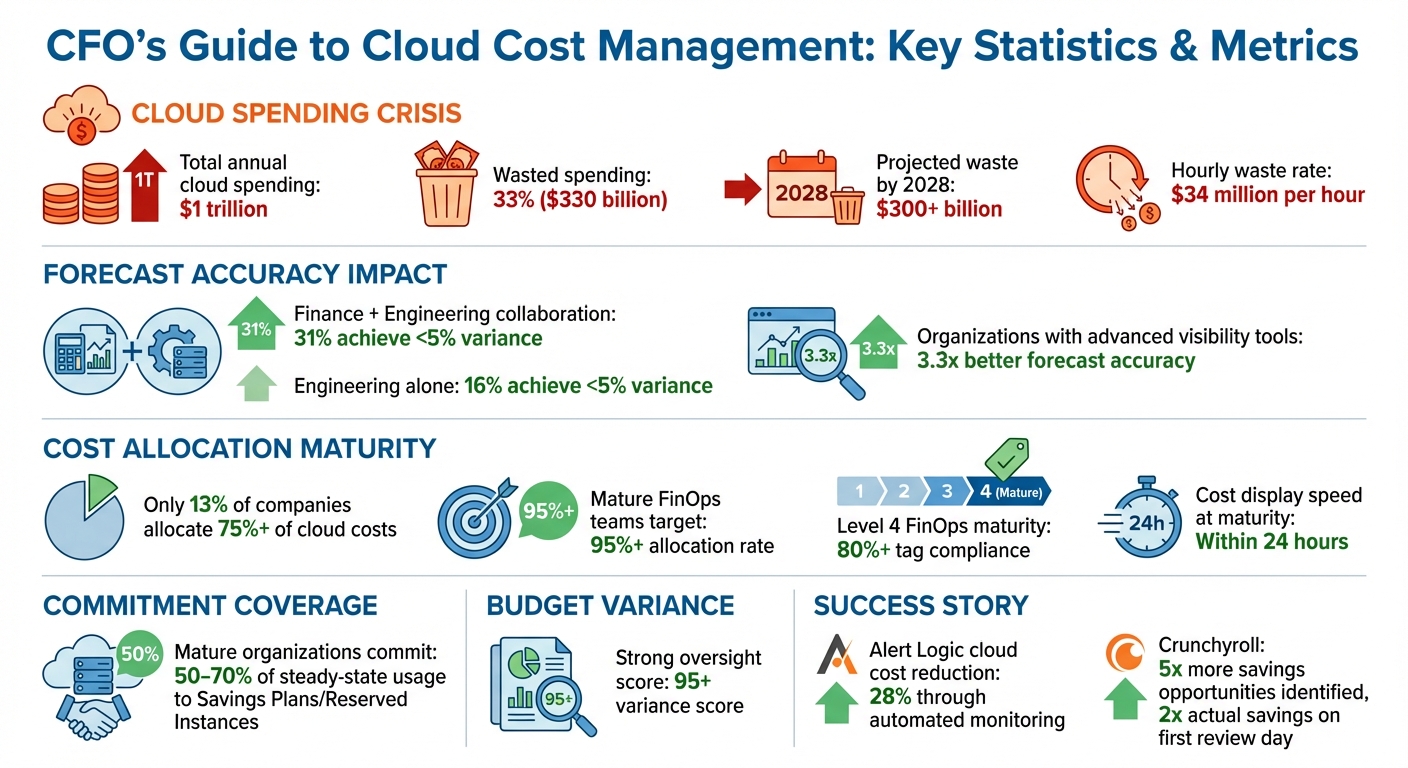
Cloud Cost Management Statistics and Key Metrics for CFOs
In the realm of cloud cost management, having the right metrics is like having a compass - it guides CFOs in transforming raw data into actionable insights. Without these metrics, managing cloud expenses effectively becomes nearly impossible. By focusing on indicators such as cost per transaction or cost per customer, organizations can directly connect their spending to revenue, making financial oversight far more meaningful.
A smarter strategy is to shift attention away from total cloud spending and focus instead on per-unit costs. For example, tracking metrics like cost per transaction, cost per customer served, or cost per business unit offers a clearer picture of how cloud expenses contribute to overall profitability and growth [5][6][4]. Interestingly, when Finance and Engineering teams collaborate on cloud cost management, 31% of organizations achieve highly accurate forecasts with less than 5% variance. This is nearly double the 16% success rate seen when Engineering handles costs independently [11]. These metrics not only pinpoint inefficiencies but also pave the way for better resource allocation.
Resource utilization is a key area to monitor. High utilization typically signals efficiency, whereas low utilization often indicates areas where resources can be resized or even eliminated to cut waste [8][10].
Another critical metric is cost allocation coverage, which measures how much of your cloud spend can be attributed to specific business units or projects. Mature FinOps teams aim for a 95% or higher allocation rate [9]. This level of accuracy ensures accountability and helps identify areas of improvement. Additionally, the ratio of provisioned resources to those actually used highlights underutilization, which is a common area for cost savings [6][7]. Organizations with advanced visibility tools are shown to achieve 3.3 times better forecast accuracy [11].
Commitment coverage is another essential metric. This refers to the percentage of cloud spend covered by Savings Plans or Reserved Instances. Mature organizations typically commit 50–70% of their steady-state usage to these plans, striking a balance between maximizing discounts and maintaining flexibility for fluctuating demand [1][6].
Tracking budget adherence and identifying unusual spending patterns are equally important for staying ahead of cost overruns. Budget variance - the gap between actual spend and forecasted budgets - offers a clear view of financial governance. A variance score above 95 reflects strong oversight and effective planning [9].
Automated tools like AWS Cost Anomaly Detection play a major role in spotting unexpected spending spikes. Using machine learning, these tools can flag anomalies in real time, helping organizations address issues before they snowball into major expenses [1][8]. Setting alerts - for instance, when spending exceeds 50–70% of planned usage - adds another layer of protection against unexpected overages.
Tracking how often anomalies occur can also reveal underlying causes, such as misconfigurations or sudden traffic surges [7][1]. Another valuable metric is insight-to-action time, which measures the number of days it takes to act on a cost-saving opportunity after it’s identified. Shorter response times mean less accumulated waste and fewer surprises on your cloud bill [9]. Keeping this time as low as possible ensures that small issues don’t evolve into costly problems.
Allocating cloud costs effectively ensures every dollar spent is tied to a specific owner - whether that's a team, project, or department. This approach not only clarifies spending but also holds teams accountable and helps CFOs identify which parts of the business are driving cloud expenses. Here are three methods to accurately distribute cloud costs across your organization.
"Cost allocation increases accountability by clearly attributing costs to responsible owners." - FinOps Foundation [15]
Account-based allocation uses the structure provided by your cloud provider to assign costs. It’s straightforward and works particularly well when teams operate within their own accounts [13][15]. Tag-based allocation involves adding metadata like "Cost Center" or "Environment" to resources, offering detailed tracking even when accounts are shared [13][15]. Lastly, business unit allocation groups accounts or tags into broader categories, aligning with your organizational structure, such as departments or specific workloads [13].
The choice between showback and chargeback determines how financial accountability is handled. Showback raises awareness by reporting costs without changing budgets, while chargeback deducts expenses directly from team budgets, encouraging cost-conscious decisions [13][4].
This method relies on the organizational tools built into cloud platforms. Each provider structures resources differently: AWS uses Organizations, Organizational Units, and Accounts; Azure relies on Management Groups, Subscriptions, and Resource Groups; and GCP employs Organizations, Folders, and Projects [15]. Assigning each team or project its own account or subscription ensures costs are automatically attributed to the right owner with minimal effort. Billing reports naturally separate expenses by account, simplifying the process and reducing the need for complex tagging or allocation policies [13][15].
However, this approach has its limits. It’s less effective when multiple teams share an account or when tracking costs at a more detailed level - like by application or environment - is necessary.
Tag-based allocation allows for precise visibility by attaching metadata to individual resources. Common tags include "Cost Center", "Environment" (e.g., development, staging, production), "Application ID", and "Business Owner" [13][15]. This method provides insights that account-based allocation might miss, making it invaluable for CFOs and other decision-makers.
To ensure consistency, establish a standardized tagging dictionary before deploying resources. Use Infrastructure as Code (IaC) tools to apply these tags automatically during deployment, minimizing human error [14][16]. Service Control Policies can also enforce tagging rules by blocking resources without proper tags [14][15]. Organizations at Level 4 FinOps maturity often achieve over 80% tag compliance, with the ability to display costs to teams within 24 hours of incurring them [15].
That said, tags have a key limitation - they aren’t retroactive. If you tag a resource late in the billing period, earlier usage remains unallocated in your reports [13][15]. In cases where direct allocation isn’t possible, shared cost distribution methods come into play.
Some cloud expenses benefit multiple teams at once, making direct allocation tricky. Examples include networking infrastructure, security tools, AWS Support fees, and shared container platforms [16][6]. In such cases, distribute costs using agreed-upon metrics.
Usage-based allocation splits costs proportionally based on consumption metrics like CPU usage, memory, or processed transactions. For instance, if Team A uses 60% of a shared database cluster’s compute capacity while Team B uses 40%, the costs are divided accordingly [15]. When precise usage data isn’t available, fixed percentage splits - based on factors like team size, revenue contribution, or historical usage - can work as an alternative [13][15]. It’s essential to get buy-in from stakeholders on the chosen method.
For commitment-based discounts such as Reserved Instances or Savings Plans, track how savings apply to specific resources using amortized cost data in billing reports [13]. This ensures teams are credited for the discounts they’ve generated while maintaining transparency around actual resource usage.
After exploring metrics and allocation strategies, let’s dive into tools that can help CFOs better manage and reduce cloud expenses. These tools are designed to shift cloud cost management from being reactive to proactive. When it comes to choosing the right tool, CFOs often decide between native cloud tools and third-party FinOps platforms. Native tools provide detailed insights within a specific cloud provider’s ecosystem, often at a lower cost. On the other hand, third-party platforms offer a unified view across multiple cloud environments.
Each major cloud provider offers built-in tools to monitor and optimize costs. These tools are designed to help businesses track spending, set budgets, and identify savings opportunities.
AWS offers several powerful features:
Microsoft Azure also delivers robust tools:
Google Cloud focuses on centralized monitoring and optimization:
Here’s a quick comparison of the key features offered by these providers:
| Capability | AWS Tool | Azure Tool | Google Cloud Tool |
|---|---|---|---|
| Cost Visualization | Cost Explorer | Cost Management | FinOps Hub |
| Budgeting/Alerts | AWS Budgets | Azure Budgets | Cloud Billing Alerts |
| Optimization Tips | Trusted Advisor | Azure Advisor | Recommendation Hub |
| Anomaly Detection | Cost Anomaly Detection | – | Active Assist |
| Resource Rightsizing | Compute Optimizer | Azure Advisor | Active Assist |
Native tools are excellent for managing costs within a single cloud provider, but they can become limiting in multi-cloud setups. Third-party FinOps platforms step in to bridge this gap by consolidating data from multiple providers like AWS, Azure, Google Cloud, and Kubernetes into a single dashboard. Popular platforms include Finout, Apptio Cloudability, and Ternary [22]. These tools also support the FinOps Open Cost and Usage Specification (FOCUS), which standardizes billing data across providers [20].
One standout feature of these platforms is virtual tagging, which allows businesses to allocate costs by project, team, or department - even when native tags are inconsistent or missing [22]. For Kubernetes users, tools like Kubecost and ScaleOps provide granular insights, breaking down costs at the pod and namespace levels, which native tools often can’t match.
Some advanced platforms take things a step further by automating key processes. For example:
In 2024, the anime streaming service Crunchyroll turned to Stratusphere FinOps to manage its expanding AWS environment. By consolidating their cost data, they uncovered five times more monthly savings opportunities compared to their first month of use. Acting on high-priority findings, the team doubled their actual savings on the very first day of review [23].
Lowering your cloud expenses requires a proactive approach. Instead of reacting to cost spikes, align your strategies with business goals to manage costs effectively and sustainably.
Establish a cross-functional FinOps team to consistently evaluate cloud spending [24]. These reviews should focus on how efficiently workloads are operating in relation to business outcomes, rather than just tracking overall expenses.
Use tools like AWS Trusted Advisor or Google Recommendation Hub to identify and eliminate waste [6][5]. For example, scheduling non-production resources to shut down during off-hours can lead to significant savings [25].
Take a phased approach to cost management maturity. Start with reactive solutions (the "Crawl" stage), progress to generating regular insights (the "Walk" stage), and eventually integrate cost considerations into your system design (the "Run" stage) [20][26]. Shifting focus from total spend to unit economics can also be impactful. In some cases, a 20% cost increase for a specific workload may be justified if it drives higher customer engagement and business value [24].
Consider shifting workloads to more efficient options like containers, serverless architectures, or specialized hardware such as AWS Graviton [6]. Securing executive sponsorship early ensures cost optimization remains a priority, aligning with financial oversight and improving budget predictability.
Automation can make a big difference by enabling real-time responses to spending anomalies. Set up alerts to notify teams when costs deviate from historical trends or exceed predefined limits [1]. Advanced systems using machine learning can detect unusual spikes in spending that might otherwise go unnoticed [1].
Forecast alerts are another useful tool, warning of potential overruns and allowing for mid-month adjustments to usage [2]. For instance, Alert Logic reduced its cloud expenses by 28% through automated monitoring [27].
Set up alerts to notify engineering or product teams through email, SMS, or Slack, fostering accountability. Adding granular monitors for high-cost areas like data transfers can help prevent these expenses from spiraling. These measures not only improve cost control but also support financial oversight and planning.
A FinOps framework brings finance, engineering, and business teams together to maximize the value of cloud investments [5][20][26].
"FinOps is an operational framework and cultural practice which maximizes the business value of cloud and technology, enables timely data-driven decision making, and creates financial accountability through collaboration between engineering, finance, and business teams" [20].
The framework operates in three phases: Inform (improve visibility), Optimize (eliminate waste), and Operate (embed cost management into daily workflows) [26][28].
Centralize governance under a dedicated FinOps team while delegating day-to-day cost accountability to individual engineering teams [5][26]. This balance helps drive efficient growth.
"FinOps is about getting the most value out of cloud to drive efficient growth" [20].
Automate tagging for new resources to ensure each deployment is linked to a department or project for accurate cost tracking [29]. Use tools to detect and delete orphaned disks or idle resources automatically [29]. Above all, prioritize metrics that reflect business value rather than just focusing on total spend [5]. This strategy supports financial oversight while promoting smarter cloud usage.

Managing cloud costs effectively requires more than just keeping tabs on spending - it demands alignment with your broader financial strategy. That’s where Phoenix Strategy Group steps in, turning unpredictable cloud expenses into tools for strategic planning [3]. This approach builds on the FinOps principles previously discussed, offering real-time financial insights to guide key business decisions.
Phoenix Strategy Group's fractional CFO services are designed to help finance teams shift from rigid IT budgets to flexible, driver-based forecasting that accounts for the dynamic nature of cloud consumption [4][30]. With technology teams now provisioning resources through APIs, procurement has become decentralized, necessitating updated financial controls [30].
Instead of merely tracking overall cloud spending, this approach emphasizes unit metrics that tie cloud costs directly to business performance. Metrics like cost per customer, cost per transaction, or cost per product feature replace the traditional monthly AWS bill as key indicators [4][6]. This shift makes it easier to identify whether spending is fueling growth or reflecting inefficiencies [12][5].
Another key benefit is fostering collaboration between CFOs and engineering teams. Phoenix Strategy Group bridges the gap by creating a shared framework for managing cloud costs, which significantly improves forecasting accuracy [11]. They also implement showback and chargeback models, assigning costs to specific business units, products, or teams. This encourages accountability across departments and ensures financial transparency [6][1].
Beyond aligning cloud costs with financial goals, Phoenix Strategy Group enhances oversight through advanced FP&A (Financial Planning and Analysis) systems and data engineering.
Their data engineering solutions consolidate billing information from platforms like AWS, Azure, Google Cloud, Kubernetes, and Snowflake into a single, unified financial dashboard [31][10]. This eliminates the need for manual spreadsheet work, replacing it with live connections between cloud platforms and FP&A tools [32].
Additionally, they offer advanced cost allocation capabilities. Using rule-based logic, shared infrastructure costs - such as networking, observability tools, or Kubernetes clusters - are distributed based on measurable drivers like request volume or revenue contribution [31]. Unlabeled resources are automatically tagged to ensure full cost visibility, and every allocation change is logged for audits and board reporting [31]. This level of precision not only simplifies financial oversight but also strengthens accountability and compliance.
Cloud costs play a critical role in shaping profit margins, yet a staggering amount of cloud spend is wasted. In fact, wasted cloud expenses are expected to surpass $300 billion by 2028 - that’s over $34 million wasted every single hour [3]. For CFOs, this represents both a challenge and an opportunity to rethink their approach to cost management.
To tackle this issue, CFOs should focus on three essential strategies. First, shift the focus from total spend to unit economics. By tracking metrics like cost per customer or transaction, CFOs can directly connect cloud usage to business outcomes [3][4]. Second, ensure precise cost allocation. Every dollar should be tied to a specific team, project, or customer. Yet, only 13% of companies have successfully allocated 75% or more of their cloud costs [3]. Third, implement a FinOps framework. This approach integrates financial, engineering, and business perspectives, enabling smarter decisions that balance speed, cost, and quality [5][20].
"FinOps is successful when decisions are made from a business value perspective." – Google Cloud [5]
For CFOs ready to transform cloud spending into a strategic advantage, Phoenix Strategy Group offers a tailored solution. Their services include fractional CFO support, advanced financial planning and analysis (FP&A), and data engineering expertise, all designed to align cloud costs with broader financial objectives. They consolidate billing data across platforms into unified dashboards, apply advanced cost allocation methods, and establish robust financial governance to ensure accountability throughout your organization. Learn more at Phoenix Strategy Group.
CFOs can improve the accuracy of cloud cost forecasting by tapping into historical usage trends and aligning projections with the company’s primary business objectives. Keeping forecasts updated to reflect pricing adjustments and incorporating FinOps-aligned practices can play a key role in refining cost management.
Leveraging advanced forecasting tools and adopting dynamic budgeting approaches allows predictions to stay adaptable and responsive to changing demands. These strategies enable CFOs to maintain tighter control over cloud expenses while supporting robust financial planning for the future.
A FinOps framework brings clear financial accountability and transparency by aligning cloud spending with an organization’s business objectives. It ensures cloud resources are used efficiently, keeping costs in check while supporting innovation and delivering measurable outcomes.
By promoting team collaboration, FinOps creates a shared responsibility for managing cloud costs. This reduces waste, prevents overspending, and enables organizations to scale their operations effectively without losing control over expenses.
Tag-based cost allocation works by attaching metadata tags - like cost center, project, or environment - to specific resources. This tagging system makes it easier to categorize and analyze expenses from multiple perspectives.
On the other hand, account-based cost allocation groups all charges within a single cloud account or organizational unit, assigning the total costs to the account owner or the related business division. Both approaches are effective for managing cloud expenses, but the best fit depends on your organization’s setup and reporting requirements.