Published on
February 16, 2026


Optimizing your ERP system after implementation is essential to ensure it aligns with your business goals, improves efficiency, and maximizes its potential. This guide provides actionable steps to refine financial processes, improve data accuracy, and enhance team adoption for better results. Here's a quick summary:
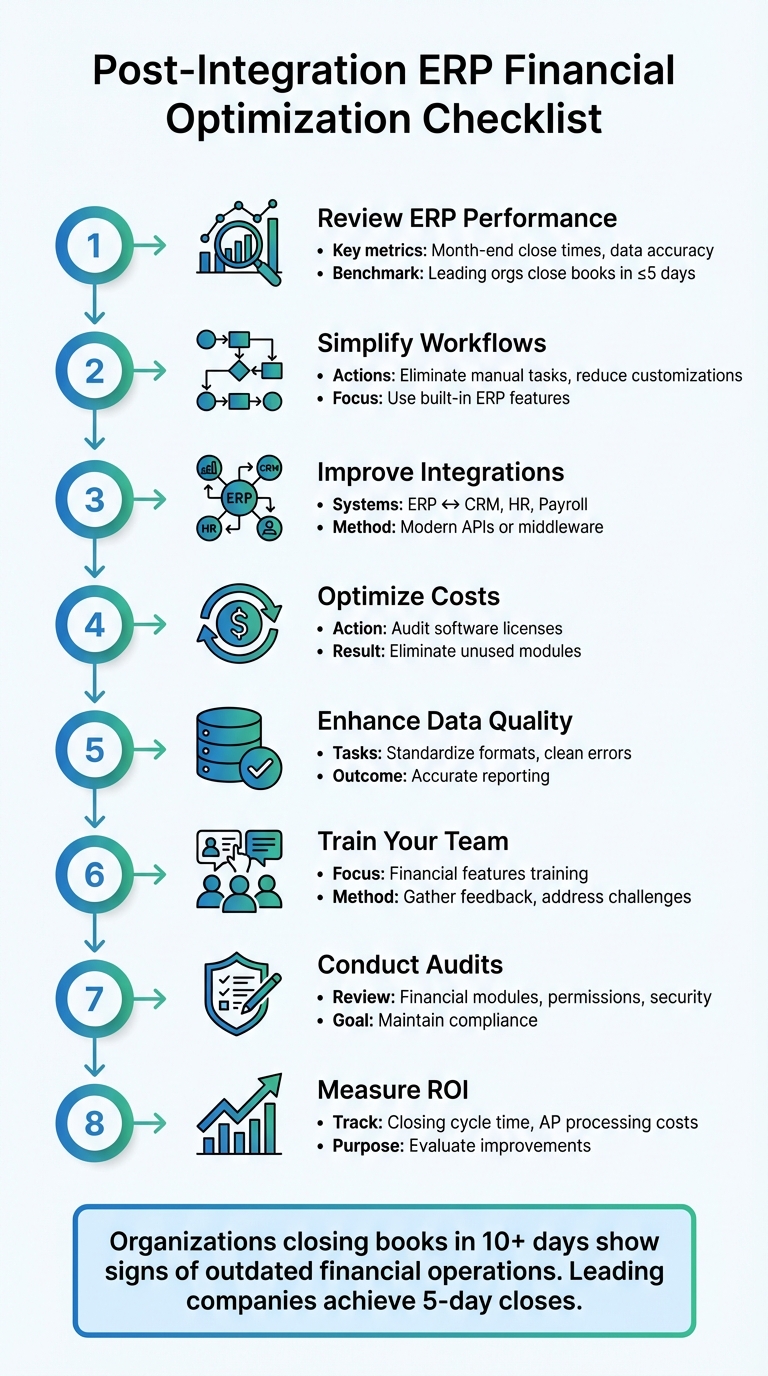
8-Step ERP Financial Optimization Checklist for Post-Integration Success
Before making improvements, it's crucial to understand your starting point. A detailed review of your ERP's current financial performance can highlight the gaps between what your system was designed to achieve and what it’s actually delivering. Skipping this diagnostic phase to dive straight into fixes often means missing key opportunities for improvement [5].
Deploying an ERP system is just the beginning. True alignment requires ongoing adjustments to ensure the system evolves alongside your financial goals [4]. As Brad Schulte, Carrie Lieberman, and Katie Glynn from Deloitte explain:
Transformation success isn't measured solely by a system's deployment; it's measured by how effectively the organization maintains, enhances, and evolves that system over time [4].
Start by reviewing your backlog to identify any deferred functionalities that could now support your current financial goals [4]. If the original project team prioritized technical setup over process clarity, now is the time to define and document clear financial workflows [4]. These steps are essential to prepare for a deeper analysis of operational outcomes.
Take a close look at your month-end close process and document each activity with timestamps. If closing the books takes more than 10 days, it’s a sign of outdated or inefficient financial operations [5]. Leading organizations often close their books in five days or less, giving them a competitive edge with faster access to real-time insights [5].
Look for signs of inefficiency, such as heavy reliance on spreadsheets or manual processes, which can indicate data inconsistencies [5]. Engage with your accounting teams and fractional CFO or FP&A leaders to pinpoint pain points in areas like forecasting, budget development, and reporting timeliness. Additionally, analyze month-end close times over the past year to spot inconsistencies or outliers in your financial reporting [5].
Reliable financial insights depend on accurate data. When data is siloed across departments, it can lead to inconsistent reporting. To assess risks to data accuracy, create a catalog of all financial systems, integration points, and processes that still rely on spreadsheets [5].
Pay special attention to key integration points, such as:
Audit trails and compliance documents can also reveal gaps in internal controls. If internal reviews miss potential vulnerabilities, consulting with external auditors can help identify overlooked issues in your control environment [5]. These steps ensure your financial data is both accurate and trustworthy.
Taking insights from your performance review, refining processes can transform accurate data into efficient operations. Once you've assessed your ERP's current state, the next step is to enhance your financial workflows. Many organizations discover their processes still reflect pre-ERP habits, missing opportunities to fully utilize the system's features. The aim is to eliminate manual workarounds, improve integrations, and reduce unnecessary expenses, all while making daily tasks smoother for your finance team. With processes identified, you can focus on streamlining workflows, improving integrations, and optimizing licensing for better results.
Your ERP system likely includes built-in best practices for essential financial tasks like invoicing, procurement, and budgeting. However, many organizations continue using overly customized workflows that add complexity without offering real benefits. As Eric Liebross from Auxis explains:
Digital technology is a tool to help you move from [manual processes] to modern finance. Modern finance requires technology to eliminate a lot of the transactional activity, moving [accountants] from a score-keeper to a true business advisor [7].
Start by mapping your current workflows and comparing them to your ERP's standard features. Identify where custom configurations are creating bottlenecks or inefficiencies. Often, adopting industry-standard modules is more cost-effective than maintaining customizations [3]. Document workflows that could be automated using your ERP's existing capabilities, then prioritize changes based on the potential time savings and impact.
Once workflows are simplified, ensure that all your tools and systems work together seamlessly.
Disconnected systems can lead to data inconsistencies and delays in critical processes like month-end close [6]. Your ERP should act as the central hub, consolidating data from tools like HRIS for labor costing, payroll systems for automated pay runs, project management tools for budgets and expenses, and CRM systems for sales data [2].
Start by mapping how data currently flows between systems. Create a detailed inventory of integration points and identify areas where manual interventions are still required. For example, CBIZ successfully integrated Centrally HR with Sage Intacct, combining operational and employee data to improve visibility and long-term financial planning [2]. In another case, CBIZ identified duplicative systems and governance gaps during an IT optimization assessment, saving a global organization over $2 million by streamlining integrations and managing vendors more effectively [2].
Focus on optimizing integrations that offer the quickest return on investment or eliminate significant bottlenecks [2]. Ensure your ERP supports modern APIs or prebuilt connectors, and consider using Integration Platform as a Service (iPaaS) to enable smoother data flow [2]. Involve key stakeholders from Finance, IT, and Operations early in the process to address both technical and functional needs [2] [7].
Reviewing your financial module usage can uncover opportunities to cut costs by eliminating unused licenses. Evaluate how your team uses each module and align your licensing with vendor-specific models to avoid overpaying for unused capacity [1]. If your ERP is more than five years old - or over a decade old - consider upgrades to reduce risks and maintenance expenses [1].
An IT optimization assessment can also reveal duplicative systems used across departments [2]. For example, you may find that different teams are paying for tools with overlapping functions, even though your ERP already offers those capabilities. Addressing these redundancies not only reduces costs but also lays the groundwork for improving financial data and configurations. These licensing adjustments, combined with process and integration improvements, create a more efficient and cost-effective financial operation.
After refining processes, the next step is to ensure your financial data is accurate and properly set up. Poor data quality can lead to incorrect reports, compliance problems, and extra work. Many organizations find that even after integration, data issues persist. These include duplicate entries from migration, mismatched formats (like non-U.S. date or currency formats), and reliance on error-prone manual spreadsheets [8][9]. Tackling these issues directly can speed up reporting, lighten processing demands, and prepare your system for expert growth strategies, such as handling multi-currency transactions or incorporating new entities [8][1].
Start by cataloging your financial systems and pinpointing any remaining spreadsheet dependencies left over from migration. Map out your month-end close process with timestamps to identify where manual reconciliations are slowing things down and affecting data quality [9]. These manual steps often hide duplicate entries and format inconsistencies, which can undermine the reliability of your reports [10].
Introduce verification processes and automated reconciliations to quickly resolve migration errors [8][9]. Standardize formats across the board, ensuring dates follow the MM/DD/YYYY format, currency symbols are consistent ($), and decimal separators align. Assess the financial impact of poor data quality to prioritize cleanup efforts, as these issues can lead to significant inefficiencies and added correction time [9].
Create dashboards that connect directly to your ERP's business intelligence tools, providing real-time access to essential financial KPIs [9]. Focus on metrics like cash flow projections, accounts receivable aging, budget variance, accrual accounting reconciliation, and working capital ratios. Ensure the dashboards pull data directly from integrated systems, such as CRM for revenue forecasts, payroll for labor costs, and the general ledger for an overall financial view [9]. By automating data collection, you eliminate the need for manual input and provide stakeholders with accurate, up-to-date information. Once the dashboards are in place, thoroughly test them to confirm they meet oversight and decision-making requirements.
Testing and validation are crucial to ensure financial reports are both accurate and actionable. Run parallel reports by comparing ERP outputs with trusted sources to uncover discrepancies. Test the reports under various scenarios, such as month-end closes, quarter-end adjustments, and consolidations involving multiple entities, to confirm they can handle complex situations. Involve your finance team in the process - they’re often best positioned to catch details that technical tests might overlook. Document any configuration changes needed to improve accuracy, and establish a routine review schedule to address potential issues before they affect critical decisions.
Streamlining financial data and processes is just the first step - you need to ensure your finance team can fully tap into the potential of these improvements. Even the most optimized ERP systems can fall short if your team struggles to use them effectively. The problem often starts with training that’s too generic, failing to link the system’s technical features to the team’s everyday tasks. To truly maximize your ERP investment, think of post-implementation as a shift in mindset rather than just a technical upgrade. When your finance team feels confident and sees how the system simplifies their work, resistance fades, and productivity climbs. Achieving this requires focused training and a commitment to ongoing support.
Training should zero in on the financial tools your team uses daily. Highlight practical features like real-time data syncing, automated reconciliations, and cash flow management that can eliminate manual tasks and speed up month-end closes. Address common mistakes uncovered during testing and show how the system removes the need for inefficient workarounds. Use examples from your own processes - like multi-entity consolidations or accrual adjustments during month-end - to make the training relatable and actionable. Plan regular refresher sessions to cover new features or knowledge gaps, ensuring your team’s skills keep pace with system updates.
Feedback is essential to understanding where your team might be struggling. Use surveys, focus groups, and ERP champions to identify pain points early. Engage your finance team during User Acceptance Testing (UAT) to address any issues before the system goes live. Pair this qualitative feedback with hard data, like adoption rates and process efficiency metrics, to pinpoint specific challenges. By continuously refining training and system configurations based on feedback, you’ll create a smoother experience for everyone.
A strong support system is key to maintaining momentum after implementation. Make it easy for team members to report problems and get quick solutions without disrupting their work. Schedule regular check-ins to tackle ongoing challenges and keep the system running smoothly. Build a centralized knowledge base with user guides, FAQs, and troubleshooting tips so your team can solve minor issues independently. For more complex problems, consider tapping into fractional CFO expertise for specialized advice. Finally, ensure open communication between IT and finance to align technical updates with operational needs, preventing small frustrations from turning into major roadblocks.
Once your finance team is proficient with the system, it’s time to focus on safeguarding your financial data. Even a well-configured ERP can pose risks if permissions are mismanaged, configurations drift over time, or security protocols weaken. Regular audits don’t just ensure compliance - they help catch issues early, preventing costly errors or data breaches. As Ritch Haselden from NetSuite Support explains:
Regular audits matter because unmonitored changes accumulate fast [11].
A systematic approach to audits and security testing keeps your financial operations accurate, secure, and resilient.
Start by reviewing your ERP’s financial modules to ensure they align with your current business needs. This includes checking General Preferences and Accounting Setup, verifying that workflows and permissions are up-to-date, and addressing privilege creep - where users retain access they no longer need. For example, in January 2026, Kimberlite Partners audited a NetSuite system and found that 40% of saved searches were outdated or duplicated. This inefficiency led to a 25% increase in report generation time. By implementing a structured remediation plan, they restored system performance and compliance [11].
During your audit, make sure transaction logs and workflow histories are accessible. Collaborate with stakeholders from finance, operations, and IT to identify blind spots. After completing the audit, develop a 30/60/90-day remediation plan. Start with easy, high-impact fixes, move on to structural adjustments, and finally address technical debt. Once the process is complete, refine access controls to better protect sensitive data.
Using the insights from your audit, focus on reinforcing role-based access controls. Assign permissions based on the minimum required for each role, and regularly review cybersecurity measures to identify vulnerabilities. Monitor user access logs for unusual activity and ensure encryption is active for both data at rest and in transit. Promptly apply security patches to close known gaps, and implement multi-factor authentication for users handling critical financial information. These steps not only protect your financial data but also help maintain compliance with reporting standards.
Your backup and recovery systems are only as good as your ability to rely on them during a crisis. Ensure automated backups run as scheduled and test recovery procedures regularly. Backups should include all financial data, configurations, and transactions, and they should meet your business continuity requirements for recovery time objectives (RTOs). Store backups in geographically separate locations to safeguard against localized disasters, and document recovery procedures so your team can respond quickly in emergencies. Regular testing ensures you can restore operations with minimal downtime or data loss.
Once you've made strides in improving your processes and data through ERP optimization, it's time to measure the financial impact. Tracking financial metrics post-optimization is crucial. Without clear benchmarks, it’s hard to justify the resources spent or identify areas that still need attention. This data not only validates your efforts but also helps shape your ongoing optimization strategy and secures support from leadership for future projects.
To assess the value of your ERP enhancements, focus on tangible metrics. For instance, look at the Financial Closing Cycle Time. If you’ve reduced the closing cycle from 10 days to 5, that’s a 50% improvement - allowing your finance team to dedicate more time to strategic tasks. Similarly, track Days Sales Outstanding (DSO) to see if more efficient receivables processes have shortened the collection cycle. A reduction from 45 days to 35 days can significantly improve cash flow and working capital. Another area to measure is the Accounts Payable (AP) Processing Cost per invoice. If automation cuts the cost from $15 to $8 per invoice, calculate the annual savings based on your total invoice volume to highlight the financial impact.
Use your existing dashboards to continuously monitor key financial performance indicators (KPIs). Real-time tracking ensures you can quickly spot deviations from expected benchmarks and maintain the improvements achieved through optimization. Set up automated alerts to flag significant shifts in these KPIs, so you can act promptly.
Create a comparison table to clearly showcase the progress made through your optimization efforts. Metrics like cash flow accuracy, reconciliation error rates, and ROI are ideal for this. For example, improving reconciliation accuracy from 92% to 98% not only reduces costly errors but also minimizes audit findings. Presenting these improvements in a concise, shareable format demonstrates the value of your work and identifies areas for further enhancements. This analysis serves as a foundation for continuous improvement and future growth.
For more expert advice on measuring ROI and optimizing your ERP financial performance, consider reaching out to Phoenix Strategy Group (https://phoenixstrategy.group).
Once you've optimized and measured your ERP's performance, the next step is refining your financial processes further. Advanced financial advisory services can help align your systems with your long-term growth strategy. Many growing companies discover that their internal teams may not have the expertise or capacity to fully maximize their ERP's potential. That’s where these services come in - they fine-tune processes, scale operations, and ensure your financial systems are positioned to support your goals.
Hiring a fractional CFO gives you access to high-level financial expertise without committing to a full-time executive. For example, Phoenix Strategy Group (https://phoenixstrategy.group) offers fractional CFO services designed to enhance ERP-driven financial processes. These professionals assist with interpreting ERP data, turning it into actionable insights for pricing strategies, cost management, and capital allocation. They also collaborate with your finance team to establish key performance indicators (KPIs) that monitor data accuracy, process efficiency, and compliance - ensuring your ERP continues to deliver value as your business grows.
Regular system audits and automation tools can significantly improve your reporting accuracy and scalability. Phoenix Strategy Group specializes in advanced data engineering practices, such as field mapping, integration testing, and automated data collection using APIs or middleware. These methods minimize manual errors and provide real-time visibility into your financial operations. By prioritizing API-based integrations, you can ensure your ERP remains scalable and ready for mergers or acquisitions. These updates prepare your system to handle growth while maintaining efficiency.
Whether you're seeking funding, preparing for rapid scaling, or planning an acquisition, it's crucial to make sure your ERP is audit-ready and appealing to investors. Phoenix Strategy Group offers M&A advisory and fundraising support, leveraging their Integrated Financial Model to synchronize real-time data across your ERP, CRM, and other platforms. This approach gives stakeholders confidence in your financial accuracy. By establishing clear protocols and keeping detailed documentation of data flow rules, you simplify audits and position your company for smoother transitions during growth or exit events - all while maintaining the optimized systems you've already built.
Optimizing your ERP system after integration isn’t a one-and-done task - it’s an ongoing process. It requires consistent attention to data accuracy, workflow efficiency, and continuous improvement. The steps outlined earlier - like reviewing system performance, refining workflows, cleaning up financial data, training your team, conducting security audits, and evaluating ROI - are key to keeping your financial operations agile and prepared for market shifts.
Every financial decision rests on accurate data, making automated validations and regular audits critical to avoiding costly mistakes[9]. Instead of replacing your ERP system entirely, focusing on untapped features already built into your platform can be a more budget-friendly and effective approach[1]. Regular training and monitoring user adoption ensure your team stays efficient and fully equipped to leverage the system’s capabilities[10]. After all, the value you pull from your ERP is directly tied to how well your team uses it.
For companies looking to push these efficiencies even further, advanced advisory services can provide the extra edge. Growth-stage businesses, in particular, can benefit from external expertise to drive optimization and strategic planning that internal teams might not have the resources to handle. Phoenix Strategy Group (https://phoenixstrategy.group) offers fractional CFO services, advanced data engineering, and M&A support to help businesses maximize their ERP investments. Their Integrated Financial Model keeps real-time data synchronized across platforms, ensuring systems are audit-ready and appealing to investors.
After implementing an ERP system, it's crucial to establish clear, measurable goals aimed at improving financial visibility, streamlining automation, and ensuring compliance. Take the time to review and map out your existing workflows. This step is essential to confirm that the system aligns with your specific business requirements. By doing so, you'll uncover any gaps and make sure the ERP system is customized to effectively support your financial processes.
Automating financial integrations and workflows speeds up the month-end close process without requiring additional staff. It minimizes manual effort, improves data precision, and provides real-time insights into financial operations. This approach helps businesses close their books faster and more efficiently while ensuring accuracy and maintaining control.
To gauge the success of financial optimization through your ERP system, focus on key performance indicators (KPIs) that highlight measurable improvements. These include:
These KPIs reveal how effectively your ERP system enhances financial operations and delivers tangible results.