Published on
June 11, 2026

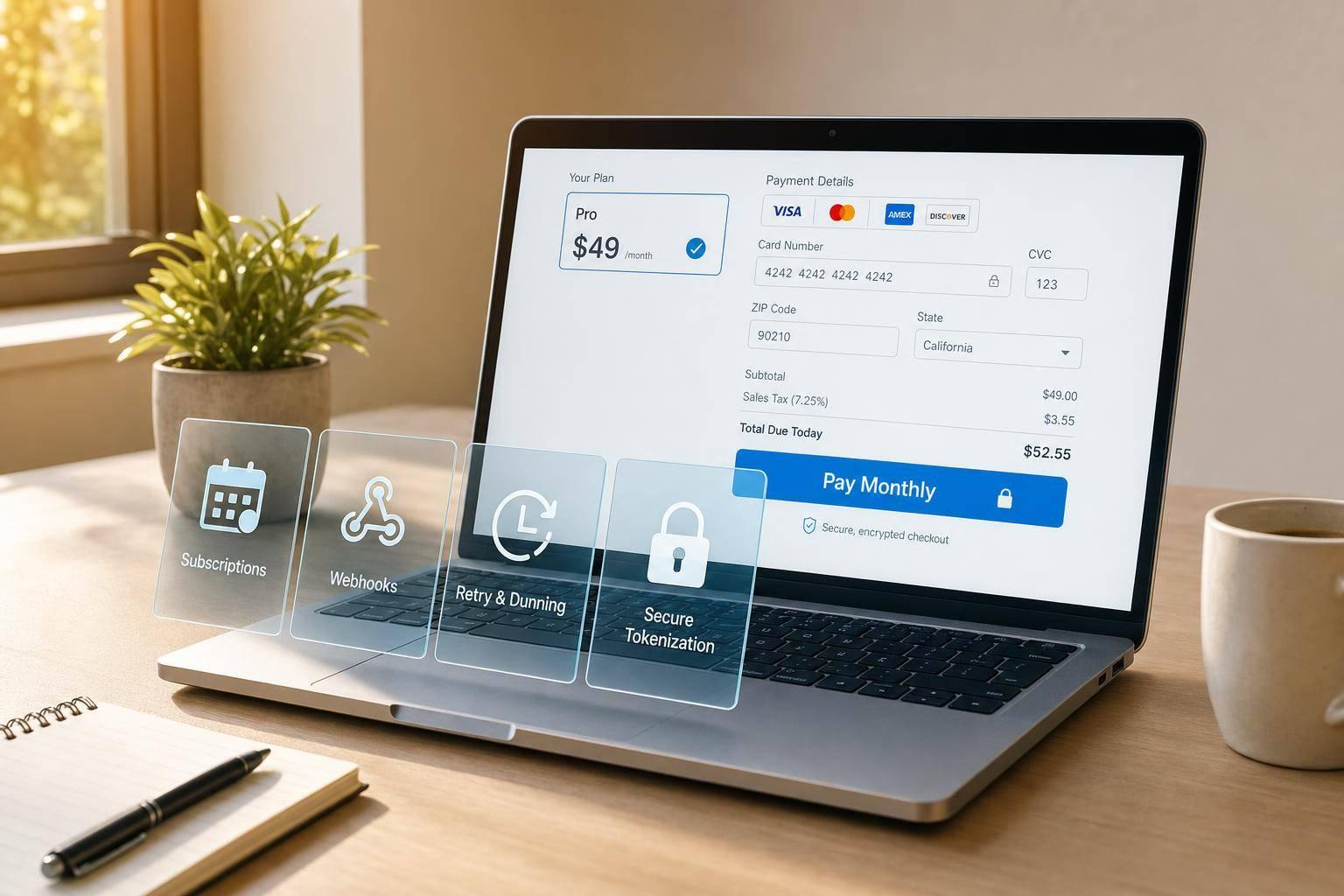
When running a SaaS business, your payment gateway isn’t just a tool to accept payments - it’s a critical part of your growth strategy. Here's what you need to know:
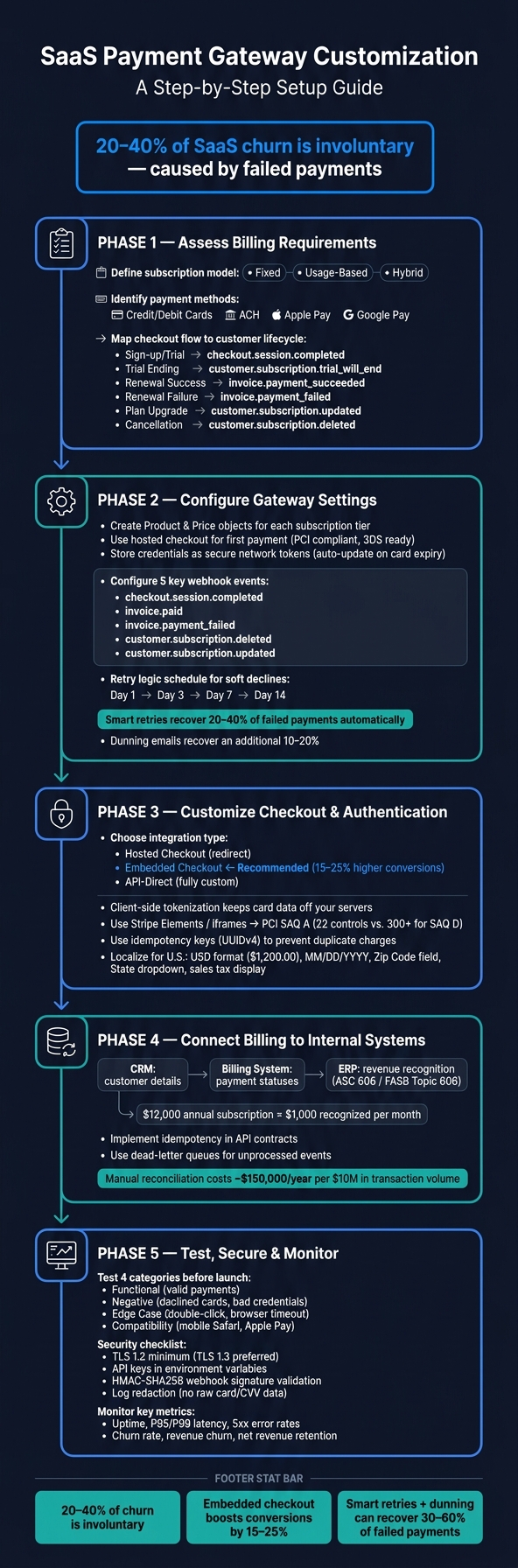
SaaS Payment Gateway Customization: End-to-End Setup Flow
Before diving into gateway settings, it’s essential to clearly define your billing requirements. A setup that works at launch could fall apart as your product scales if it doesn’t align with your needs. Start by focusing on your subscription model, payment methods, and checkout flow to ensure they meet your business goals.
Your subscription model lays the groundwork for every technical decision you’ll make about billing. The three most common SaaS models are:
Recurring billing is straightforward, while usage-based models require real-time tracking. Hybrid models add complexity with features like proration. Another key decision: how will cancellations work? Will access end immediately, or will customers retain access until the billing cycle ends? These choices directly influence how you configure your payment gateway.
"Billing is not a feature you bolt on at the end. It's infrastructure that touches every part of your product, from user permissions to feature gating to churn management." - Infinity Sky AI [5]
Your subscription model will also shape the payment methods you need to support. For SaaS businesses operating in the U.S., credit and debit cards are a must-have, but don’t stop there. ACH bank debits are ideal for B2B subscriptions with larger transaction amounts, offering lower fees and avoiding issues like card expirations. Digital wallets such as Apple Pay and Google Pay can further streamline the checkout process for self-service customers.
Make sure your checkout process follows U.S. formatting standards, such as using the $ symbol, MM/DD/YYYY dates, and $1,000.00 for amounts. Incorrect formatting can erode buyer trust during checkout. If international expansion is on the horizon, supporting local payment methods isn’t just about improving the user experience - it’s a critical revenue driver that can help mitigate churn and boost conversions, as discussed earlier.
Your payment gateway should do more than process the first charge - it needs to handle billing events throughout the entire customer journey. The table below outlines how key lifecycle stages align with gateway events and actions:
| Lifecycle Stage | Key Gateway Event | Action Required |
|---|---|---|
| Sign-up / Trial | checkout.session.completed |
Provision account and set trial end date [5] |
| Trial Ending | customer.subscription.trial_will_end |
Send conversion email 3 days before trial ends [4][5] |
| Renewal Success | invoice.payment_succeeded |
Extend access and generate invoice [5] |
| Renewal Failure | invoice.payment_failed |
Trigger dunning flow and smart retries [4][5] |
| Plan Upgrade | customer.subscription.updated |
Apply proration and enable new features [4][5] |
| Cancellation | customer.subscription.deleted |
Revoke access at the end of the billing period [4][5] |
Once you've established your billing requirements and lifecycle events, the next step is to configure your gateway settings to bring those plans to life.
Start by creating Product and Price objects within your payment gateway. Products represent your subscription tiers (like Starter or Pro), while Price objects define the billing intervals and amounts - such as $49.00 per month or $470.00 annually. If you need to make changes to pricing later, always use separate Price objects to ensure current subscriber terms remain intact.
For the first payment, use a hosted checkout page instead of building a custom payment form. Hosted pages simplify compliance with PCI standards, handle 3D Secure authentication, and automatically adjust for localization. During this initial transaction, the gateway secures consent for future charges and stores payment credentials as secure network tokens. These tokens are automatically updated when a card expires, reducing potential disruptions.
Finally, set up webhooks to ensure your system can handle billing events reliably.
Webhooks are essential for keeping your system in sync with billing activities. Here are five key events every SaaS setup should monitor:
| Webhook Event | Required System Response |
|---|---|
checkout.session.completed |
Provision user access and create internal records |
invoice.paid |
Update the subscription period and confirm continued access |
invoice.payment_failed |
Trigger the dunning process and notify the user |
customer.subscription.deleted |
Revoke access and start the offboarding process |
customer.subscription.updated |
Sync plan changes with your database |
Always validate webhook signatures using stripe.webhooks.constructEvent and process events idempotently by referencing the event ID. This prevents errors like granting access twice or sending duplicate emails.
"The biggest mistake I see SaaS teams make with recurring billing is treating webhook handling as an afterthought. Your retry logic, dunning emails, and access control all depend on processing payment events reliably and idempotently - get that wrong and you leak revenue silently for months." - Ayush Agarwal, Co-founder & CPTO, Dodo Payments [6]
With your webhooks in place, focus on building effective retry logic and dunning strategies to recover failed payments.
Involuntary churn - often caused by payment failures or expired cards - makes up 30–40% of total subscription churn [7]. The good news? Much of this can be recovered with the right approach.
Start by identifying the type of payment failure. Hard declines (e.g., stolen cards, closed accounts) should not be retried, as doing so could harm your merchant account. On the other hand, soft declines (e.g., insufficient funds, network timeouts) are where retry logic can make a difference. A common retry schedule includes attempts on Days 1, 3, 7, and 14 before canceling the subscription. Machine learning can improve this process by aligning retries with cardholder paydays or optimal processing windows, recovering 20–40% of failed payments automatically [8]. Pair this with a well-timed dunning email sequence prompting users to update their payment information, which can recover an additional 10–20% [8].
During the dunning period, continue providing access to your product, and include a direct link for updating payment details in every email. Organize your subscription lifecycle into clear states - such as trialing, active, past_due, suspended, and canceled. This approach keeps your access control logic straightforward and easier to test.
Once your subscription and retry systems are set up, the next step is creating a checkout experience that aligns with your SaaS product's flow. Payment methods play a key role in driving conversions, just like pricing and plan options.
There are three main ways to integrate checkout: hosted checkout (redirecting users to a provider's page), embedded checkout (using an iframe or component within your app), and API-direct (a fully custom solution). For most SaaS teams, embedded checkout is often the best choice. Switching from hosted redirects to embedded checkouts can increase conversions by 15%–25% [10]. Ayush Agarwal, Co-founder & CPTO of Dodo Payments, explains:
"The mistake I see most often is founders confusing embedded payments with payment facilitation. Embedded payments mean keeping your customer's checkout in-app." [10]
For mobile-first SaaS, overlay checkouts work better on smaller screens than fixed iframes. On the other hand, desktop-first SaaS with more complex plan options can benefit from embedded fields, offering more control over the user experience without taking on the full PCI compliance burden.
To secure payment data, client-side tokenization is the go-to method for SaaS platforms. Here, card details are captured directly on the user's device and sent securely to the payment gateway. This approach keeps sensitive data off your servers while providing a token you can use for recurring billing. It ensures secure transactions without the need to store sensitive information on your infrastructure.
Using embedded fields such as Stripe Elements or iframes helps you maintain PCI SAQ A status, which requires compliance with just 22 security controls. In contrast, collecting card data directly through your API (SAQ D) ramps up the compliance requirements to over 300 controls [9].
You can further enhance security by using idempotency keys (like UUIDv4) for each payment API request to avoid duplicate charges caused by retries. When verifying webhook signatures, use constant-time comparison methods (e.g., crypto.timingSafeEqual in Node.js) and set a 5-minute window for accepting webhook events. This helps prevent replay attacks [9].
"The safest payment architecture is often the one that makes developers a little less 'powerful' by default. If engineers cannot casually access card data... you will prevent most compliance mistakes." – Payhub.cloud [11]
Securing payment data is just one part of the puzzle. Localizing your checkout for U.S. customers can go a long way in building trust and improving conversion rates.
For U.S.-based users, small details matter. Display prices in USD with the dollar sign, use commas for thousands, and a period for decimals (e.g., $1,200.00). Use the MM/DD/YYYY format for dates, label the postal field as "Zip Code", and include a dropdown menu for "State." These adjustments reassure customers that your product is tailored to their expectations.
Additionally, ensure your checkout supports popular U.S. payment methods like ACH transfers and Apple Pay. Don’t forget to display applicable state sales tax at checkout. Since SaaS services are taxable in many U.S. states, this transparency helps avoid confusion and reduces billing disputes, which can otherwise lead to checkout abandonment.
Once your system is live, it's crucial to set up automatic updates across all platforms whenever a payment event occurs. Without proper synchronization, subscription statuses can become inconsistent, leaving support teams scrambling to resolve discrepancies.
To avoid this, clearly define the role of each system: the CRM should manage customer details, the billing system should track payment statuses, and the ERP should handle revenue recognition [12]. Using an event-driven architecture with correlation IDs ensures smooth communication between these systems [12].
From the start, implement two key safety measures:
These steps lay the groundwork for accurate revenue recognition and faster support resolutions.
Once payment events are synced, the next step is ensuring structured data storage for precise reporting and efficient support.
How you store billing data has a direct impact on both financial reporting and ticket resolution times. For revenue recognition, align your data structure with ASC 606 standards. This guideline requires recognizing revenue as services are delivered rather than when payments are received. For example, a $12,000 annual subscription should allocate $1,000 to the general ledger each month [13]. As Sanjay Prajapati, Head of Business at Acquaint Softtech, explains:
"The FASB's Topic 606 requires subscription revenue to be recognised as service is delivered, not when cash is received." [13]
For support teams, transform raw payment data into a clear timeline, such as: created → authorized → challenged → succeeded → fulfilled → refunded [3]. This clarity helps resolve billing-related issues faster and reduces customer confusion.
Here's a pro tip: store only a reference to a versioned price object in subscription records. This ensures existing customers are not accidentally overcharged when you update pricing for new subscribers [13].
Connecting billing data to internal systems not only streamlines operations but also strengthens financial management. This integration impacts everything from financial reporting to cash flow forecasting. For example, manual reconciliation can cost around $150,000 annually for every $10 million in transaction volume [14].
Companies like Phoenix Strategy Group specialize in helping SaaS businesses build the financial infrastructure needed for this kind of integration. Their services include data engineering, fractional CFO services, and financial planning and analysis (FP&A). They help bridge the gap between fragmented billing data and a reliable, audit-ready revenue system. If your financial systems and billing data aren't in sync yet, this could be the solution you need.
Once your gateway is configured and the checkout process is customized, the next step is to ensure everything works seamlessly. This involves thorough testing, implementing robust security measures, and setting up monitoring to keep things running smoothly.
Before you go live, it's crucial to test all possible payment scenarios - not just the straightforward ones. Think about situations like a declined card, a browser refresh in the middle of a transaction, or a user double-clicking the "Pay" button. These tests are essential because they help avoid issues that could lead to involuntary churn.
"A failed payment is never just a technical failure. It is the moment a customer loses confidence in your platform, abandons their purchase, and often does not return." - Joe Sturgess, Director of Performance Marketing, Katalon [15]
Leverage your payment gateway's sandbox environment to organize your testing into four key categories:
For SaaS businesses, it's also important to test specific workflows like trial-to-paid transitions, prorated upgrades, and recurring billing. On the backend, make sure webhook events are processed correctly. As Arch notes, "Webhooks are essential. Client-side success screens are not a reliable source of payment truth." [2]
| Test Category | Example Scenario | Outcome |
|---|---|---|
| Functional | Valid Visa charge | Payment succeeds; confirmation loads; correct amount charged |
| Negative | Insufficient funds card | Payment fails; clear error message shown; retry option available |
| Edge Case | Double-click "Pay" button | Only one charge created; no duplicate transaction |
| Compatibility | Checkout on mobile Safari | Fields remain visible; Apple Pay authentication works as expected |
Once your tests confirm system reliability, it's time to focus on security.
Securing your payment integration is an ongoing responsibility. Start by implementing tokenization to keep raw card data off your servers. This can significantly reduce your PCI DSS compliance requirements, cutting down the number of security controls from over 300 to just 22 for SAQ A compliance [9][16].
Other critical security measures include:
These practices not only protect your customers but also safeguard your platform from potential liabilities [9][11][3].
After launch, monitoring becomes your safety net for maintaining a healthy integration. Involuntary churn - when customers want to pay but their card fails - can account for 20–40% of total SaaS churn [1]. Addressing this is critical for minimizing revenue loss.
Key metrics to track include:
Pay special attention to tail performance (P99) to identify slowdowns that averages might hide [17]. Also, monitor webhook delivery times and failure rates for key events like invoice.payment_failed and charge.dispute.created. These events directly impact your dunning processes and customer support efforts. Running availability checks from different U.S. regions can help you catch routing issues before they affect your users.
A well-tailored payment gateway can do more than process transactions - it can fuel revenue growth and improve customer retention. This guide has outlined key steps, from aligning billing models with regional demands to fine-tuning subscription plans, securing checkouts, and integrating real-time internal systems. Together, these measures not only minimize churn but also ensure seamless operations across platforms.
Here’s a striking fact: involuntary churn can make up 20% to 40% of total SaaS churn [1]. The good news? It’s preventable. Smart retry logic, personalized dunning sequences, and a smooth checkout process that accommodates preferred payment methods can significantly reduce this issue.
"Involuntary churn - when customers want to pay but their card fails - can account for 20–40% of your total churn. Without proper dunning management and payment retry logic, you're bleeding revenue unnecessarily." - Dawid Woźniak, Technical Support Engineer, Fungies.io [1]
Synchronizing tools like CRM, ERP, and BI with live payment data elevates billing from a backend task to a growth enabler. Real-time insights empower finance and customer success teams to act quickly on at-risk accounts and make informed pricing decisions.
"Billing is not a feature you bolt on at the end. It's infrastructure that touches every part of your product, from user permissions to feature gating to churn management." - Infinity Sky AI [5]
Finally, to take your payment strategy to the next level, consider collaborating with experts like Phoenix Strategy Group. They can help you connect your billing infrastructure to broader financial planning and revenue strategies, ensuring your payment system becomes a cornerstone of your business growth.
Fixed billing involves charging a consistent, recurring fee, making it a great option for straightforward subscription plans. On the other hand, usage-based billing adjusts charges based on how much a customer uses, which works well for services where consumption varies. Then there's hybrid billing - a mix of the two - where customers pay a base fee plus additional charges tied to usage.
The right choice depends on your business goals, what your customers expect, and how capable your systems are. Fixed billing keeps things simple, while usage-based or hybrid models demand more advanced systems to ensure accurate tracking and billing.
Webhook failures can result in problems like incorrect access or even double charges. These issues often arise from:
To avoid these pitfalls, focus on implementing idempotent processing, setting up reliable retry mechanisms, and ensuring proper signature validation. These steps can help maintain the integrity and reliability of your webhook system.
To reduce the risk of involuntary churn caused by failed payments, consider using multiple payment gateways with intelligent routing. This approach can boost approval rates by directing transactions through the most effective gateway. Establish clear guidelines for retries, failovers, and switching between gateways to ensure seamless handling of payment issues. Regularly test failover systems to confirm they work smoothly when needed.
Additionally, keep detailed transaction records and closely monitor webhook delivery. This helps simplify reconciliation processes and ensures your payment system runs efficiently. By implementing these strategies, SaaS businesses can protect their revenue while improving the overall customer experience.