Published on
January 4, 2026


Data encryption for backups is no longer optional - it’s a must for protecting sensitive information and meeting compliance standards like HIPAA, PCI-DSS, and SOC 2. Here’s why and how you can secure your small or medium-sized business (SMB) against cyber threats:
Encrypting your backups protects your business from data breaches, regulatory penalties, and operational disruptions. Start by implementing strong encryption methods, managing keys securely, and testing backup recovery procedures regularly.
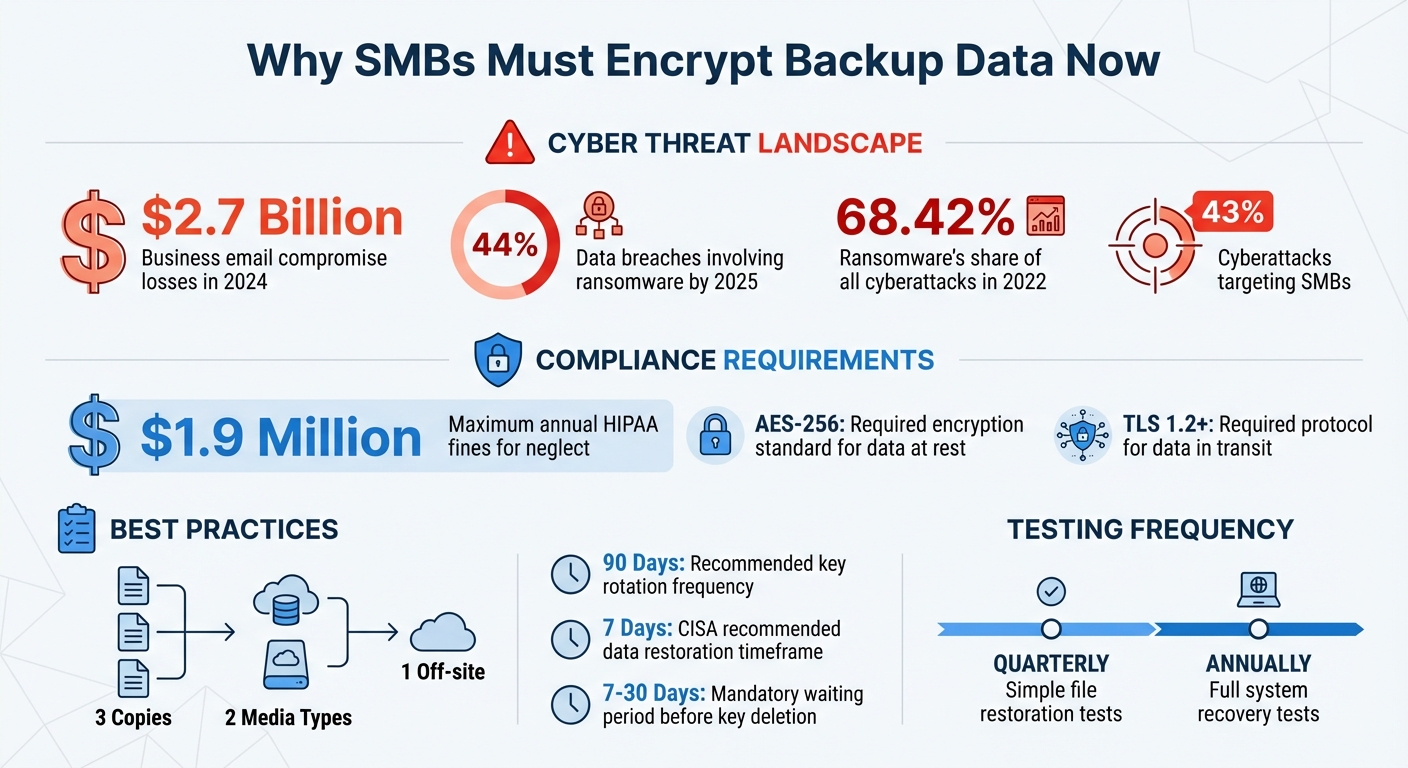
SMB Cybersecurity Threats and Backup Encryption Statistics 2024-2025
To safeguard backup data effectively, it's crucial to encrypt it both during transfer and while stored. Using proven, industry-accepted encryption methods ensures your data remains secure, even if other defenses fail. Let’s dive into how to protect your data during transit and at rest.
When backup data moves between your systems and storage locations, it becomes vulnerable to interception. To counter this, use Transport Layer Security (TLS) 1.2 or higher. This protocol is the go-to standard for securing data in transit. Ensure your backup clients are configured to enforce TLS 1.2 or newer versions, as older protocols may have exploitable vulnerabilities [9].
Take the time to review your backup software's security settings. Confirm that all API calls and network transfers utilize secure SSL/TLS certificates. This step is essential for maintaining the integrity and confidentiality of your data as it travels.
Once backup data reaches its destination, encryption at rest becomes critical. The Advanced Encryption Standard (AES) with 256-bit keys (AES-256) is widely regarded as one of the most secure encryption methods available [1][4]. It complies with FIPS 140-2 standards and offers robust protection through its strong block cipher [5].
For database backups, many platforms provide built-in key management features to implement AES-256 encryption. If you're using cloud services, providers like Azure Backup automatically encrypt data at rest with AES-256, simplifying the process [5]. Leveraging these built-in tools ensures your backup data remains secure without requiring extensive manual configuration.
The right backup provider can make encryption easier to manage. Look for providers that support Customer-Managed Keys (CMK) or "Bring Your Own Key" (BYOK) models. These options give you control over encryption keys, rather than relying solely on the provider's internal systems [4][5].
Additionally, consider providers offering automated audit tools to identify unencrypted backup volumes [7][1]. Automated encryption key rotation is another feature to prioritize; it minimizes the risk of prolonged exposure if a key is compromised [1][4]. These features collectively enhance the security and manageability of your backup encryption strategy.
Once you've implemented strong encryption for your backup data, the next critical step is managing your encryption keys securely. Without proper key management, even the best encryption can be compromised, leaving your data vulnerable to unauthorized access.
Encryption keys act as the gatekeepers of your backup security. If an attacker gets hold of your keys, they can decrypt everything, regardless of how strong your encryption is. That's why it’s absolutely crucial to store your keys separately from your encrypted data. This separation ensures that even if your backup storage is breached, the absence of the keys will prevent decryption attempts from succeeding [1].
Encryption keys need their own secure environment, isolated from the data they protect. This is where Key Management Services (KMS) or Hardware Security Modules (HSM) come into play. These tools provide highly secure and redundant storage for your keys. For top-notch protection, consider high-security HSMs that comply with FIPS 140-3 Level 3 standards. For instance, AWS KMS keys are safeguarded by HSMs validated under these standards [1][11].
To further enhance security, implement strict access controls using identity and access management (IAM) policies. This ensures that no human operator ever has direct access to plain-text key material [11]. Additionally, replicate keys across multiple regions to ensure data can be restored even in the event of a site outage [1].
Once your keys are securely stored, the next priority is systematic key rotation and stringent access controls.
Regularly rotating your encryption keys is essential for minimizing the impact of potential compromises. A good rule of thumb is to rotate API keys every 90 days [13]. Automating this process is critical, as manual rotations are prone to human error and can lead to overlooked updates [12][13]. In fact, major compliance standards like PCI DSS, HIPAA, SOC 2, and ISO 27001 mandate regular key rotation [12].
"Data encryption is only as strong as the security of its cryptographic keys." - Natoma [12]
Keep a detailed log of all activities involving encryption keys, including read-only access and any attempts to modify or access them. Regularly review these logs to identify unusual patterns or unauthorized actions [11]. For added protection, set up automated alerts for high-risk events, such as unauthorized policy changes or keys being scheduled for deletion [11]. To avoid accidental or malicious key deletion, enforce a mandatory waiting period of 7 to 30 days before any key is permanently destroyed [11].
Finally, ensure you're prepared for emergencies with well-thought-out access procedures.
For critical recovery operations, establish a "break-glass" procedure that uses multi-party (M-of-N) approval. This approach ensures that no single individual can authorize a recovery operation without the consent of others [6].
"Implement multi-party approval for critical recovery operations... to prevent unauthorized or malicious recovery attempts by requiring authorization from multiple designated approvers." - AWS Well-Architected Framework [6]
Another effective strategy is to use split knowledge techniques, where key material is divided among multiple users. This way, no single person has the full key, adding an extra layer of security [10]. Clearly document your emergency procedures and train your team to recover systems and data during a crisis. Regularly test these controls to ensure they function even if your network is compromised or unavailable [2].
Once encryption is in place, the next step is to test and validate your backup procedures. This ensures your small or medium-sized business (SMB) is prepared to meet compliance standards. Regular testing confirms that encrypted backups can be restored when needed. It’s crucial to verify that encrypted data decrypts properly and that recovery processes align with your Recovery Time Objective (RTO) and Recovery Point Objective (RPO) targets. Skipping this step leaves your SMB vulnerable, especially since ransomware was involved in 44% of investigated data breaches, as noted in the 2025 Data Breach Investigations Report [2]. Make sure to also review your restoration procedures to confirm they work as intended.
Backup testing should cover a range of scenarios, including recovering accidentally deleted files, addressing failed application upgrades, restoring databases after server failures, and undoing unintended changes to identity or access systems [15].
"Often, the only backup recovery pattern that actually works is the path you test frequently." - AWS Prescriptive Guidance [16]
For simple file restorations, aim to test quarterly, while full system recoveries should be conducted annually - or more frequently if you operate in a high-risk environment [15]. During these tests, use checksums or hashes to confirm data integrity and ensure that encryption keys successfully decrypt the data [8][16].
After every test, thoroughly document the process and results. Compliance frameworks like NIST 800-53 and the NIST Cybersecurity Framework (PR.IP-4) require a review of contingency plan test outcomes, along with documentation of any corrective actions taken [14][17]. Record details such as root causes of failures and the steps taken to resolve them. These records are essential for demonstrating compliance during audits [16][14].
"Fixing the problem when a recovery test fails is easier than losing valuable or critical data." - AWS Prescriptive Guidance [16]
Over time, configuration drift can weaken your encryption and compliance efforts. To stay ahead, implement automated alerts that notify you of changes to encrypted backup settings, unauthorized access to backup servers, or modifications to encryption configurations [15][1]. Use continuous monitoring tools to track these changes and generate compliance reports [18]. Enable logging to monitor access to encrypted backup data and detect any unauthorized attempts [8]. Additionally, keep an eye on KMS access policies to ensure they remain aligned with your backup configurations [1].
When you hand over backup services to an external provider, you're entrusting them with some of your most sensitive data. This trust must be supported by thorough evaluations and strong contractual protections. Even with outsourcing, your SMB remains accountable for compliance, managing access to backup data, and safeguarding encryption keys [1]. Proper evaluation lays the groundwork for binding security agreements with your chosen vendor.
The first step? Request a SOC 2 Type 2 report from any potential backup provider. Why Type 2? Unlike Type 1, which only confirms the existence of controls at a specific moment, Type 2 demonstrates how well those controls function over a longer period - typically 3 to 12 months [19]. This distinction is critical. It’s one thing to know a vendor has a security checklist; it’s another to see proof they consistently follow it. A current Type 2 certification signals a vendor’s sustained commitment to security [19].
Next, verify technical safeguards. Ensure the provider uses AES-256 encryption for data at rest and TLS for securing data in transit [20][3]. Ask if they offer Bring Your Own Key (BYOK) functionality, which allows you to encrypt data using keys you control - keeping your data out of reach without your explicit authorization [20]. Also, confirm they log system events and admin activities and actively monitor for unauthorized access attempts [3]. Finally, review their Service Level Agreements (SLAs) carefully to ensure they include specific recovery time objectives. Many standard services won’t compensate for data loss, so these details matter [20].
Once you’ve vetted their capabilities, the next step is to formalize expectations in a contract.
Your contract should clearly outline the vendor’s responsibilities, including the use of industry-standard encryption methods and adherence to SOC 2 criteria [22].
"SOC 2 Compliance... focuses on the controls and processes that service organizations must implement to ensure the security, availability, processing integrity, confidentiality, and privacy of customer data." - BD Emerson [22]
Include provisions for audit rights, allowing you to review SOC 2 reports and obtain bridge letters to address any audit gaps [19]. Tie encryption and compliance requirements directly to SLAs, giving you legal leverage if the vendor fails to meet agreed-upon standards [20]. It’s also wise to include an annual review clause to verify the vendor’s cybersecurity practices remain robust [21].
Additionally, ensure the agreement aligns with the 3-2-1 backup rule - keeping three copies of your data on two different media types, with one stored off-site [3][2]. The contract should also document procedures for emergency access in case the vendor’s network becomes unavailable [3]. These measures provide a safety net, ensuring your data remains protected no matter what.
Encrypting backup data has become a non-negotiable for ensuring compliance and safeguarding your business. With 43% of cyberattacks targeting SMBs and ransomware making up 68.42% of all cyberattacks in 2022 [23][4], taking a proactive approach to encryption is critical to staying ahead of ever-evolving threats.
Start by implementing dual-layer encryption: use AES-256 encryption for data at rest and TLS for data in transit. This combination not only protects sensitive information but also helps meet regulatory requirements. Stick to the 3-2-1 rule: maintain three encrypted copies of your data, store them on two different types of media, and ensure one copy is kept off-site [3].
Key management is another cornerstone of a strong encryption strategy. Avoid storing encryption keys alongside your backup data. Instead, rely on dedicated key management solutions like AWS KMS or Azure Key Vault. Automate key rotation and separate backup administration from security oversight. Adopting a Bring Your Own Key (BYOK) approach gives you full control of your encryption keys, even when working with third-party providers.
Testing your backup restoration process regularly is equally important. According to CISA, you should ensure your procedures enable data restoration within seven days [3]. These tests confirm that your backups are decryptable and compliant. Documenting recovery exercises is also vital to meet audit requirements and demonstrate readiness.
If you’re using third-party backup services, maintain strict oversight. Regularly review their encryption protocols and include robust security terms in your contracts. Remember, your organization is ultimately responsible for compliance, even when outsourcing.
Don’t wait for a breach to force your hand. Take action now to protect your business. For tailored strategies on securing backup data and meeting compliance standards, reach out to Phoenix Strategy Group today.
Encryption plays a vital role in helping small and medium-sized businesses (SMBs) meet data security regulations like HIPAA, PCI-DSS, and GLBA. These rules often mandate that sensitive information - such as health records or payment details - be encrypted both when it's being transmitted and while it's stored. Without encryption, backups can turn into a major risk if unauthorized individuals gain access, potentially leading to hefty fines, legal troubles, and a loss of customer confidence.
When you encrypt backups, the data is transformed into unreadable ciphertext, ensuring it stays confidential even if the storage device is compromised. On top of that, encryption introduces another layer of security by requiring a decryption key. This helps reduce risks tied to overly broad access permissions. These measures align with compliance requirements that emphasize strong security practices and proper key management.
Partnering with Phoenix Strategy Group allows SMBs to adopt robust encryption strategies, including using advanced algorithms like AES-256 and maintaining secure key management systems. This not only helps meet regulatory demands but also enhances data protection and fosters customer trust.
Effective encryption key management plays a critical role in keeping backup data secure. To start, always store your keys in a dedicated Key Management Service (KMS) or a Hardware Security Module (HSM). Avoid keeping them on individual servers or in plain text files, as this significantly lowers the risk of unauthorized access. Use strong encryption algorithms like AES-256 to secure data at rest, and enforce regular key rotation - ideally every 90 days or sooner for highly sensitive information.
Control access to encryption keys with role-based permissions, ensuring only authorized personnel can use them. Keep detailed audit logs to track access and changes, and store backup copies of keys in an encrypted, offline location for added safety. Automating key management tasks - such as key creation, rotation, and revocation - can reduce the chance of human error. Don’t overlook the importance of testing your key recovery processes during backup-recovery drills to confirm encrypted data can be retrieved when needed.
For small and medium-sized businesses seeking help, Phoenix Strategy Group offers expertise in building secure, compliant key-management frameworks. They can assist in protecting your data while ensuring compliance with regulations like HIPAA, PCI DSS, and GDPR.
When selecting a backup provider, small businesses need to prioritize services that use strong encryption both at rest and in transit, such as AES-256. It’s even better if the provider offers end-to-end encryption (E2EE), ensuring that only your business has access to the decryption keys. Look for options that support customer-managed keys (BYOK) or work seamlessly with trusted key management systems. Features like regular key rotation and clear policies on key storage and access are also important for maintaining security.
Compliance is another key factor. Make sure the provider aligns with U.S. regulations like HIPAA or PCI-DSS, as well as any applicable state-specific privacy laws. Certifications such as SOC 2 or ISO 27001 indicate the provider follows strict security standards. Other must-haves include transparent encryption practices, detailed audit logs, and the capability to test data restores, ensuring your backups remain secure and functional. Providers adhering to NIST guidelines can also help protect against ransomware and other cyber threats.
Phoenix Strategy Group specializes in helping small businesses assess backup providers to ensure they meet these encryption and compliance standards, safeguarding your security and regulatory requirements.