Published on
June 15, 2026


If you share deal files by email or simple links, you lose control fast. In M&A, that can slow diligence, create data leaks, and hurt buyer confidence.
I’d boil this down to a few points:
The article’s main point is simple: when a company in the $500,000 to $10 million revenue range enters a deal process, cloud sharing has to shift from everyday file exchange to controlled disclosure. That means tighter permissions, cleaner records, and a full activity trail.
A few numbers stand out:
Here’s the short version of what matters most:
| Area | What I’d focus on |
|---|---|
| Access | Role-based permissions and NDA acceptance before viewing |
| File control | Version tracking, watermarking, and separate folders for restricted files |
| Security | AES-256 at rest, TLS 1.3 in transit, MFA, and file-level protection after download |
| Deal workflow | Stage file release from early review to LOI to signing |
| Recordkeeping | Export logs, Q&A history, and a final archive at signing |
If you want a clean M&A process, the answer is not more sharing. It’s better control over who sees what, when, and for how long.
Once a deal is live, cloud sharing has to do more than store files. It needs to protect confidentiality, track versions, limit access, log activity, and keep documents organized. Those aren’t nice-to-have admin habits. They’re deal protocols, and they shape whether diligence stays under control.
The stakes are high. Nearly 60% of companies face a data security incident during the M&A process, and more than 50% of executives say data privacy and security are top deal-breakers during diligence.[3] That’s why these requirements matter so much when choosing a cloud-sharing workflow.
Start with a clear folder structure before you upload anything. Common top-level folders include Financials, Legal, HR, Marketing, and IT/Tech. Inside each one, add subfolders that match how buyers and advisors will review the materials. When the structure makes sense, people find what they need faster, and you cut down on the usual back-and-forth.
Version control is a bigger deal than many founders think. If a financial model changes in the middle of diligence, the old file shouldn’t sit next to the new one as a duplicate. It should be replaced in a way that keeps the history intact. Platforms with automatic versioning help every party work from the same document, while also logging each change. If someone later asks what was shared, when it was shared, or which version was live at the time, that record matters.
Restricted files should sit in a separate folder with tighter access. That includes cap tables, legal disputes, pending deals, and any documents with personally identifiable information (PII). Don’t mix those files into general financials. Open that folder only in the later stages of diligence, and only for people who have a clear need to see it.
In any deal, different people need different levels of access. A prospective buyer’s business development lead does not need the same files as outside legal counsel. A lender needs something else again. The best rule here is least-privilege access: each person gets access only to the documents tied to their role.
| Stakeholder | Typical Access Level | Examples of Documents |
|---|---|---|
| Prospective buyers (early stage) | Medium | Marketing materials, high-level financials |
| Finance leads / lenders | High | Audited statements, debt schedules, tax returns |
| Legal counsel | High | IP documentation, contracts, litigation history |
| HR / senior executives | Restricted | Employee contracts, salary data, pension details |
| Technical advisors | Medium | IT infrastructure maps, cybersecurity policies |
As Ezra D. Church, Partner, Morgan Lewis, notes:
"Privacy and data security have become central considerations in mergers and acquisitions, reflecting both regulatory expansion and the growing role of data as a core business asset." [2]
These access rules set the baseline for protocols and virtual data rooms.
It also helps to require NDA acceptance on first login. No one should see a single file until they’ve accepted the confidentiality terms. Pair that with user-specific watermarks that show names and timestamps on every document. Put together, those controls support auditable disclosure. They discourage unauthorized sharing, and they leave a clear record if something goes sideways.
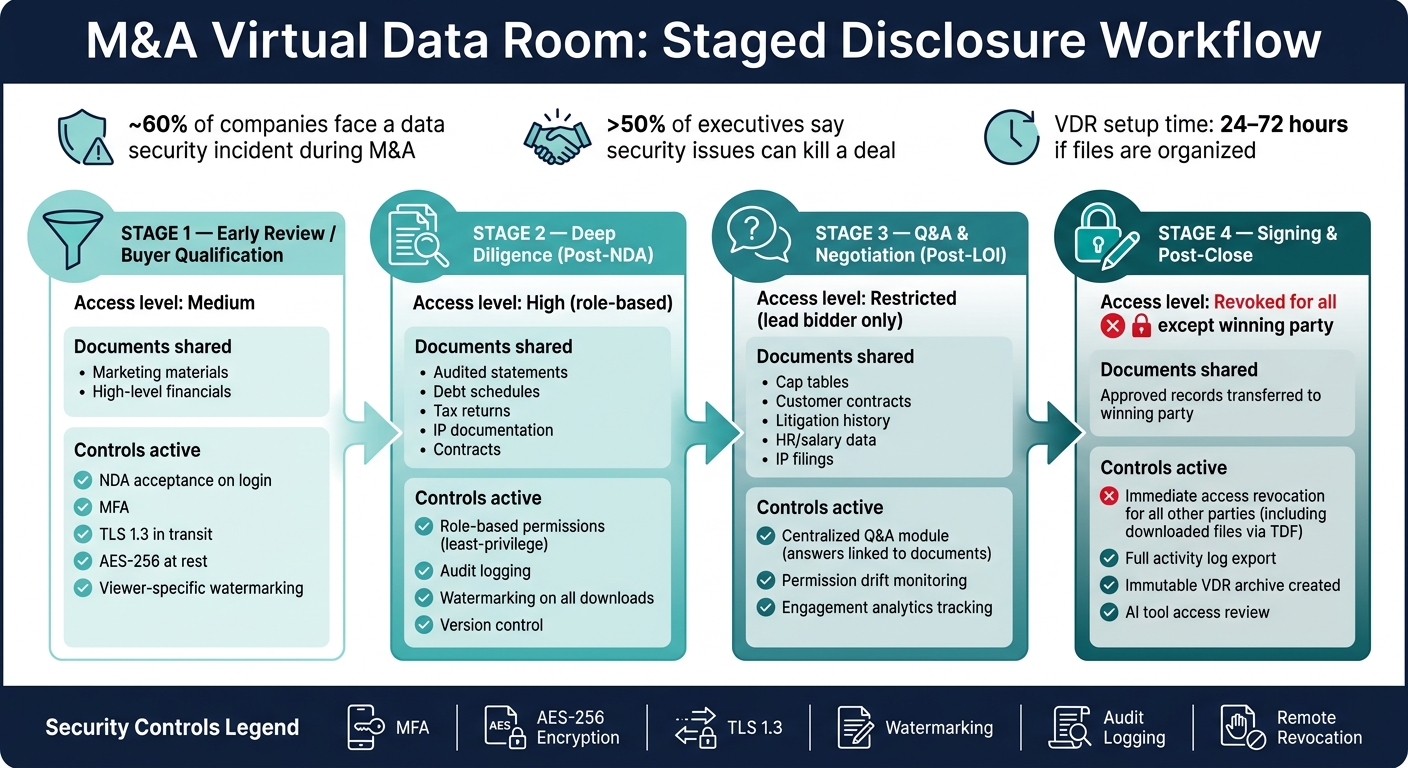
M&A Data Room: Staged Disclosure Process & Security Controls
In a live deal, the protocol layer decides whether files stay under control after they leave your team. That’s the part many teams overlook. It’s not enough to lock down access inside your own system if documents become hard to manage the moment someone downloads them.
Cloud controls need to enforce the access rules above. That means using AES-256 for files at rest, TLS 1.3 in transit, file protections that stay attached after download, remote revocation, viewer-specific watermarking, and detailed audit logs [1][4][6]. Put together, these controls keep deal documents tied to the people who are supposed to see them, even after a file leaves your environment.
Remote revocation becomes most important when a buyer exits the process. If a prospective buyer walks away after downloading sensitive files, access can still be cut off remotely, including on a local device [1]. Audit logs add another layer by recording logins, file views, downloads, and time spent on specific pages. That gives sellers a clear record of what was disclosed and when [4][5].
Those controls matter most inside a VDR, where diligence usually unfolds in stages.
A virtual data room, or VDR, is built for M&A diligence. VDRs use standardized indexing, which helps reviewers move through files fast without getting lost in a messy folder structure [4].
Sellers can share core materials with all qualified buyers first, then open access to more sensitive files, such as customer contracts or IP filings, only after a lead bidder signs a letter of intent (LOI) [4]. That staged release keeps exposure limited until the deal has moved far enough to justify it.
The built-in Q&A module also changes the rhythm of diligence. Instead of juggling questions across email threads and spreadsheets, buyers submit questions in one place. Sellers can then link answers straight to supporting documents, while keeping each buyer’s thread separate [4][7]. It’s cleaner, easier to track, and far less chaotic.
Engagement analytics give sellers an early signal on what buyers care about most. By tracking which documents get the most views and how long buyers spend on certain pages, sellers can spot likely concerns before they show up in negotiations [5]. If documents are already organized, a VDR can usually be set up and ready to share within 24 to 72 hours [4].
Use general cloud storage for day-to-day collaboration. Use a VDR when you need:
Once diligence closes, the room should preserve the disclosure trail. At signing, export an immutable VDR archive as the disclosure record.
Those controls lay the groundwork for the security and workflow safeguards that come next.
Once the data room is live, the next issue is control: who can view each file, when they can view it, and how long that access lasts.
M&A moves fast, and fast-moving deals often leave holes in security. These controls help keep deal data tied to verified users. At its core, M&A security comes down to identity. Every file should map back to a verified person. That matters when financial models, tax records, cap tables, and diligence Q&A files are moving across teams and outside parties.
| Security Control | Purpose | Risk Addressed | Best used in |
|---|---|---|---|
| Multi-Factor Auth (MFA) | Verifies identity of deal team members and advisors | Credential theft and unauthorized entry | All phases |
| Persistent Encryption (TDF) | Embeds protection directly into files | Data exposure after files leave your environment | Diligence & Deep Dive |
| Watermarking | Overlays buyer name, email, and timestamp on documents | Unauthorized sharing or leaking of downloaded files | Buyer Diligence |
| Audit Logging | Tracks every view, download, and access event | Compliance gaps and lack of accountability | Diligence & Q&A |
| Access Revocation | Instantly kills access, including to downloaded files | Data lingering with former buyers after a deal falls through | Closure or Termination |
| Retention Settings | Automates deletion or archiving of stale data | Inheriting legacy compliance and privacy liabilities | Post-Close Integration |
TDF keeps protection attached to the file after download, so revoked access still blocks the local copy [1].
That said, these controls are only useful if they shift with the stage of diligence. A setup that works in early review can be too loose later on, or too tight when teams need to move.
Access should change as the deal moves forward.
During preparation, keep access limited to executives, legal, and finance. In deep diligence, open up financial models and HR records based on user entitlement, and keep watermarking on for every downloadable file. During Q&A and negotiation, watch for permission drift. This can happen in very ordinary ways, like a deal team member dropping a term sheet into a general finance folder and exposing it to employees outside the confidential deal team.
At signing, transfer approved records to the winning party. For everyone else, revoke access right away.
You should also export the full activity log and Q&A record for the permanent transaction file. Before post-close migration starts, review which AI tools may have inherited access to newly acquired data. That step is easy to miss, and it can turn into a mess later.
Most M&A security failures come from process mistakes, not advanced attacks.
Oversharing is the biggest one. A tiered disclosure model helps keep things in order: marketing materials first, then operational data, then financials. That gives buyers what they need without opening the whole vault on day one.
Stale access is another common problem. External advisors and early-stage buyers often keep permissions long after their part of the work is over. Access lists should be checked at every deal milestone, with any old permissions removed. The same issue shows up after close, when inherited access from the acquired company’s systems quietly expands who can see what.
Inconsistent file naming and versioning causes a different kind of trouble. If buyers ask about “the Q3 model” and there are three files with nearly the same name, confusion creeps into Q&A and weakens the disclosure record. A fixed numbering system, such as Document 3.2.1, keeps references clear.
Incomplete audit trails often stay hidden until late in the process. If a regulatory review or dispute comes up after closing, a broken log that shows only internal activity won’t be enough. Audit coverage needs to reach past your own perimeter and track every external access event.
AI exposure is a newer weak spot, and many teams still aren’t watching it closely. Review AI access before post-close migration so copilots do not inherit permissions to restricted deal data.
Start data room prep at least six months before buyer outreach. Then, before anyone outside the company gets access, do one last readiness review. That final pass helps catch the gaps that tend to slow deals down or create doubt.
Here’s a simple checklist to work through:
| Control Category | Pre-Deal Action | Risk Mitigated |
|---|---|---|
| Governance | Assign owners for privacy, security, and records | Compliance & Accountability |
| Data Quality | Reconcile balance sheets and clean general ledger | Valuation & Trust |
| Access | Review and remove unnecessary external access | Security & Data Leakage |
| Retention | Delete outdated files, duplicates, and drafts before upload | Liability & Attack Surface |
| Compliance | Map cross-border transfers and industry rules | Regulatory Fines |
Audit the full document inventory before granting any external access.
If your data room still needs cleanup, outside help can cut down the prep timeline. Phoenix Strategy Group works with growth-stage companies to clean up financial and operating data, build dependable reporting, and get ready for diligence. The firm has supported 100+ M&A deals and helped clients raise over $200 million in the last 12 months [8].
Their team also handles diligence coordination, tracks milestones, and helps keep the process on schedule [8].
Once the room is clean, the job changes. It’s no longer just about prep. It’s about controlled disclosure.
Secure cloud protocols help protect confidentiality. VDRs let you control who can see specific files and when. Clean records help prevent the slowdowns that chip away at deal value. The controls themselves aren’t complicated, but they need to be in place before the first buyer logs in.
Move from shared drives to a VDR once the amount of confidential information starts to climb and several parties need secure, controlled access during due diligence.
That usually happens after NDA signing, when buyers need to review and download materials.
Staged disclosures can lower M&A risk because they help buyers spot issues early and deal with them before they grow into bigger problems. That early visibility improves transparency and cuts the odds of later disputes.
They also give sellers more time to prepare careful, accurate disclosures without putting trust under strain.
Before and after due diligence, clean up the data that matters most, starting with financial records like income statements, balance sheets, and cash flow statements. Those records should be accurate, consistent, and sorted into the right categories.
It also helps to review and line up technology and operating data. That can cut down on integration debt and make post-deal integration go more smoothly.