Published on
July 5, 2026

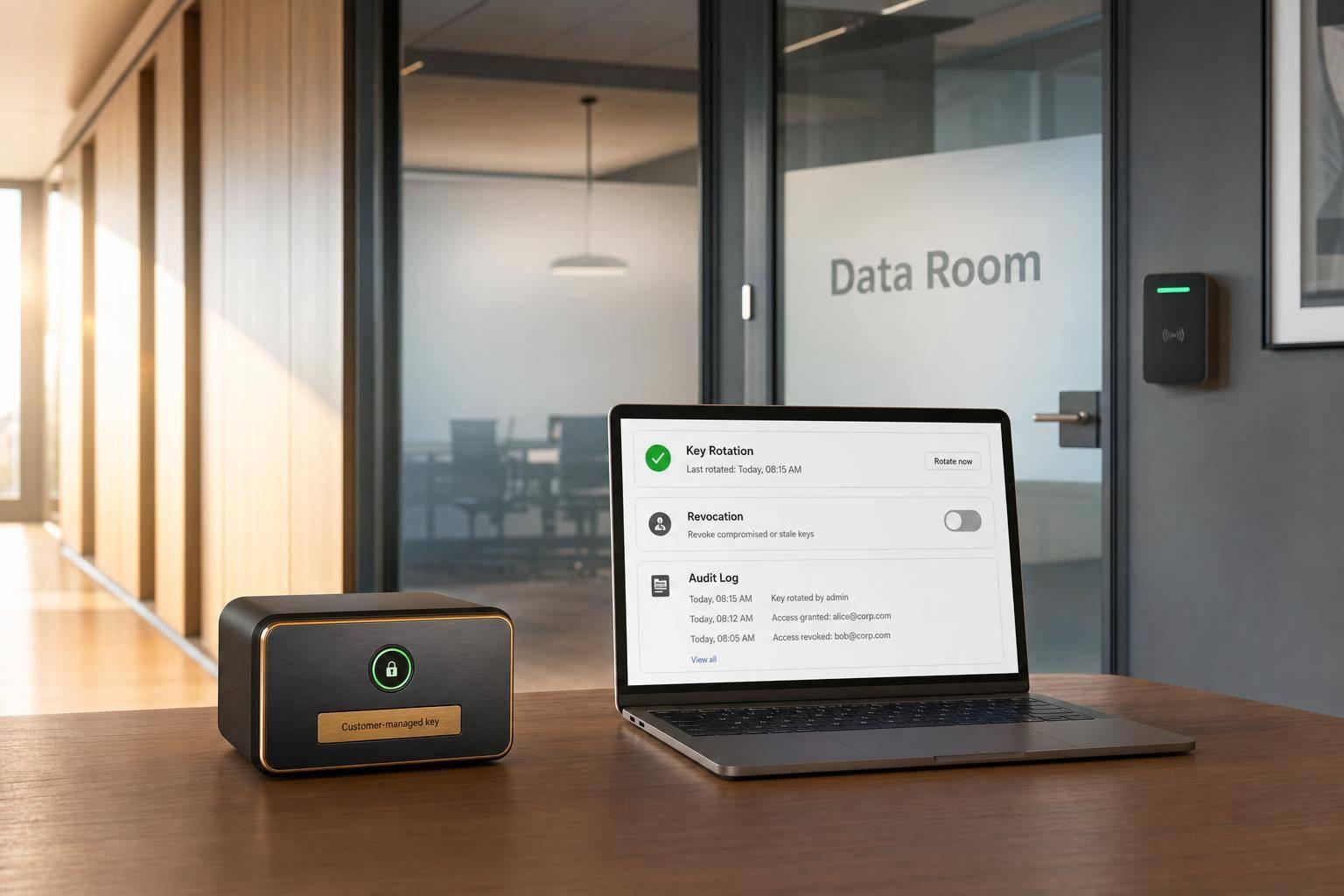
If your VDR vendor holds the encryption keys, they can decrypt your deal files. That is the core risk this article addresses.
I’d sum it up like this: standard VDR controls like AES-256, TLS 1.2/1.3, MFA, and role-based access help, but they do not solve the main problem when the keys live with the data. In a live M&A process, that gap can affect diligence, pricing, trust, and compliance.
Here’s the article in plain English:
A few numbers stand out. The article recommends 7–14 day access windows for external parties and permission reviews every 48 hours during active diligence. Those are simple controls, but they can cut down deal-room exposure fast.
If I were setting up an M&A data room, I’d treat key control as a deal issue, not just a security setting.
In an M&A data room, key control decides who can actually read diligence files. That matters most during diligence, when buyers need access to highly sensitive documents. In many standard VDRs, the vendor manages the encryption keys. In plain English, that means the provider has the technical ability to decrypt the documents [7][9].
In many standard setups, the documents and the encryption keys sit inside the same third-party infrastructure. If an admin account gets compromised, or if a workflow breaks down, an attacker may be able to decrypt the entire room [9][1].
For regulated sellers, this is not just a nice-to-have. It is a compliance issue. If a vendor holds the keys in another jurisdiction, foreign disclosure demands may reach decrypted data [9][3].
When key control breaks, the fallout doesn’t stay in the security team. It hits the deal. A leaked cap table, contract archive, or financial model can change negotiating leverage and weaken trust between parties [10][7][1].
Buyers also treat security posture as a signal. A well-governed data room tells them the company runs a tight process. A security failure during diligence sends the opposite message. It can even spill into post-closing reps-and-warranties disputes. KMaaS helps reduce that risk by separating key control from the data room itself [7][1].
Customer-managed keys (CMK) means your company controls the encryption keys, not the VDR vendor. Your team keeps sole authority to generate, rotate, and revoke those keys. As a result, the vendor cannot decrypt your files [8][9].
This matters even more when parties move in and out of the data room. In a competitive auction, bidders join and exit at different points. With centralized key control, you can revoke key access after a bidder leaves or a deal falls through [11][12].
For that control to work in a live deal, it also needs a few basics in place:
Without those controls, key ownership looks good on paper but can fall apart under pressure.
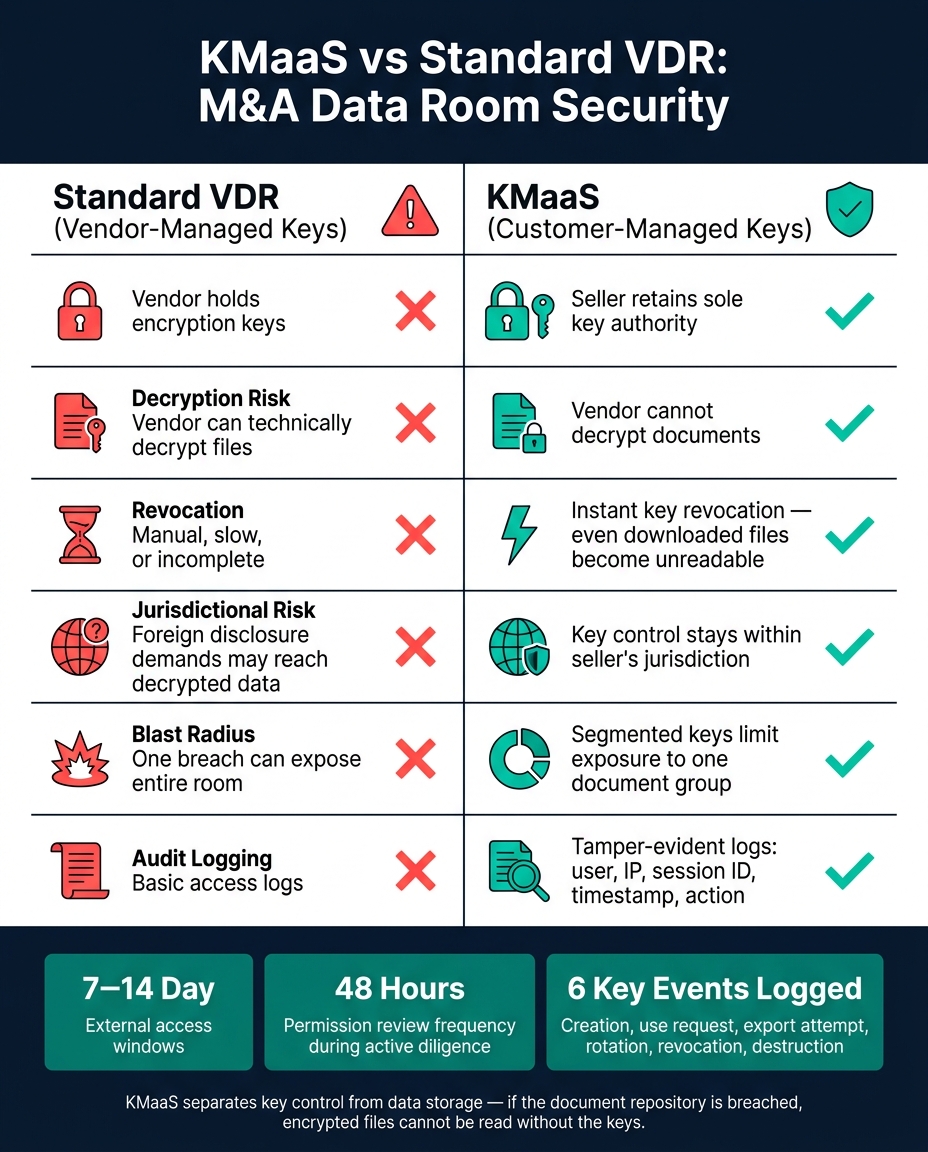
KMaaS vs Standard VDR: M&A Data Room Security Comparison
Key Management as a Service (KMaaS) is a cloud-based service that manages the full lifecycle of cryptographic keys - generation, storage, rotation, revocation, backup, and destruction - separate from the data storage environment [9][2]. In plain English, it gives customer-controlled keys a setup that can work during live diligence. The big shift is simple: key control sits apart from data storage, so deal teams can set and enforce policy without handing the VDR provider the power to decrypt documents.
With KMaaS, documents remain in the data room, while the keys sit in a separate, isolated service such as AWS KMS. If someone breaks into the document repository, they get encrypted files and nothing more. Without the keys, those files can't be read [9][1]. That separation changes the security model in a direct way.
KMaaS paired with DRM can also support instant revocation. Revoke a key, and even documents that were downloaded earlier become unreadable right away [12][14][5]. That's a big deal in M&A, where access can change fast and one wrong file in the wrong hands can create a mess.
This setup matters most when different parties need different levels of access to diligence files, cap tables, contracts, and financial statements. You don't want one access mistake to expose the whole room.
| Document Type | Primary Risk | KMaaS Key Policy | Logging |
|---|---|---|---|
| Diligence Files | Bidder leakage [8] | Separate keys per bidder group [5] | Log which bidder accessed which file [1] |
| Cap Tables | Ownership and control exposure [14] | Weekly rotation during active bidding [1] | Alert on abnormal decryption spikes [1] |
| Customer Contracts | Competitive and pricing leakage [14] | Restrict key use by approved devices or IP ranges [1] | Forensic traceability of key requests [5] |
| Financial Statements | Valuation impact from leaks [1] | Finance owns key policy; IT manages the VDR [9] | Tamper-evident audit logs [9] |
Across all four categories, the same rule applies: limit the blast radius. If one set of credentials is compromised, segmented keys keep the damage boxed into one document group instead of exposing the entire room [1][5].
Then comes the next layer: policy. Who can request keys? When can they use them? And how is every request recorded?
KMaaS only works when roles, rotation, and logs are set before the deal gets busy. In a live process, it’s common to have more than a dozen advisory and stakeholder groups active at the same time, deadlines get tight, and access requests pile up fast [15]. So the setup has to be clear from day one.
Start by applying controls based on role and document sensitivity. Put the most attention on diligence files, cap tables, customer contracts, and financial statements. Those are usually the files people want first, and the files that can hurt the most if access gets too loose.
Split key administration, access approval, and security hardening across different people or teams. That means the CFO acts as the final approver for key policy changes, the Finance Lead owns financials and cap tables, Legal Counsel manages contract and IP access, and IT or Security handles authentication hardening. External bidders should get the narrowest access possible.
The point is simple: every bidder, advisor, and internal team should stay in its own lane. Group-based permissions help a lot here. Labels like "Bidder A – Legal" or "Seller – Management" let you apply rules across a whole group instead of making manual one-off changes every time someone joins or leaves.
| Role Group | Access Level | Document Scope | Key Security Controls |
|---|---|---|---|
| Founders / Admins | Final approval only | All folders | MFA, audit logging |
| Finance Leads | Upload/edit | Financials, tax, cap table | DRM, version control, watermarking |
| Legal Counsel | View/download | Corporate, IP, material contracts | Redaction, time-bound access |
| Internal Employees | View-only | Assigned workstreams | No download/print, MFA |
| External Bidders | Restricted view | Highest-sensitivity folders (initial), broader access (late stage) | Browser-only view, dynamic watermarking, NDA-required access |
Set external access windows to 7–14 days and renew them manually [16]. It’s a small step, but it cuts down long-tail exposure as diligence moves ahead.
That setup doesn’t mean much unless key use is tracked as it happens and reviewed on a set schedule.
Once access is split up, the next job is showing every key action in audit trails that streamline the review process.
Rotate keys more often for cap tables, customer contracts, financial statements, and IP-sensitive diligence files than for general reference materials [16][13]. Higher-risk documents need tighter key rules. If a file could change bidder behavior, pricing, or legal risk, it shouldn’t sit under a relaxed rotation schedule.
Logging should cover every key event tied to diligence files, cap tables, customer contracts, and financial statements. That includes:
Each log record should include the user’s name and email, IP address, session identifier, exact timestamp, and the action taken [4][3]. Those logs should also be exportable in CSV or JSON for legal review [3].
During active diligence, review permissions every 48 hours [16]. That keeps the data room tight from the first invite through close.
M&A data rooms hold some of a company’s most sensitive deal files. KMaaS puts the seller - not the vendor - in control of who can decrypt those files. It adds customer-managed key policies, rotation, and revocation that standard folder-level access just can’t match. So readiness needs to start before the room opens.
Buyers often read a disciplined data room as a sign of operational maturity.
Before the first invite goes out, classify every file by deal impact. Start with file classification, then phase access: release corporate and financial folders first, and hold back IP and top customer contracts until a later stage of the deal [13].
Set up role-based access, key rotation, revocation, authenticator-app MFA, and audit logging before the room goes live [6][13]. Turn on dynamic watermarking for sensitive files from day one. It embeds User ID, IP address, and timestamps directly into the document [6].
That same discipline is what makes a data room credible in diligence. Log every view, download, and permission change as part of deal governance, not just technical setup [6][13]. When the deal closes, revoke access for non-winning bidders right away and archive financial records under the required retention policy [4].
Phoenix Strategy Group helps growth-stage companies align M&A readiness and financial operations with secure data room practices [13][1].
Standard VDR encryption is the baseline. It keeps data safe at rest and in transit, so unauthorized parties can't read it.
KMaaS goes a step further. It adds control across the full document lifecycle, including remote revocation, persistent file-level protection after download, and dynamic watermarking to discourage unauthorized sharing during diligence.
Protect the most sensitive files first by putting them in a separate folder with restricted, tiered access.
That folder should include cap tables, legal disputes, pending deals, and files with personally identifiable information. Keep these files apart from general financial documents. Then share them later in diligence, and only with users who have a specific, documented need to review them.
Data room access and keys need review continuously during the transaction, not on a fixed calendar. Set permissions to expire from day one, and remove access at once when a bidder drops out or a deal stage closes.
Administrators should keep a root index with a last-reviewed field for each folder. They should also check role-based access on a regular basis so least-privilege stays in place as bidder lists shift.