Published on
March 3, 2026


Integrating NetSuite and QuickBooks can help businesses streamline financial operations, reduce manual work, and improve data accuracy. However, it’s a complex process that requires careful planning. Here’s what you need to know:
Bottom Line: Integration requires a clear plan, clean data, and the right tools. Treat it as an opportunity to improve financial workflows, not just connect two systems.
Bridging the technical gap between QuickBooks and NetSuite is often more complex than it seems. NetSuite relies on enterprise-grade tools like SuiteTalk (REST/SOAP web services), SuiteScript for custom server-side logic, and SuiteQL for advanced data queries [2]. QuickBooks Online, on the other hand, uses a standard REST API, while QuickBooks Desktop requires an on-premise agent or connector for API access [2]. These differences not only increase latency but also necessitate middleware to connect cloud and on-premise data.
Both platforms support OAuth 2.0, but NetSuite leans heavily on Token-Based Authentication (TBA) for secure, persistent connections [2]. Field name mismatches - such as mapping NetSuite's "Invoice ID" to QuickBooks' "Invoice #" or "Company Name" to "Customer Name" - can lead to duplicate records or missing transactions if not properly handled [1]. These technical details highlight the importance of selecting the right integration tool.
For mid-sized businesses, custom API development is often skipped due to its high cost (over $50,000) and extended timelines (3–6 months). Instead, many opt for Integration Platform as a Service (iPaaS) tools. For instance, Celigo offers 12 pre-built flows for QuickBooks-NetSuite synchronization and boasts a 95% auto-error resolution rate [2]. While enterprise iPaaS tools like Celigo typically cost $1,000 to $3,000 per month, Oracle Integration is often bundled with NetSuite licenses at no extra charge [2]. The decision between native and third-party tools comes down to customization needs: native integrations provide straightforward connections and frequent updates, while third-party tools offer advanced mapping for specialized workflows. Whichever path you choose, aligning these tools with strong data management practices is critical for smooth integration.
To prevent synchronization errors, clean your QuickBooks data by removing duplicates and standardizing names [2]. Adding custom fields in NetSuite (e.g., "QB_ID" to store original QuickBooks record IDs) can also help avoid duplicate records during bi-directional synchronization. A phased approach works best: start with a single data flow, such as customers, in a sandbox environment before moving on to more complex transactions like invoices or journal entries [3]. Finally, clearly define which system will act as the "source of truth" for specific data points to avoid conflicting records during synchronization [1].
Transferring data from QuickBooks to NetSuite revolves around three main categories: Master Records (like general ledger accounts, customers, vendors, and inventory items), Historical Financials (such as trial balances for closed periods), and Open Transactions (including unpaid invoices, outstanding bills, and active purchase orders) [7]. Most businesses opt for a phased approach - starting with master records and historical trial balances early in the project for testing and training, and saving open transactions for the final "go-live" weekend, after halting data entry in QuickBooks [7][8]. This phased process, often split into two batches, typically spans 4–6 weeks within a larger 4–6 month implementation timeline [4]. However, challenges like data cleansing, field mapping, and validation demand careful attention.
Cleaning your data is a crucial first step. QuickBooks’ flexibility with free-form entries can lead to messy records - duplicate vendor names, inconsistent account coding, and outdated information can all create headaches [6][9]. As OptimalData Consulting highlights:
"The more work you put into cleaning the data ahead of time, the more you will avoid additional back-and-forth with the implementation partner" [7].
To streamline the process, clean up your QuickBooks data directly instead of exporting it to Excel, which can lead to mapping errors or data loss [7]. Archive vendors with zero balances, standardize naming conventions, and void old bank transactions that haven’t cleared in over 180 days [7].
Once your data is clean, accurate field mapping becomes vital. NetSuite's structured, multi-entity model requires precision - fields that were optional in QuickBooks may now be mandatory, and you'll need to account for NetSuite’s segment structure (Departments, Classes, Locations) [6][4]. If you’re revamping your chart of accounts (e.g., switching from 4-digit to 5-digit codes), track old and new account numbers in a single Excel row to simplify the transition [7].
Always test your mapping with a pilot migration in a sandbox environment. This allows you to identify and fix errors before the full-scale import [3]. After loading the data, reconcile financial balances and transaction counts with QuickBooks to ensure everything matches [6][3]. Most businesses only need 2 to 3 years of historical data - archiving older records helps reduce complexity while maintaining operational efficiency [2]. Additionally, keep a read-only QuickBooks license for at least a year post-migration to reference any data that wasn’t transferred [8].
Timing your go-live is critical. Avoid starting on January 1st or during audit season when your finance team is already overwhelmed with year-end tasks [8][4]. It's also important to note that Oracle NetSuite employees are contractually prohibited from handling your legacy data [7]. While your implementation partner will provide templates and perform uploads, the responsibility for extracting and formatting the data lies with you [7][8]. During the implementation, expect internal staff to allocate 20% to 30% of their time to the project [4]. Data migration services usually cost between $10,000 and $30,000, though this is often bundled into the overall implementation fee [4].
Once data migration is complete, ensuring smooth system performance becomes essential to fully leverage the benefits of integration. Real-time synchronization is key - it eliminates the need for manual data entry and keeps both platforms aligned with accurate, up-to-date information [1][2]. This efficiency can streamline workflows for finance teams, but it hinges on the synchronization process running reliably and efficiently. These operational demands also bring technical considerations into focus, such as the type of sync and how it’s implemented.
The decision between one-way and bi-directional synchronization plays a big role in shaping how your system operates. For example, one-way syncs are ideal for transferring journal entries from QuickBooks to NetSuite without needing updates in the opposite direction, preserving an accurate ledger of record [2]. On the other hand, bi-directional syncs are necessary for scenarios like managing customer profiles or inventory data [1][10]. In inventory management, a bi-directional sync ensures that master inventory records in NetSuite are updated immediately when sales occur in QuickBooks or through connected e-commerce platforms. This prevents overselling and keeps inventory data accurate [10].
Beyond choosing a sync type, the technical implementation directly affects system performance. For faster integration speeds, RESTlets (custom SuiteScript endpoints) are a great choice. They can bundle multiple operations into a single call, cutting down on network round-trips [10]. Tools like Celigo also enhance efficiency by offering 95% auto-error resolution and supporting "delta syncs", which only synchronize updated records rather than the entire dataset. This approach significantly reduces the system load [2][1]. However, it’s important to note that NetSuite enforces limits on script execution time and API calls, so staying within these constraints is crucial to avoid throttling issues [10]. Before deploying the integration, aim for an error rate below 5% and monitor sync latency to ensure real-time reporting remains accurate [2].
To maintain synchronization reliability, set up automated notifications for any sync failures and monitor latency during peak activity [1]. Running a parallel month-end close in both systems is another smart move. This helps identify potential bottlenecks or reconciliation issues before fully transitioning away from QuickBooks [2]. Additionally, the integration must support ASC 606 compliance by creating a clear audit trail, which is critical for automated revenue recognition processes [1].
Here’s a quick comparison of sync options to help you weigh their benefits and challenges:
| Sync Type | Best For | Complexity | System Load |
|---|---|---|---|
| One-Way | Journal entries, historical archiving | Lower; simpler mapping | Lower; predictable |
| Bi-Directional | Customers, inventory, sales orders | Higher; requires conflict resolution | Higher; continuous updates |
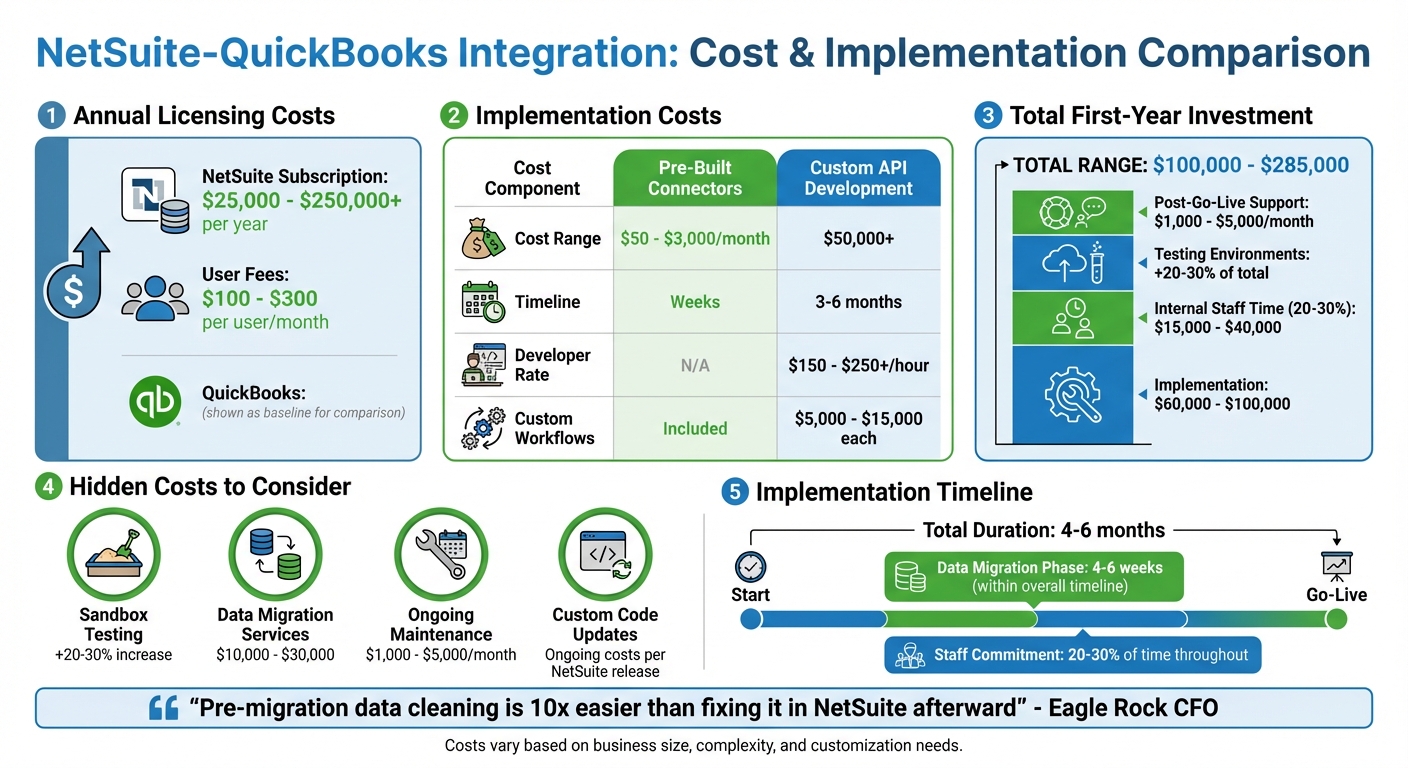
NetSuite vs QuickBooks Integration Cost Breakdown and Timeline Comparison
When planning a NetSuite-QuickBooks integration, it's important to consider more than just the upfront costs. The Total Cost of Ownership (TCO) includes annual software subscriptions, one-time implementation fees, and ongoing maintenance expenses [14]. For mid-sized businesses, implementation costs typically fall between $60,000 and $100,000, though this can vary widely depending on specific needs [15].
One major factor in TCO is NetSuite's licensing structure. NetSuite operates on a named-user model, with annual subscription costs ranging from $25,000 to over $250,000, depending on the edition (Starter, Emerging, Mid-Market, or Enterprise) and the number of users. Monthly user fees typically range from $100 to $300 per user [15][1]. As Joe Giegerich from Techfino explains:
"NetSuite software costs land between $25,000 and $250,000+ per year, while implementation commonly ranges from $30,000 to $150,000+, depending on complexity, modules, integrations, and customization" [15].
The integration method you choose also plays a big role in overall costs. Pre-built connectors like Celigo or Skyvia, which can be deployed in weeks, cost between $50 and $3,000 per month [11][2]. On the other hand, custom API development often exceeds $50,000 and can take 3–6 months to complete [11][2]. Developers typically charge $150 to $250+ per hour, and creating complex custom workflows can add $5,000 to $15,000 per workflow [11][13]. Tom Zargaj from Centium highlights:
"Custom integration projects frequently exceed $50,000, especially when middleware and real-time data syncing are involved" [11].
There are often hidden costs that can catch organizations off guard. For instance:
Jesse Guzman from Concentrus warns about the long-term impact of customizations:
"The more you customize NetSuite during implementation, the more you'll pay for ongoing maintenance and future upgrades because custom code requires testing every time NetSuite releases updates" [13].
To keep expenses under control, consider these strategies:
"Cleaning data before migration is 10x easier than fixing it in NetSuite afterward" [4].
Integrating NetSuite with QuickBooks offers clear benefits, but it also comes with its share of challenges. Weighing both sides is essential to determine if this approach aligns with your business needs.
On the benefits side, automation is a game-changer. Finance teams can save 5–10+ hours per user each week by cutting out manual data entry [2]. Platforms like Celigo boast an impressive 95% auto-error resolution rate for synchronization issues, which means less time spent fixing errors. You also get real-time insights into your financial data, eliminating the delays caused by manual reconciliations. Plus, integration allows you to operate both systems simultaneously, offering a safety net to validate data accuracy before fully transitioning to NetSuite [2]. For growing companies, the ability to handle advanced requirements like multi-entity consolidation and automated revenue recognition (ASC 606) is a major advantage - something QuickBooks simply can’t manage on its own [5][16]. Still, these perks come with some significant hurdles.
The downsides are just as important to consider. The upfront investment is steep, with first-year costs typically ranging from $100,000 to over $285,000. This includes licensing fees, implementation expenses, and internal staff time [4]. NetSuite’s complexity also presents a learning curve far greater than QuickBooks, and improper setup can lead to data silos [2][5]. Implementation itself is no small task, requiring 4–6 months and a 20–30% commitment from internal staff [4]. As Anchor Group points out:
"Integration is not a permanent solution. Running both systems indefinitely doubles data management burden and creates governance nightmares" [2].
This highlights the importance of viewing integration as a temporary solution rather than a long-term fix. The challenges of data silos and high implementation costs reinforce this perspective.
Here’s a quick comparison of the two systems:
| Aspect | QuickBooks | NetSuite |
|---|---|---|
| Target Market | Small businesses / Startups | Mid-market to Enterprise |
| User Limits | Capped at 25–30 users max | Supports hundreds/thousands |
In most cases, integration serves as a short-term bridge, lasting 1–6 months, before a full migration to NetSuite [2]. Interestingly, 90% of users reported satisfaction after switching from QuickBooks to NetSuite, and 89% noted improved growth potential [5]. However, making the leap requires careful planning, a clear budget, and realistic expectations about the complexity involved.
Integrating NetSuite with QuickBooks is no small task - it requires careful planning and a clear understanding of your goals. Are you creating a temporary bridge for a few months before fully migrating, or are you planning to run both systems simultaneously for the long haul? For most growing businesses, this integration works best as a short-term solution to validate the move before committing fully to NetSuite [2].
Start by evaluating your data quality and technical capabilities. Ask yourself: does your team have the skills to handle a direct API integration, or would a third-party iPaaS platform like Celigo be a better fit? Keep in mind, the first-year costs for such an integration can range from $100,000 to $285,000, and implementation could take 4–6 months. Plus, your team should be prepared to dedicate 20–30% of their time to the project [4].
Your decision should also align with your workflow needs and growth plans. If you're facing challenges like multi-entity consolidations, user limits, or too many manual processes, NetSuite’s advanced features - like automated revenue recognition and real-time reporting - could make a huge difference. But if your operations are straightforward, the costs might outweigh the benefits.
To get started, map out your financial workflows and conduct a thorough audit of your current processes. Use a sandbox environment to test and refine your data flows before going live [1]. And remember, this isn’t just about switching systems - it’s a chance to rethink and improve how your financial operations run. Avoid the trap of simply copying your QuickBooks processes into NetSuite; treat this as an opportunity to optimize [6].
For businesses ready to outgrow QuickBooks, integration can be a smart stepping stone - if it’s backed by clean data, detailed planning, and realistic expectations about the effort involved. If you’re unsure about navigating this process, Phoenix Strategy Group offers specialized advisory services to help growth-stage companies tackle these challenges head-on.
When migrating systems, having a single, reliable source for all your data is crucial. NetSuite excels at this by centralizing your business data, ensuring that all information is stored in one place. This eliminates data silos and ensures that every department is working with the same, up-to-date information.
By consolidating your data in NetSuite, you also gain the ability to make better, faster decisions. With everything in one place, you can trust that you're working from accurate and consistent data, making NetSuite the backbone of your business operations during migration.
Whether you need a one-way sync or a bi-directional sync depends entirely on what your business requires.
The right option depends on your workflow. Go with one-way sync for occasional updates, or choose bi-directional sync if constant synchronization is key.
When moving from QuickBooks to NetSuite, it's important to decide how much historical data you actually need. Many businesses opt to migrate only the essentials, like open balances and recent transactions, to keep things simpler and cut down on costs. Unless having detailed historical records is absolutely crucial for your operations, it's often better to focus on summary financials and open transactions. This approach helps streamline the process, reduces effort, and shortens the migration timeline.