Published on
June 27, 2026

A payment setup is ready only when checkout, webhooks, tax, fraud checks, refunds, and reconciliation all match from end to end. If I had to shrink this article into one takeaway, it would be this: test the full payment path before launch, then verify live money movement after launch.
Here’s the short version of what matters:
This article is about one thing: making sure a payment works before, during, and after the charge - without double charges, bad tax totals, missing receipts, or ledger mismatches.
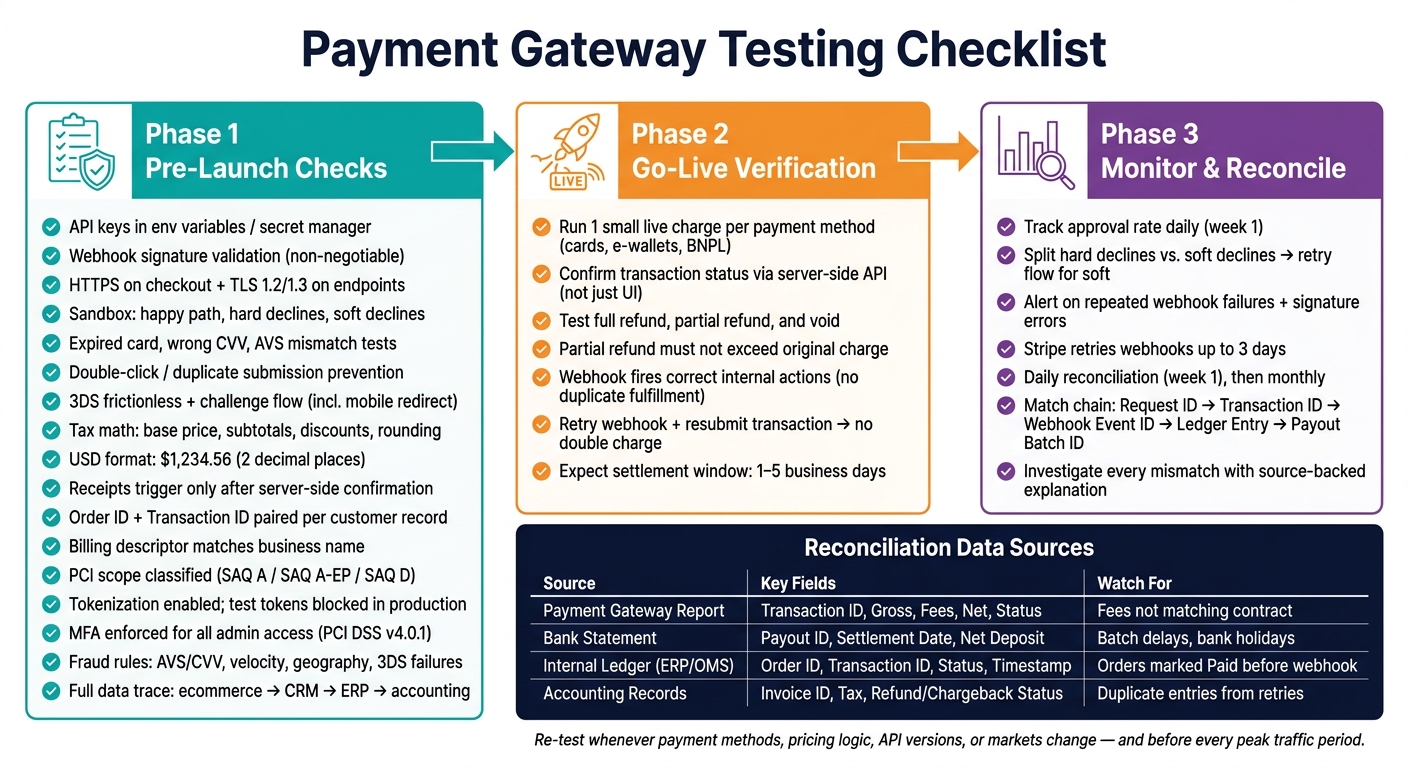
Payment Gateway Testing Checklist: Before, During & After Launch
These areas - credentials, checkout behavior, and customer records - need to be checked in order before you process any live payment.
Start with the basics: make sure the right API keys, webhook URLs, and callback endpoints are loaded for each environment. Keep API keys in environment variables or a secret manager, not in source code or front-end configs [1][4].
Webhook signature validation is non-negotiable. If you skip it, an unauthorized sender can push a fake "payment succeeded" event to your endpoint and trigger order fulfillment without a real charge [1][5]. Test this on purpose. Send a failed or unsigned payload and make sure your system rejects it. Then simulate webhook failures and confirm missed events are retried or queued until delivery works [7].
Also review application logs, analytics, and admin dashboards for any PAN or CVV exposure [1][4][5]. Every checkout page should use HTTPS, and webhook endpoints should run on TLS 1.2 or 1.3 [4][7].
Once access checks are done, move to transactions and pricing.
Don't just test the happy path. Use your gateway's sandbox test cards to trigger hard declines, such as a stolen card, and soft declines, such as insufficient funds. Also run expired cards, incorrect CVV, and AVS mismatches [3][6][8]. Then test double-click behavior on the payment button. A duplicate submission should never create two charges [2][1].
For 3-D Secure, test both the frictionless flow and the challenge flow, including OTP or biometric prompt. On mobile, make sure the session survives a redirect to a banking app and back [5][10].
Tax logic needs a separate pass. Check that base price, subtotals, discounts, and sales tax are calculated correctly before authorization [2]. For display, all USD amounts should use the $ symbol and exactly two decimal places - $1,234.56, not $1234.5 or $1,234.560. Review rounding on subtotals, tax lines, and final totals one by one [2][10].
After checkout works, check the records it creates.
Receipts and confirmation pages should trigger only after server-side payment confirmation [2][1][7].
Make sure each customer record includes both a matching internal Order ID and the gateway's Transaction ID [1][9]. That pairing lets your support team trace a dispute back to a specific provider event. Also confirm timestamps use mm/dd/yyyy and 12-hour time across confirmation pages, receipts, and admin records - for example, 06/28/2026, 03:30 PM [2].
Finally, verify the billing descriptor, which is the statement text customers see. It should clearly match your business name so customers aren't left guessing and filing disputes [2][7].
These controls shape fraud risk, compliance scope, and the records your team will depend on later. If something slips here, the problem may not show up until weeks after launch.
Start by classifying the integration: hosted page, embedded form, or direct API. This step matters more than it may seem. One mistake here can pull you into a larger PCI scope or expose card data.
| Integration Method | PCI Scope Level | Impact |
|---|---|---|
| Hosted Payment Page | SAQ A (Lowest) | Customers are redirected; gateway handles all card data. |
| Embedded (iframe/JS) | SAQ A-EP (Moderate) | The form sits on your site, but card data bypasses your server. |
| Direct API | SAQ D (Highest) | Card data flows through your systems and carries the highest compliance burden. |
Then check tokenization and admin access. Tokenization should be on by default, and tokens should stay tied to their own environment. A test token should never work in production. Also confirm that raw PANs are replaced by tokens before they reach your server [1][4].
After testing, review logs for any PAN-like values that may have slipped through. On top of that, make sure MFA is enforced for all administrative access to payment settings and reporting tools, as required by PCI DSS v4.0.1 [4][5].
Once these checks are clear, move into fraud-rule testing.
Most teams make sure good transactions pass. Far fewer make sure bad ones fail the way they should. You need both.
Run planned fail scenarios across three test groups:
Bad payment data can create reconciliation trouble before a single live transaction even settles.
Before launch, trace one full transaction from checkout through your ecommerce platform, CRM, ERP, and accounting workflow. Verify that gross amount, tax, gateway fees, payment status, timestamps, customer ID, and order ID all land where they should [2][1].
Make sure gateway fees and the Electronic Commerce Indicator (ECI) value from 3DS are stored as well. An ECI value such as 05 shows full authentication and can help show liability shift to the issuer if a fraud dispute comes up later [5]. Clean records here save a lot of cleanup work later.
When those records match across systems, move on to live verification, refunds, and reconciliation.
Once your pre-launch checks are done, it's time to watch what happens in the wild: live payments, refunds, monitoring, and reconciliation.
Right after you switch to production, run one small live transaction for every payment method you turned on - cards, e-wallets, BNPL, and anything else in the mix [11]. And don't stop at the checkout success screen. That screen can look fine even when something breaks later. Pull the transaction status on the server side through the API and confirm the final result there [11][5].
Then test the full reversal path. That means:
For partial refunds, check that the refund amount never goes over the original charge total. Also make sure live webhook events fire the right internal actions and don't trigger duplicate fulfillment [11][1]. On top of that, retry a webhook and resubmit a transaction to confirm neither one creates a double charge or a duplicate order shipment [1][7].
You should expect a settlement window of 1–5 business days [4]. These live checks help confirm that production follows the same order, refund, and webhook logic you cleared before launch.
Once live payments start coming in, focus on three things: approval rate, decline type, and webhook failures.
Track approval rate every day during the first week. If it drops out of nowhere, that's often a sign of a fraud-rule setup problem, an authentication loop, or a 3DS issue that only shows up with live traffic from a specific issuer [10].
Split hard declines from soft declines. Hard declines usually stop there. Soft declines should move into a retry flow. Also set alerts for repeated webhook delivery failures and signature errors. Stripe retries undelivered webhook events for up to three days [7], so your reconciliation process needs to accept late data without spinning up duplicate records.
If approval rates change fast, treat that as a warning light. Go back and check fraud rules, authentication, and webhook delivery.
Reconciliation answers a simple question: did the money move the way it should have? You want a clear chain from the first payment request to the final journal entry in your general ledger:
Request ID → Transaction ID → Webhook Event ID → Ledger Entry → Payout Batch ID [7]
Match each live payment from gateway to bank to ledger in the same sequence every day. Do this daily during the first week. After volume levels out, move to a monthly cadence:
| Data Source | Key Fields to Match | Typical Issues |
|---|---|---|
| Payment Gateway Report | Transaction ID, Gross Amount, Processing Fees, Net Amount, Status | Fees not matching contract rates |
| Bank Statement | Payout ID, Settlement Date, Net Deposit Amount | Batch deposits spanning multiple days; bank holidays delaying funds |
| Internal Ledger (ERP/OMS) | Order ID, Transaction ID, Status, Timestamp | Orders marked "Paid" before webhook confirmation; currency rounding errors |
| Accounting Records | Invoice ID, Tax Amount, Refund/Chargeback Status | Duplicate entries from webhook retries; refunds not reflected in tax liabilities |
Don't close a mismatch just to clear the queue. Every gap needs a source-backed explanation. If gross-to-net numbers don't line up, generic decline codes jump, or webhook retries run past the provider's normal window, investigate right away [1][7].
Once testing wraps up, turn your checklist into a named playbook. Give clear ownership for API behavior, webhooks, and reconciliation. Then re-test any time payment methods, pricing logic, API versions, or markets change. Do the same before peak traffic periods.
Break re-testing into three layers. Automate the core happy path, hard decline handling, and webhook signature validation so those checks run on every build in your CI/CD pipeline. Run a fuller negative suite before each release. Then schedule periodic exploratory checks for locale variants, new payment methods, and edge cases that don't fit neatly into automated scripts.
To keep the integration stable, review reconciliation on a fixed cadence. Document the daily, weekly, and monthly reconciliation schedule, the owners for each step, and the escalation rules.
Re-test based on the changes made and how critical the payment flow is.
Use P1 core happy-path and error tests before every deployment. This is the bare minimum. If the payment flow breaks, users feel it right away.
Use P2 full regression testing for updates, bug fixes, or API changes. Even a small change can ripple through refunds, retries, or status handling.
Perform P3 periodic checks for edge cases, currency variants, and exploratory testing. That helps catch the weird stuff that doesn't always show up in day-to-day runs.
Consistent testing helps prevent issues with refunds, retries, and status mapping.
Treat webhooks as your source of record, not browser redirects. Redirects help with the user experience, but webhooks are the part you can trust for what actually happened.
If your system goes down, have a replay process ready so you can fetch and process any events you missed. That safety net matters. Without it, a short outage can turn into missing payments, stale account status, or messy support work later.
Make your handlers idempotent. In plain English, the same event should be safe to process more than once. Retries and duplicate deliveries shouldn't lead to double charges, duplicate emails, or wrong balance updates.
It also helps to store the raw payloads, headers, and processing results for each event. That gives you a paper trail when something looks off and makes debugging much less of a guessing game.
Finally, plan for events to arrive out of order. State changes should be able to handle that without breaking. A payment system in the wild doesn't always send events in the neat sequence you'd expect, so your logic has to keep its footing when that happens.
Store both your internal order ID and the processor’s transaction ID in every payment record. That link makes it much easier to trace payouts, refunds, and disputes back to the right transaction.
Also, use idempotency keys for every action that changes a balance. If a request gets retried, idempotency helps stop duplicate entries and keeps your reconciliation data clean and reliable.