Published on
May 15, 2026

Automating financial systems under SOX compliance can save time and reduce errors, but it requires careful planning and execution. The Sarbanes-Oxley Act (SOX), introduced in 2002, ensures accurate financial reporting and mandates strong internal controls. With automation reshaping financial workflows, companies must align their systems with SOX requirements to avoid compliance risks.
Key takeaways:
To succeed, businesses should map workflows to SOX controls, embed controls into automation, and use centralized platforms for continuous monitoring. Start with high-risk areas and maintain a clear audit trail to simplify compliance and build trust with auditors.
Knowing which controls apply to your automated systems is essential for building a strong SOX compliance program. These requirements are organized into several layers, each ensuring accurate and auditable financial reporting. For many organizations, fractional CFO services provide the strategic oversight needed to design these reporting frameworks.
Under SOX Section 404, ICFR mandates that companies maintain controls to ensure their financial statements remain accurate and reliable [7]. In automated systems, this means ensuring the software processes transactions correctly, with minimal risk of human error or interference.
One major benefit of automated controls is the ability to use a "test of one" approach. If the IT environment is stable and change management is well-regulated, auditors can validate a control with just one successful transaction test [5]. In contrast, manual controls require broader sample-based testing due to the potential for human error.
However, auditors must confirm that system inputs are accurate before relying on automated outputs [5]. Once transaction processing is reliable, IT General Controls (ITGCs) ensure these processes are effectively implemented across the system environment.
ITGCs form the backbone of automated financial systems, making processes dependable and secure. Andrew Broderick, Principal in the SOC Services practice at Schellman, highlights their importance:
"ITGCs anchor your security posture and help to mature your daily operations processes so that you can better mitigate risks such as material misstatement, IT incidents, and loss of market confidence." [6]
Every automated financial system must address four key ITGC domains:
| ITGC Domain | Core Focus | Key Requirement |
|---|---|---|
| Access to Programs/Data | User management | Role-based access, segregation of duties, periodic reviews [8] |
| Program Changes | Change management | Formal requests, non-production testing, deployment controls [8] |
| Program Development | System implementation | Requirements documentation and user acceptance testing (UAT) [8] |
| Computer Operations | System reliability | Backup/restore testing and automated job monitoring [8] |
Access controls are a frequent area of concern during SOX audits [8]. Best practices include Role-Based Access Control (RBAC), Multi-Factor Authentication (MFA), and automated logging through a Security Information and Event Management (SIEM) system. The principle of "least privilege" is critical - users should only have the access necessary for their role [7].
Change management is another critical area. Any updates to financial system logic must follow a structured process: formal requests, testing in non-production environments, and documented approvals before deployment [6][8]. Developers should never have direct access to production systems.
Even with these controls in place, organizations often encounter challenges that can jeopardize SOX compliance.
Some common missteps include:
Addressing these issues is key to maintaining a compliant and reliable automated financial system.
Start by identifying processes that fall under SOX compliance, such as revenue recognition, procure-to-pay, journal entry approvals, and user access management. Pinpoint where evidence is captured and determine which systems store the data[3].
Next, rank these processes based on their materiality and audit risk. High-priority areas, like journal entry analysis and segregation of duties (SoD) monitoring, should be addressed first to ensure measurable improvements in compliance and efficiency[3][10].
Review your existing technology stack to identify integration gaps between critical systems like ERP, HR platforms, and identity management tools. Bridging these gaps reduces the risk of oversight and ensures auditors can easily verify compliance[3].
Once workflows are clearly mapped, the focus shifts to embedding controls directly into the automation process.
Effective controls are built into every stage of automation rather than added later. These controls span three critical layers: input, processing, and output.
| Automation Stage | SOX Control Focus | Implementation Method |
|---|---|---|
| Input Validation | Data integrity & completeness | Automated reconciliations of source data to the general ledger; IPE validation checklists[4] |
| Data Processing | Accuracy & policy adherence | SQL logic to detect unusual account combinations or unauthorized journal creators[10] |
| Output Reporting | Timeliness & monitoring | Real-time alerts via Slack or Jira; automated exception reports routed to designated reviewers[10][4] |
For example, input validation ensures data completeness by reconciling source data with the general ledger. During processing, deterministic SQL logic flags irregularities, such as unauthorized account activity. Finally, output controls provide real-time monitoring through alerts and exception reporting[3][10].
A great example of this approach comes from Snowflake’s internal audit team. Led by Amrita Kapoor, they analyzed over 2 million transactions in seconds, identifying unauthorized journal entries and SoD conflicts[10].
"Having day-to-day visibility into operation of key controls allows functional leaders to focus on what matters, proactively identifying and fixing errors versus being reactive to when issues arise." - Amrita Kapoor, Director of Internal Audit, Snowflake[10]
Treat compliance analytics with the same precision as software development. Significant logic changes should go through peer review, testing, and formal approval processes[10][4]. This level of rigor becomes even more critical as automation integrates advanced technologies like AI.
As AI becomes part of your financial workflows, ensure it adheres to SOX compliance standards. Any AI model that impacts financial statements must produce results that are fully explainable.
For SOX purposes, deterministic logic is preferred over probabilistic outputs. AI should act as a support tool - flagging potential issues for human review - rather than serving as the sole source of control validation[12]. When AI does make decisions, the system must log every step of the process, including input sources, applied policies, confidence scores, and exception paths[11].
Change management policies should also apply to AI systems. This includes version control for code, prompts, model policies, and connectors, all of which require formal approval before updates are implemented[11].
For AI bots interacting with financial systems, assign them specific service identities with least-privilege access. Apply the same segregation of duties rules to bots as you would to human users. For example, a bot capable of both creating and posting journal entries poses the same risk as a human with unrestricted access[11]. Use human-in-the-loop (HITL) checkpoints at critical stages - such as general ledger coding or approving high-value payments - to maintain oversight[11].
"Finance can't accept 'best effort' automation; it needs deterministic execution that stands up to SOX, internal audit, and the Board." - Christopher Good, EverWorker[11]
A practical way to begin integrating AI is by targeting workflows with high volumes and well-defined rules, such as AP invoice matching, vendor validations, and subledger reconciliations. These structured processes make it easier to validate AI outputs and build trust with auditors before tackling more complex, judgment-based tasks[11].
Modern automation platforms are designed to embed compliance into every step of financial workflows, going well beyond basic ERP integrations. For SOX compliance, this means addressing the most time-consuming tasks with precision and efficiency.
One standout feature is the use of Unified Accounting APIs. These APIs connect directly to systems like NetSuite, Oracle, and SAP, pulling structured data for tasks such as journal entries, purchase orders, and invoices. Why does this matter? Because around 70% of SOX compliance time is spent on administrative tasks like exporting CSVs, taking screenshots, and tracking down documentation [14]. Automation platforms that handle evidence intake can significantly cut down on this tedious workload.
Other features tailored to SOX requirements include:
"If your platform can automate the extraction and validation of this evidence, you aren't just selling software; you are replacing expensive external audit hours." - Truto Blog [14]
The table below compares traditional approaches with modern execution-first platforms for key SOX requirements:
| SOX Requirement | Traditional Approach | Execution‑First Automation Platform |
|---|---|---|
| Evidence Collection | Email and shared drives | Structured, guided workflows |
| Approvals | Inbox-based email threads | Logged, timestamped, and enforced |
| Audit Trail | Manually reconstructed | System‑generated in real time |
| Auditor Review | Manual exports, high friction | Auditor-accessible view |
With these robust automation tools, compliance shifts from periodic reviews to a system of continuous oversight.
Building on the automation features mentioned earlier, centralized data platforms enable ongoing SOX compliance monitoring. Instead of relying on quarterly reviews, these platforms allow teams to catch issues like unauthorized journal entries, 3-way match failures, or SoD conflicts as they happen.
A major advantage here is full-population testing. Traditional audits often sample only a fraction of transactions, leaving room for errors to slip through. Centralized analytics tools, however, can process 100% of transactions, ensuring no anomalies go unnoticed [13]. By normalizing data from multiple ERPs into a unified schema, these tools also let you run consistent control tests across various business units without having to rebuild your logic for each one.
Maintaining evidence integrity is another critical feature. Modern platforms use tamper-evident timestamping and immutable logs to create exportable auditor bundles. These bundles include hash sums and full data lineage, enabling auditors to trace any sample directly back to its original ERP source - a capability that aligns with evolving PCAOB standards [12].
"Modern SOX programs treat controls as an always‑on operational capability - one you must design, automate, and measure like production quality rather than a seasonal audit chore." - Jodie, Beefed.ai [12]
To ensure a smooth transition, it's wise to clean your data before automating and run parallel manual and automated tests for at least one full reporting cycle. This builds trust with auditors and ensures the platform is functioning as intended.
Even with advanced automation tools, expert guidance is essential to ensure that SOX controls are properly implemented. Phoenix Strategy Group specializes in aligning automation platforms with SOX requirements, ensuring they meet auditor expectations. Their services include data engineering, fractional CFO support, and FP&A, all aimed at bridging the gap between financial reporting needs and the technical infrastructure required to meet them.
Their approach typically follows a phased roadmap:
This structured process ensures that automation is deployed effectively and with the right controls in place from the outset.
"Automation accelerates testing but must preserve auditability." - ZephTech [4]
When executed correctly, automation in SOX workflows can reduce manual workloads by 30% to 50% [4]. The goal isn’t to eliminate human judgment but to free your team from repetitive tasks, allowing them to focus on decisions that truly require expertise.
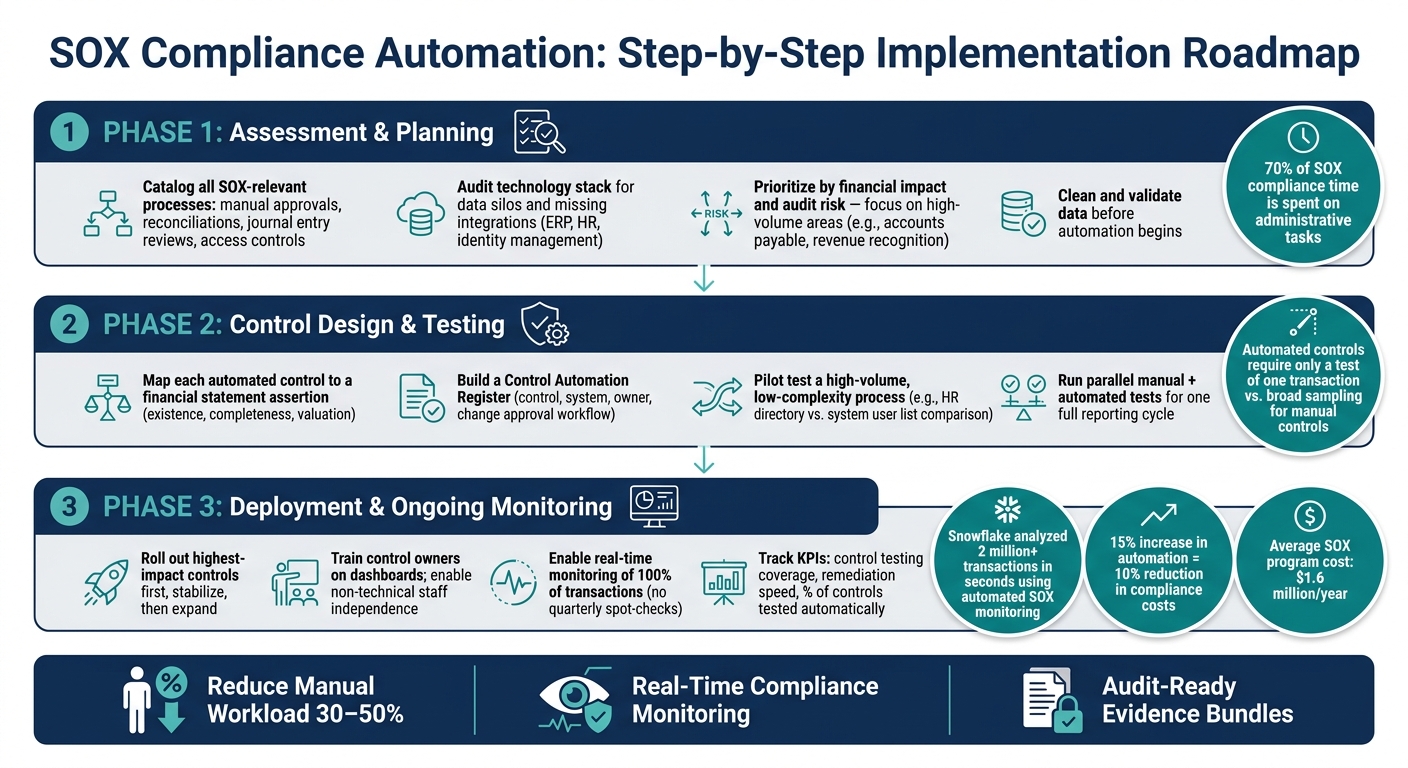
SOX Compliance Automation: Step-by-Step Implementation Roadmap
Building on the earlier discussion of linking workflows to SOX controls and embedding those controls into automation, here's a detailed guide to implementing them effectively in your organization.
Start by evaluating your current processes that are relevant to SOX compliance. Catalog every process tied to SOX - manual approvals, reconciliations, journal entry reviews, and access controls. Identify formal controls, informal practices, and any gaps in your current setup.
Next, review your technology stack for potential issues like data silos, missing integrations between systems (e.g., ERP, HR, and identity management), and areas where evidence isn't captured digitally. Then, prioritize processes based on their financial impact and audit significance. Focus on high-risk, high-volume areas, such as accounts payable or revenue recognition, instead of starting with the easiest tasks.
Before diving into automation, ensure your data is clean and reliable. As BizTech Magazine wisely notes:
"If your data is messy, your automation results will also be messy." [1]
Accurate and well-structured data forms the backbone of successful automation.
Once you’ve cataloged your processes and ranked risks, design controls to specifically address the identified gaps.
Using your gap analysis, create controls that are both effective and ready for auditor scrutiny. Map each automated control to a specific financial statement assertion - like existence, completeness, or valuation - so its purpose is crystal clear. Maintain a Control Automation Register that details each control, its system, owner, and change approval workflow.
To build confidence, pilot test a high-volume but straightforward process, such as comparing system user lists with your HR directory. Run both automated and manual tests simultaneously for one reporting cycle. This approach not only builds trust with auditors but also helps identify discrepancies early on.
For fully automated controls, particularly where IT General Controls are strong, testing may require only a single transaction. As John Kim, CPA, explains:
"Once an internal control process is automated, there is also a significant difference when testing manual or automated controls. For example, automated controls testing only needs a test of one transaction." [9]
After validating the pilot controls, move forward with phased deployment and continuous monitoring.
Roll out controls gradually to allow for real-time adjustments. Begin with your highest-impact controls, stabilize them, and then expand to others. This step-by-step approach minimizes disruption and gives your team time to adapt. Train control owners on the new processes, emphasizing platforms with user-friendly dashboards so non-technical staff can manage tasks without constant IT support.
Modern platforms now allow for real-time monitoring of 100% of transactions, eliminating the need for quarterly spot-checks. For example, in March 2022, Snowflake introduced an automated SOX monitoring system using its Data Cloud platform. Under the leadership of Amrita Kapoor, Director of Internal Audit, the team integrated user access logs and financial data to enable real-time alerts via Slack and Jira. This system analyzed over 2 million transactions in seconds, flagging issues like weekend journal postings and segregation of duties violations before they escalated into audit deficiencies. [10]
Track key metrics such as control testing coverage, the speed of remediation, and the percentage of controls tested automatically. As Amrita Kapoor advises:
"Automating controls monitoring is not just limited to superhero risk and compliance teams. The key is to start with one or two high-impact use cases and align with relevant stakeholders." [10]
This focused, step-by-step approach - aligned with stakeholder priorities - sets successful SOX automation programs apart from those that falter after initial trials.
Automation weaves critical controls into every financial workflow, reshaping how organizations maintain financial integrity under SOX compliance. As Quantarra aptly puts it:
"When SOX compliance operates continuously, audit season becomes a validation exercise rather than a crisis." [2]
This shift - from reactive fire drills to proactive control - captures the true value of automating compliance processes.
In a typical corporate setup, there can be over 300 SOX controls spanning finance, IT, and operations [2]. Managing these manually - via spreadsheets, email chains, and last-minute efforts - is neither efficient nor foolproof. Automation changes the game by embedding controls directly into workflows, centralizing evidence, and enabling real-time oversight across all transactions.
Key Benefits of Automated SOX Compliance
| Control Area | How Automation Helps |
|---|---|
| Internal Controls (ICFR) | Continuous monitoring with automated alerts for exceptions |
| IT General Controls (ITGCs) | Real-time access reviews and segregation of duties (SoD) drift detection |
| Evidence Collection | Automatic data pulls from ERP, HRIS, and IT systems |
| Audit Readiness | Immutable logs and pre-organized evidence bundles for auditors |
| Scalability | Controls that adapt as your business grows, without extra manual work |
These pillars illustrate how automation transforms compliance from a theoretical framework into a practical, scalable solution.
Increasing automation by just 15% can slash compliance costs by 10% [1]. Considering companies spend an average of $1.6 million annually on SOX programs [3], this reduction can significantly impact the bottom line.
Use these insights to evaluate your current control environment and address any gaps. Start by auditing your existing controls and focusing on high-risk areas - such as journal entry approvals or user access reviews - for immediate improvement.
For companies navigating growth, IPO preparations, or M&A transactions, the complexity of maintaining SOX compliance grows exponentially. Phoenix Strategy Group specializes in helping businesses manage these challenges. They offer strategic guidance to integrate automated controls, build scalable financial systems, and provide fractional CFO expertise to ensure your compliance remains solid through every stage of growth.
Key SOX controls play a crucial role in maintaining compliance within automated financial systems. Some of the most important include:
These controls are vital for minimizing errors, protecting data, and mitigating fraud risks in automated financial environments.
To ensure automated workflows meet SOX audit requirements, it's essential to focus on continuous monitoring, thorough documentation, and the ability to provide real-time evidence. Here’s how to achieve this:
These steps help establish compliance and demonstrate readiness for audits effectively.
Yes, AI can play a role in SOX controls without raising audit risk - if it's implemented with a controls-first approach and strong governance. The key is to design transparent and auditable processes. This includes embedding controls such as role-based access, automated reporting, and continuous monitoring directly into the system.
Leveraging established frameworks like COSO or NIST AI RMF, combined with human oversight during the testing and piloting phases, can help maintain compliance. This approach also addresses potential risks, such as errors or bias, ensuring the AI operates within acceptable boundaries.