Published on
July 10, 2026

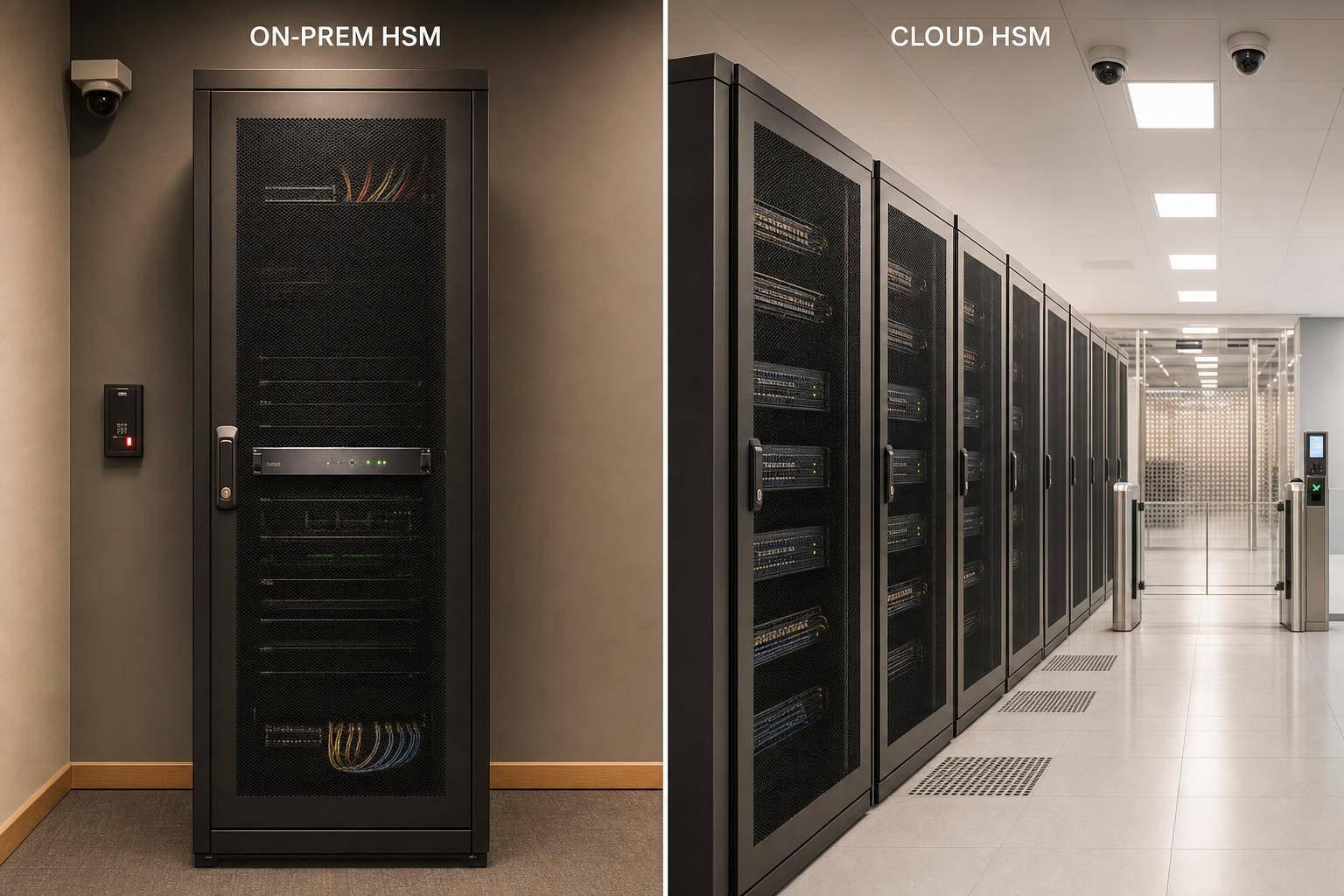
If you need the short answer: cloud HSM is usually the right starting point for most growing companies, while on-prem HSM fits teams that need direct physical key custody.
I’d sum it up like this:
Here’s what I’d look at before choosing:
| Criteria | Cloud HSM | On-Prem HSM |
|---|---|---|
| Key custody | Provider holds hardware; you control key use | You control hardware and site |
| Setup time | Days to weeks | Weeks to months |
| Cost model | OpEx | CapEx + yearly support |
| Uptime model | Provider-backed service SLA, often 99.9% to 99.99% | Your team builds redundancy |
| Audit evidence | Built-in service logs | Device logs + site access records |
| Best fit | Small teams, fast launches, audit prep | Hard custody rules, air-gapped CA use, strict internal controls |
If I were making the call, I’d treat cloud HSM as the default unless a contract, regulator, or internal policy says the hardware must stay under my company’s physical control.
Cloud HSM moves the hardware side to the provider, while your team keeps control over how keys get used. The provider runs the HSM hardware, and your team provisions and uses it through a console, CLI, or API inside a private network. Applications connect through standard cryptographic APIs like PKCS#11, JCE (Java Cryptography Extensions), or CNG (Microsoft Cryptography API: Next Generation). The provider handles hardware availability, patching, and FIPS 140-2 Level 3 validation.[5][14][17][18]
That split matters. The provider is on the hook for the hardware and service uptime. Your team still owns IAM, key lifecycle, network boundaries, and monitoring. So you get strong logical control, but not physical custody. And if access roles are too broad or network rules are too loose, that problem still sits with you.[5][14]
A big part of cloud HSM's security value comes from access control. It isn't just "managed hardware." It's the fact that you can tie key use to the provider's IAM system and set role-based policies that keep duties separate. A common setup is simple: keep HSM admins separate from application users, and require MFA for every human admin action.[5][8][14]
HSM endpoints sit in private subnets and can be reached only by authorized services in private subnets.[9][11]
Isolation is scoped to your account, which means other customers can't reach your keys or ciphertext. For higher-risk workloads like payment processing, PKI, or healthcare data, it helps to spell out that isolation model in compliance records. That can support PCI DSS, HIPAA, or SOX reviews.[12][16][3]
Audit logging is built in. Key creation, rotation, deletion, admin access, policy changes, and tamper events generate immutable logs with timestamps, actor identity, operation type, and result. Those logs can flow into cloud-native monitoring tools and then into SIEM platforms, where teams can flag odd key usage or failed admin sign-ins. They also help support SOC 2, ISO 27001, and PCI DSS evidence.[6][10][15]
For growing teams, the day-to-day question is pretty simple: how fast can you get this live, and how much work does it take off your plate?
Cloud HSM clusters are built for high availability by default. HSM instances are spread across multiple availability zones in a region, so if one device goes down, another keeps operations running automatically. Provider SLAs usually target 99.9% to 99.99% uptime, which means yearly downtime is often measured in hours.[9][11][7]
Setup speed is one of the clearest upsides. You can provision a cluster in minutes through the console or API. Full integration, though, takes longer. IAM setup, VPC configuration, SIEM connection, and application testing usually take anywhere from a few days to a few weeks. That can make a big difference when a compliance deadline or product launch is closing in. Compared with on-prem procurement, the gap is hard to ignore. Buying hardware, waiting for shipping, racking devices, and lining up data center work can drag on for months.[9][3]
Cloud HSM also shifts spending to OpEx, with no upfront hardware purchase. For small security and DevOps teams, that cuts out a lot of hands-on infrastructure work: no firmware updates, no hardware swaps, no data center contracts. The downside is cost creep. As workloads grow, spend can climb fast, so it's smart to model usage against realistic growth before you commit to a cloud HSM setup.[3][13]
An on-prem HSM is a tamper-resistant appliance that lives in your own data center or server room. Your team controls who can physically reach it, where it sits on the network, when firmware gets updated, and who holds the keys. That ownership changes almost everything that follows. In tightly regulated settings, an on-prem setup can make it easier to show that keys stay inside a clearly defined physical trust zone.[20]
In practice, that usually means placing the HSM in a locked rack inside a restricted room, with badge/PIN or biometric access and logged entry.[22][23]
Admin access should be locked down too. Many teams use hardware tokens or smart cards, then require dual approval for steps like initialization, key generation, and firmware updates.[20][22][26] The idea is simple: no single person should be able to make high-impact changes alone.
Audit evidence comes from the trail your team leaves behind. HSM logs, access records, and change tickets help show who did what and when. For PCI DSS, SOC 2, and ISO 27001 reviews, keep tamper-evident logs for at least 12 months. It also helps to retain configuration snapshots that show key rules and FIPS mode status.[22][23][24] That’s the core tradeoff with on-prem HSMs: tighter physical custody, but more day-to-day work.
With on-prem HSMs, there’s no provider SLA stepping in when something breaks. Uptime depends on how well you build clustering, failover, power, cooling, and network redundancy around the devices. Vendors often support clustering or replication so several appliances can share key material and handle traffic. That way, if one node goes down, cryptographic operations can keep moving. A common starting point is to deploy HSMs across at least two separate data centers or sites, each backed by redundant power feeds, UPS systems, generators, and enterprise cooling.[22][1][25]
Disaster recovery testing matters a lot here. Full-site failover tests are the practical way to check whether payment processing, PKI, and authentication services will stay up under stress. Auditors often look at these tests, and board-level risk committees may review them too.
A first on-prem HSM rollout often takes 6–15 weeks from procurement to production. And that’s before policy documentation, training, and runbook work are finished.[1][25]
Cost is where the picture gets very concrete:
Next, compare on-prem and cloud HSMs side by side on control, agility, compliance, and operating burden.
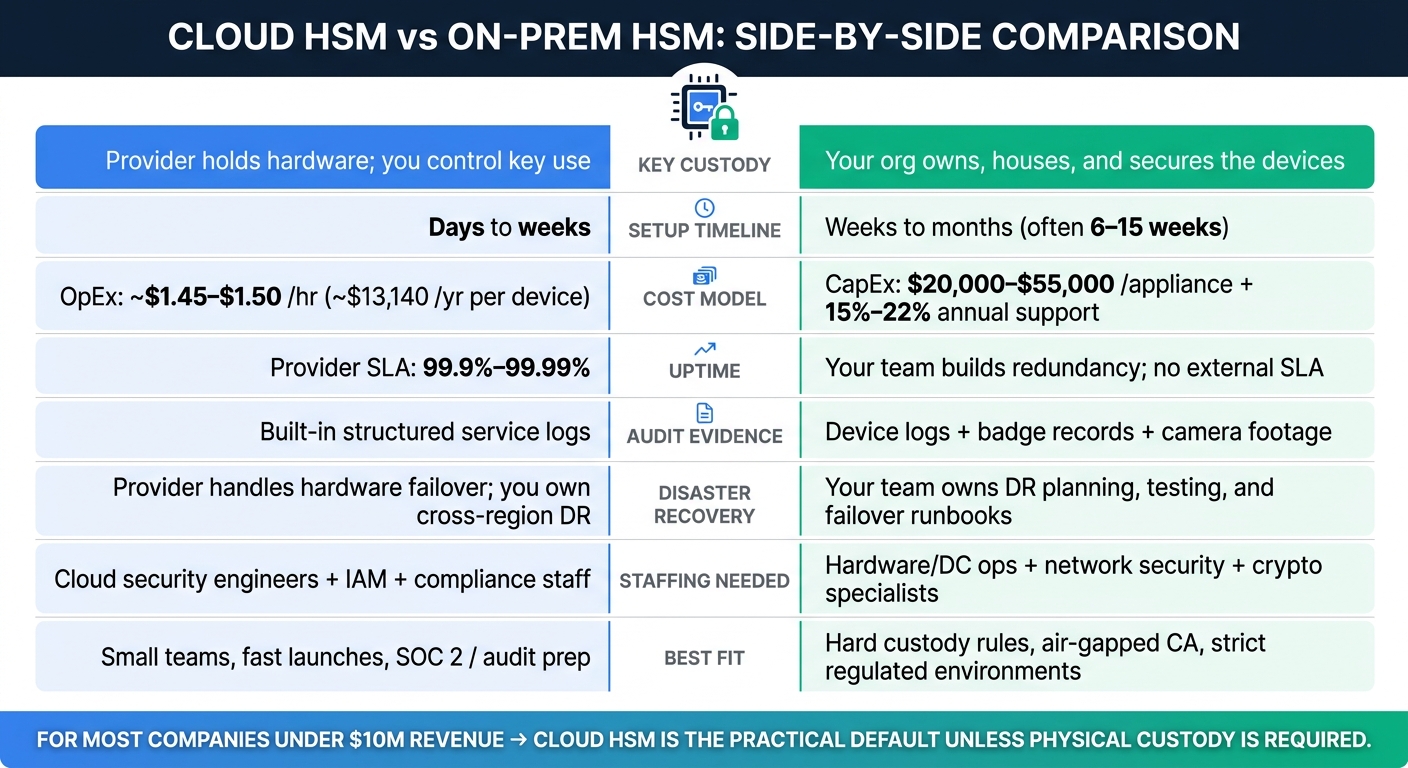
Cloud HSM vs On-Prem HSM: Side-by-Side Comparison
Put these two models next to each other and the trade-off jumps out fast: cloud HSM leans toward speed and less day-to-day ops work, while on-prem HSM leans toward direct custody and tighter control. For scaling companies, that usually comes down to one thing: speed vs. custody.
Here’s the practical comparison.
| Criteria | Cloud HSM | On-Prem HSM |
|---|---|---|
| Access control and isolation | Cloud HSM puts logical control in the provider’s IAM layer. | Your team owns physical and logical controls, including operator cards or tokens, multi-person approval rules, and dedicated VLANs. |
| Audit logging and forensic visibility | Cloud HSM gives you structured service logs. | Device logs, badge records, and camera footage can be tied together directly, and you control retention and log format. |
| Uptime and resilience | Cloud HSM moves availability duties to the provider. | There’s no external SLA; resilience depends on your clustering, power, cooling, and DR design. |
| Disaster recovery ownership | The provider handles hardware failover, but you still own cross-region key replication and app-level DR. | Your team owns DR planning, testing, hardware spares, and failover runbooks. |
| Cost model (USD) | OpEx; about $1.45–$1.50 per HSM-hour for AWS CloudHSM, or about $13,140 per year per device running 24/7.[3][19][21] | CapEx; about $20,000–$55,000 per appliance, plus 15%–22% annual support.[3][19][28] |
| Physical custody of hardware | The provider owns and houses the hardware, while you control the keys at the logical level. | Your organization owns, houses, and physically secures the devices. |
| Setup timeline | Usually a few days to a few weeks for a cloud-native team. | Often several weeks to a few months from procurement to production. |
| Staffing requirements | You’ll need cloud security engineers, IAM know-how, and compliance staff. In most cases, no dedicated hardware ops staff is needed for the HSM itself. | You’ll need hardware and data center ops staff, network security engineers, and cryptographic specialists. |
| PCI DSS, SOC 2, FIPS fit | Major cloud HSM services often carry FIPS 140-3 Level 3 certifications and PCI DSS/SOC 2 attestations, which fits most compliance programs.[4][27][2] | Full physical custody and custom audit evidence, which is why strict internal auditors and regulated financial institutions often prefer this model. |
For companies scaling from $500,000 to $10 million in annual revenue, the choice usually comes down to three things: custody, team capacity, and compliance scope. The comparison above shows the tradeoff. This section turns that into a stage-based call.
For most companies in this range, cloud HSM is the default unless there’s a clear custody or regulatory reason to go on-prem.
If your security and infrastructure team is small, cloud HSM is often the better place to start. It gives you strong key management controls without forcing you to run data center-style operations yourself.
That matters when you’re preparing for a SOC 2 audit, trying to close an enterprise deal, or moving through investor diligence. In those moments, speed and proof of control matter a lot.
Deployment is also much faster. Cloud HSM can usually be put in place in days or weeks, not months. Sometimes that timeline is the whole game. It can be the difference between hitting an audit deadline or missing it, shipping on time or slipping the launch.[30]
The main exception is any workload with hard custody requirements. On-prem HSM makes sense when physical custody is a documented requirement, not just a nice-to-have. That can apply to payment systems, government work, or contracts that require keys to stay in customer-controlled sites.[29][32]
It’s also a fit for organizations that need air-gapped root CAs, since cloud HSMs do not support air-gapped use.[31]
But here’s the catch: on-prem HSM only works well if you have the people and process to support it. Without dedicated infrastructure staff, clear key policies, and solid incident response, it can add more risk than it takes away.
The right choice depends on which limit matters most: control, compliance, or cost.
Cloud HSM leans toward speed, agility, and OpEx flexibility. On-prem HSM leans toward physical control and deeper ownership of the cryptographic setup, but it comes with higher cost and more operational weight.
For most companies under $10 million in revenue, cloud HSM is the practical default unless a specific regulation, contract clause, or internal risk decision says otherwise.
A 3- to 5-year total cost of ownership analysis often makes the tradeoff easier to see. For on-prem, that means looking at hardware purchase, maintenance, staffing, and data center overhead. For cloud, it means weighing usage-based OpEx over time.[30]
You likely need physical key custody if your compliance rules or internal policies require full control of encryption keys and keep them out of reach of cloud providers.
On-premises HSMs are often the right fit for high-risk workloads where you must make sure no cloud administrator can access or affect key material. They give you isolated, tamper-resistant control over key generation, storage, and lifecycle management.
The biggest hidden costs over three to five years usually show up in operations and compliance.
With on-premises HSMs, teams often underestimate the people and upkeep involved. That includes staffing for key ceremonies, maintaining the physical setup, and planning for high-availability failover. Those items may not look huge at the start, but they can add up fast over time.
Cloud HSMs cut down on hardware maintenance, which is a big plus. But they can bring more variable costs tied to transaction throughput, cluster sizing, and data egress. As infrastructure grows, manual key rotations and log audits also take more time and effort. That extra work can quietly turn into a bigger drain on time and budget than many teams expect.
Yes. Cloud-based HSMs can meet strict audit requirements when they use FIPS 140-2 or FIPS 140-3 Level 3 validated hardware and support standards such as PCI DSS, SOC 2, HIPAA, and ISO 27001.
They also make compliance work easier by providing:
That matters because audits usually come down to one thing: can you show who did what, when they did it, and how keys were protected the whole time? A cloud-based HSM with the right controls helps answer that in plain terms.