Published on
July 12, 2026


Most growth-stage companies do not fail because no one saw a problem. They fail because each team saw only part of it.
If I had to sum up this guide in a few lines, it would be this:
The article makes one point very clear: risk management at this stage is about visibility and action, not paperwork. That matters because cash flow problems are linked to about 82% of small business failures, and many of those issues show up first in hiring plans, churn, late collections, backlog, or vendor strain - not just in the bank account.
What stood out to me is how tightly the guide links risk to a 12- to 18-month cash forecast. Instead of treating risk as a separate exercise, it ties it back to budget changes, hiring, timelines, and board choices. That keeps the process short, useful, and tied to daily decisions.
Here’s the full picture in plain English:
Bottom line: if I want fewer surprises, better cash control, and cleaner board conversations, I need a simple cross-functional risk system that people will actually use.
The rest of the article explains how to set that up without turning it into a heavy process.
KRI Thresholds for Growth-Stage Companies: Green, Amber & Red Zones
Scattered visibility doesn't help much if no one owns the issue. The goal here is simple: turn loose awareness into clear accountability.
A hub-and-spoke model works well for that. One person runs the risk process. Department leads handle the risks closest to their teams. Then a small committee steps in only when an issue cuts across multiple functions.
The central risk owner keeps the whole system from drifting. This person maintains the risk register, standardizes templates, drives follow-up, and makes sure the process keeps moving.
In most growth-stage companies, this role usually sits well with the fractional CFO, FP&A lead, COO, or a strategic operations leader. In plain terms, you want someone who can see across the business and has enough authority to get answers and push action. The title matters less than the person's influence, access, and follow-through.
Each department should own the risks it can see most clearly and act on most directly. A simple ownership map looks like this:
| Function | Primary Risk Ownership |
|---|---|
| Finance | Liquidity, runway, covenant, and forecasting risk |
| Operations | Vendor concentration, supply continuity, and process failure |
| Product | Uptime, release quality, and technical reliability |
| Sales | Customer concentration, pipeline volatility, and renewal risk |
| Legal | Contract risk, litigation, and regulatory exposure |
| IT | Cybersecurity, access controls, and infrastructure risk |
| Compliance | Policy adherence, data privacy, and reporting obligations |
| Leadership | Strategic risk, reputational risk, and enterprise tradeoffs |
Once those lines are clear, the next step is deciding when a risk stays with the team and when it needs to move up.
Teams should know exactly what they can handle on their own and what needs escalation. If that line is fuzzy, two bad things tend to happen: small issues get pushed upstairs for no reason, and bigger problems sit too long before anyone acts.
Set four clear escalation triggers:
Escalate when a risk crosses agreed cash, timing, customer, or compliance limits. If mitigation spending changes the forecast, hiring plan, or product timeline, finance and the executive team should review it together.
When a risk does escalate, keep the discussion tight. Present the risk, estimate the downside, compare the main options, assign an owner, and make a decision within a defined cycle.
That way, the committee spends time on exceptions instead of routine issues.
The risk committee should stay small and focused. Use it only for issues that touch more than one function.
Its job is to review top risks, settle ownership conflicts, and confirm mitigation deadlines. In most cases, that means finance, operations, product, and executive leadership should be there. Legal, IT, or compliance can join when the issue calls for it.
A monthly meeting is usually enough for active oversight. Then use a deeper quarterly review to support planning and board prep.
Once owners are in place, the next job is simple: pick the small set of metrics that tell you risk is building before it turns into a bigger problem. Each KRI should sit with the functional lead who can do something about it.
Every KRI should connect to a business goal the company is trying to protect or reach.
It helps to think in metric families, not one-off numbers. For liquidity, don't look at cash runway by itself. Pair it with burn multiple, cash conversion, and AR aging. For revenue quality, track churn rate, expansion rate, customer concentration, and pipeline coverage together. For execution, watch forecast accuracy, implementation backlog, and on-time delivery. For people risk, track regretted attrition and open critical roles.
A metric belongs on the dashboard only if it gives the team enough warning to act. Pipeline coverage - the ratio of qualified pipeline to next quarter's target - is a leading signal for sales risk. Implementation backlog is often the first clue that operations are starting to lag behind sales growth.
Thresholds turn raw metrics into action triggers.
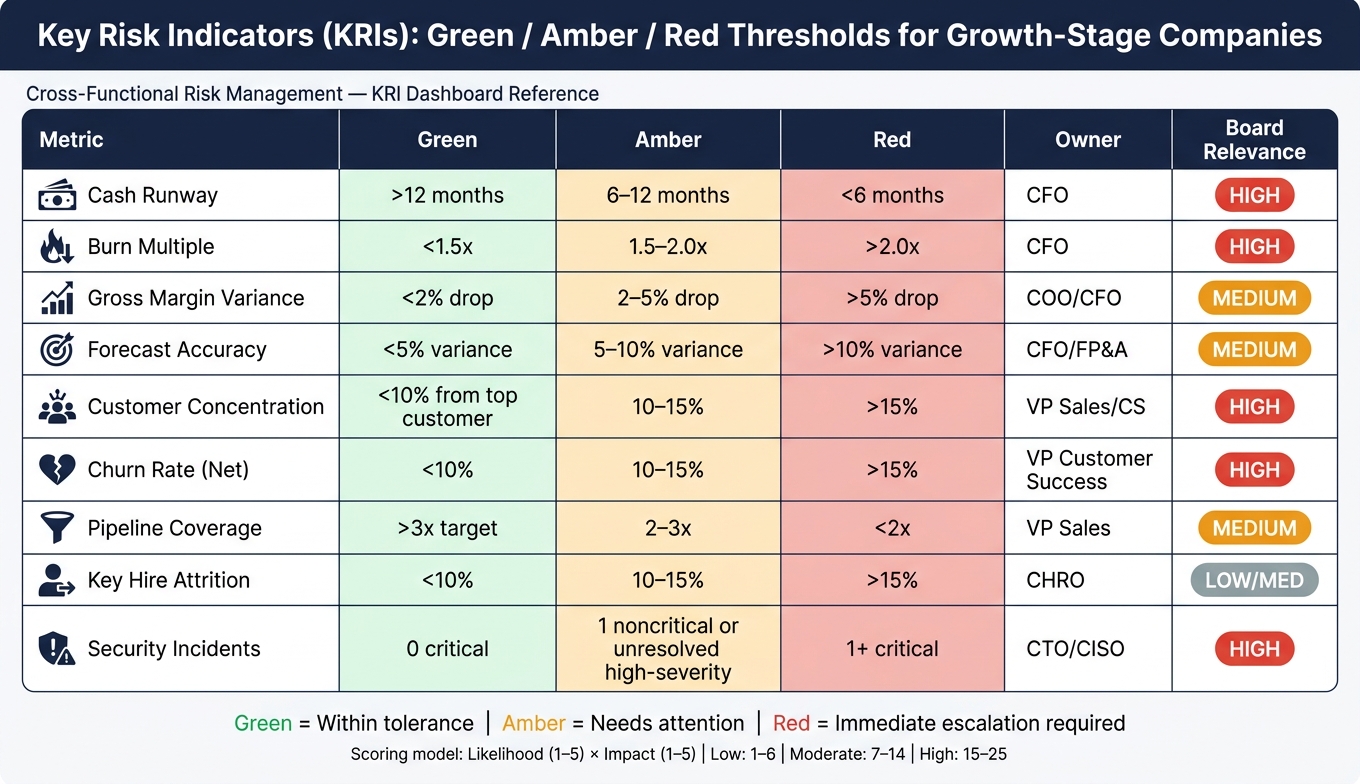
Use a green/amber/red setup, and base each level on your company's operating model, historical volatility, and risk appetite, not only on industry averages. Green means performance is within normal tolerance. Amber means the metric is moving toward an unacceptable level and needs attention. Red means the risk is past appetite and needs immediate escalation.
Here's a practical reference for common KRIs at growth-stage companies:
| Metric | Green | Amber | Red | Owner | Review Cadence | Impact Area | Board Relevance |
|---|---|---|---|---|---|---|---|
| Cash Runway | >12 months | 6–12 months | <6 months | CFO | Monthly | Liquidity | High |
| Burn Multiple | <1.5x | 1.5–2.0x | >2.0x | CFO | Quarterly | Efficiency | High |
| Gross Margin Variance | <2% drop | 2–5% drop | >5% drop | COO/CFO | Monthly | Profitability | Medium |
| Forecast Accuracy | <5% variance | 5–10% variance | >10% variance | CFO/FP&A | Monthly | Planning | Medium |
| Customer Concentration | <10% from top customer | 10–15% | >15% | VP Sales/CS | Quarterly | Revenue | High |
| Churn Rate (Net) | <10% | 10–15% | >15% | VP Customer Success | Monthly | Growth | High |
| Pipeline Coverage | >3x target | 2–3x | <2x | VP Sales | Weekly | Growth | Medium |
| Key Hire Attrition | <10% | 10–15% | >15% | CHRO | Quarterly | Execution | Low/Med |
| Security Incidents | 0 critical | 1 noncritical incident or unresolved high-severity alert | 1+ critical | CTO/CISO | Real-time | Compliance | High |
You also need a scoring model that lets teams compare risks in the same way. Score each risk for likelihood and impact, then multiply the two. Likelihood runs from 1, meaning very unlikely, to 5, meaning very likely. Impact runs from 1, meaning minor, to 5, meaning severe. That gives you a score from 1 to 25[1].
This gives leadership one shared language. A compliance risk and a liquidity risk can be compared side by side. That said, judgment still matters. A low-probability, high-impact risk - like losing your largest customer - may need more attention than the raw score suggests.
Keep only the KRIs that lead to decisions, then build the dashboard around that set.
8 to 15 KRIs is the right range. Once you go past 15, ownership gets fuzzy and the signal gets buried.
Each KRI on the dashboard needs four things: one owner, one source of truth, a set review cadence, and one clear management action if it moves into amber or red. The source of truth might be your financial system, CRM, HRIS, or incident tool. And every amber or red trigger should connect to a predefined response. An amber cash runway signal might lead to a revised cash forecast and a spending review. A red signal might mean immediate leadership escalation and board notification.
Review the dashboard every year and after major growth shifts. Thresholds can drift over time. What felt right at one stage can become too loose or too tight as the company scales, or as seasonality and forecast assumptions shift.
Once the KRIs are set, the next step is routing them through a consistent review process.
Once KRIs are set, every exception needs to move through one clear process. A risk metric only means something if it gets to the people making calls early enough to change the forecast or the plan.
Each risk should move through the same path: log it, assign one owner, score it, define mitigation, set a review date, and escalate it when it hits amber or red.
At intake, document the risk event, the affected function, the date it was identified, and the first estimated impact. During review, record the likelihood score, severity score, root cause, mitigation plan, and any cross-team dependencies. At escalation, capture which threshold was breached, who was notified, what decision was made, and whether the issue needs a budget, headcount, or schedule change. At sign-off, note the final disposition, residual risk, and follow-up owner.
That level of documentation keeps operating reviews centered on decisions instead of status reporting. It also gives you a clean audit trail for board materials and future planning reviews.
The pace of review should match the pace of the risk. Some issues move fast and need weekly attention. Others show up over time and fit better into a monthly or quarterly cycle.
| Cadence | Purpose | Participants | Outputs | Escalation Trigger |
|---|---|---|---|---|
| Weekly | Monitor active operational risks and fast-moving signals | Functional leads, operators | Exception log, immediate action items | Threshold breach, forecast deviation in the current period |
| Monthly | Cross-functional trend review and leadership prioritization | Leadership team, functional risk leads | Risk status update, mitigation progress, forecast adjustments | Repeated overdue mitigation actions, missed deadlines |
| Quarterly | Risk register governance and board-prep alignment | Executives, CFO, risk committee | Updated register, score comparisons, board risk summary | New high-severity risk, material change in risk profile |
| Annual / Twice-Yearly | Strategy, budget, and capital planning alignment | Full leadership team, board | Revised risk appetite, updated assumptions in the operating model | Emerging principal risk, significant shift in business model |
Each review should lead to an update in forecasts, budget assumptions, and action plans. Then, at the next review, track what changed and what didn’t. At this stage, speed matters more than perfect detail.
A simple closed loop works well:
Clean data, standardized inputs, and a live planning model keep risk reviews tied to execution.
Those inputs should then flow into a single system of record and dashboard.
Keep the risk tool stack simple. You only need four core tools:
Those tools should match the owners, thresholds, and review cadence you already set. The point is shared visibility and fast escalation, not some shiny new system that no one touches.
Once owners, KRIs, and cadence are in place, put everything in one system so reporting stays fast and consistent.
A centralized risk register is the working home for the risk setup built in Sections 1–3. Use it as the source of truth for logging, scoring, and assigning risks.
Why does that matter? Because if every team logs risks in its own way, leadership can't line up a financial risk next to a technology risk and judge them on the same scale. One record, one owner, one score, and one due date solves that.
Each record should include identity, ownership, scoring, mitigation, and escalation history. In plain terms, that means:
Use the same data, but show each audience only the level of detail it needs to act.
| Audience | Primary Focus | What to Show | Level of Detail |
|---|---|---|---|
| Operators | Execution and daily actions | Open risks, mitigation tasks, owners, due dates, overdue items | High - include checklists and operational metrics |
| Executives | Trend and resource allocation | Top 10–20 risks by score, KRI threshold breaches, trend direction, financial impact in USD | Medium - severity, trend, and decision needs |
| Board | Oversight and strategic exposure | Top 5–10 enterprise risks, quarter-over-quarter movement, appetite breaches, growth and liquidity impact | Low - narrative direction, not task lists |
Operators need the most detail because they're managing the day-to-day work. Executives need to know if a risk is getting better, staying flat, or getting worse, and what that means for the forecast. The board needs less. It usually wants the few risks that could hit valuation, liquidity, or a major event like a fundraise or acquisition.
A good place to start is by connecting core financial systems like QuickBooks or NetSuite to your BI tool. That lets KRIs such as cash runway, monthly burn, and accounts receivable aging refresh on their own in USD.
Then connect CRM and product analytics systems so you can track growth KRIs like churn rate, customer acquisition cost, NPS, and uptime.
Once those feeds are live, set threshold alerts so the right person gets notified the moment a KRI crosses its limit. For example, that might happen when cash runway drops below nine months or monthly churn goes above 5%. Those alerts should go straight to the risk record and owner.
For mitigation tasks, set automatic escalation when an action is overdue by more than 14 days. Also tie feeds and alerts straight to forecast updates and escalation decisions. That keeps the planning cycle current without manual handoffs.
Version control is the part many teams ignore until it bites them. Store monthly management reports and quarterly board materials in clearly labeled folders, like Risk Management → Management Reports → 2026 and Risk Management → Board Packs → 2026. Use a naming format such as Board_Risk_Update_09-30-2026_FINAL.
Limit editing rights on finalized materials to the CFO and the central risk owner. And export key register views as static PDFs or images for board packs so the data stays locked to the exact reporting date. In many teams, finance, FP&A, and data engineering all need to help keep these systems dependable.
Use the same risk register and KRIs, but turn them into board-level choices. Once your risk register, dashboards, and escalation flows are in place, the final step is building board materials that help directors act. The aim is simple: show the risks, trends, and decisions that matter most.
The main board deck should cover the top 5–7 enterprise risks. For each risk, include one plain-English line of context, a current rating (High / Medium / Low or Red / Amber / Green), a trend arrow (↑ increasing, → stable, ↓ decreasing), and a one-line mitigation status.
Add a compact risk appetite table with limits, current status, and any breaches. Directors should be able to scan the page fast and see where the company stands.
The board deck should include four core elements:
After the current top risks, show what may enter that list next. Use one slide for emerging risks - items that are not yet material but could become top risks within 6–12 months. Keep the list to 3–5 items. For each one, name the owner, explain the possible impact in business terms, and state the trigger that would move it onto the main risk list.
For example:
"If days sales outstanding (DSO) exceeds 60 days for two consecutive months, working capital strain moves into top risks."
Each top risk should also include a short impact line tied straight to growth, cash flow, execution, or strategic choices - in dollar terms and with a timeframe. For instance:
"Engineering attrition above 20% could delay key product milestones by 2–3 quarters, affecting competitive positioning in enterprise deals."
If a risk needs board action - such as changing growth targets, approving capital, or revising appetite - add an explicit "Decision needed" note. That way, the ask doesn't get lost in the deck.
A cross-functional risk management system does not need to be complicated to work well. Assign clear owners, track a short set of KRIs tied to growth and cash flow, set a steady review cadence, and use tools that give teams shared visibility. Then turn that work into board updates that are concise, forward-looking, and tied to actual decisions. When the board can see risk this clearly, the company can keep moving fast without adding drag.
Growth-stage companies that do this well are in a stronger position to protect cash, support faster scaling, and go into fundraising or exit diligence with a solid governance story. Teams working with Phoenix Strategy Group can apply the same discipline with support from fractional CFO services, FP&A, and data engineering - light enough to keep running, but structured enough to grow with the business.
Ownership needs to be clear. That’s how you get accountability and avoid gaps where risks slip through the cracks.
Leadership should keep overall oversight. At the same time, each specific risk should have a named owner in the risk register, backed by a clear responsibility matrix so everyone knows who does what.
For financial and compliance risks, accountability usually runs from department heads and the controller up to the CFO. The Three Lines Model can help sort out the roles across operations, risk and compliance, and internal audit.
There’s no set number of Key Risk Indicators (KRIs) that fits every growth-stage company. What matters is picking clear, measurable metrics that show what’s happening in your business and help you act when risk starts to build.
Start with the areas that matter most to your company’s risk profile, such as financial, operational, strategic, and compliance risk. From there, choose indicators you can track consistently and tie to decisions.
Automated dashboards make this a lot easier. They can help you monitor KRIs in real time, send alerts when something moves outside your set range, and give your team a simple way to adjust as the business grows.
Escalate a risk immediately when critical indicators pass set thresholds or when an unexpected event lands outside planned scenarios.
That can include automated alerts for anomalies such as: