Published on
July 13, 2026


Most finance automation projects miss the mark because teams automate broken work. If I were reviewing a scaling company as a fractional CFO, I’d check seven areas first: close, cash reporting, invoice flow, approvals, data quality, system overlap, and owner gaps.
Here’s the short version:
A few numbers from the article make the point fast:
If I had to boil the checklist down even more, it would be this:
This article is a pre-buy review. It’s less about software demos and more about whether your finance process is ready for automation at all.
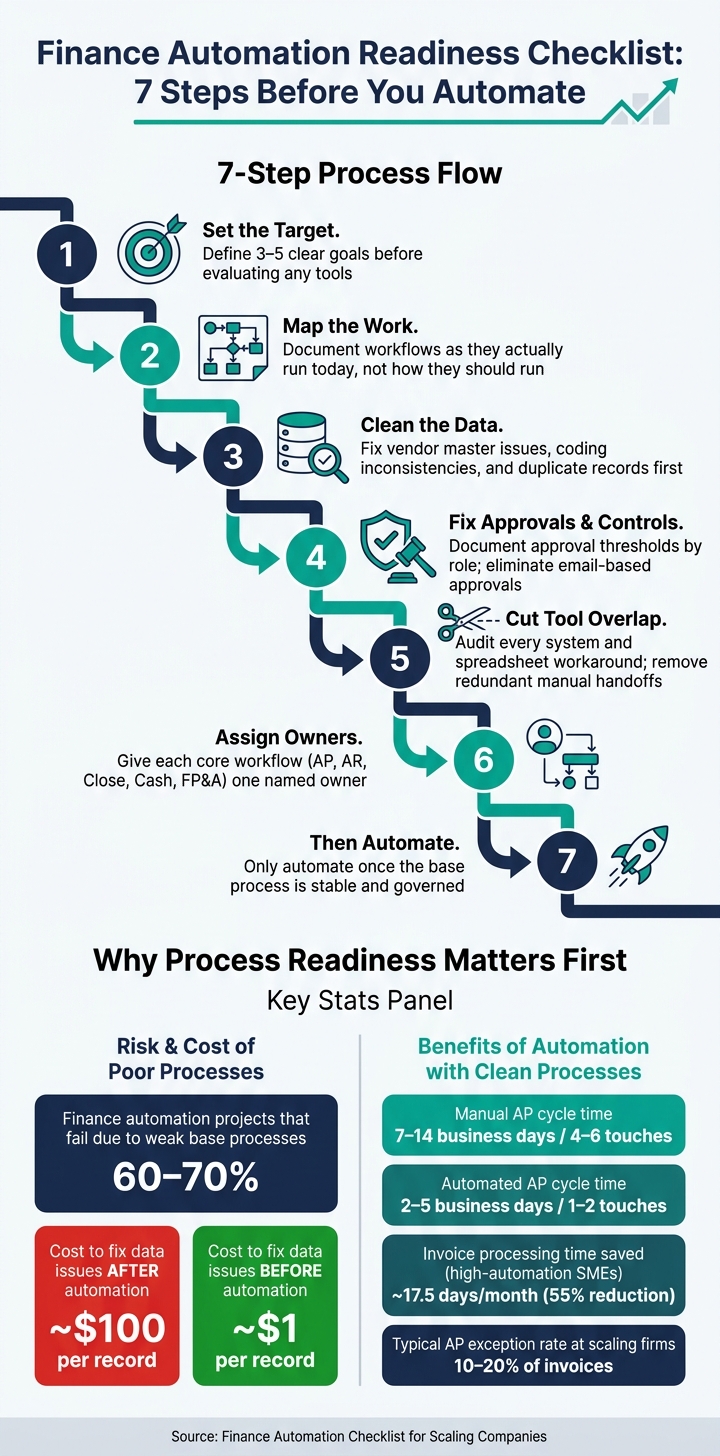
Finance Automation Readiness Checklist: 7 Steps Before You Automate
Map close and cash reporting as they work today, not as they should work. That sounds simple, but it’s where a lot of teams trip up. If you document the ideal version instead of the messy, day-to-day version, you’ll miss the delays, workarounds, and handoff issues that slow everything down.
Build a close calendar that covers every task from Day 0, the first day after month-end, through the delivery of management and board reports. For each step, document the process name, the role responsible, the target due date and time in local time - for example, “Day +3 by 5:00 p.m. ET” - along with any upstream dependencies and the actual completion times from the last three to six months.
Then tag each task in a simple way:
This makes it much easier to spot repeated, rules-based, high-volume tasks that are strong early picks for automation.
Track actual completion times across multiple close cycles so you can see where delays tend to pile up. That’s usually where the story is. A close process may look fine on paper, but if the same step slips every month, that’s a red flag.
Daily cash reporting matters most for companies with tight liquidity or fast growth. Each report should include opening cash, inflows, outflows, and ending balance by bank account. It should land by 10:00 a.m. ET and come from system feeds, not manual spreadsheets. [3]
To test your current setup, reconcile bank statement balances to the general ledger daily or weekly for two to three months. Track both the number and dollar value of unreconciled items, plus how fast they clear. After that, compare forecasted versus actual ending cash in USD for each week or month across the last three to six periods.
A good target is to keep short-term forecast variances within ±5% to 10%. If variances run higher, that usually points to missing inputs like payroll cycles or tax payments, or to inconsistent cutoffs between operating systems and the GL. [3]
For scaling teams, a weekly rhythm often works well:
That cadence keeps cash reporting from turning into a fire drill every week.
Review the last three months for cash, AR, AP, revenue, and payroll liabilities. For each area, confirm there’s a documented reconciliation, a set cadence, and preparer/reviewer signoff. Also check that cutoff rules are applied the same way across teams. If one team recognizes revenue on shipping date and another uses invoice date, automated reporting will just spread that mismatch faster.
Set a few ground rules before any workflow touches this data. Standardize on U.S. date format, MM/DD/YYYY. Define one time zone for transaction cutoffs. Confirm that all consolidated reporting is denominated in USD.
Journal entries need close attention too. Any entry above a set threshold - often $25,000 to $50,000 - should require dual approval, with clear separation between preparer and reviewer in sensitive areas like revenue, equity, and intercompany balances. [1][2] If that control isn’t in place, automation doesn’t fix the problem. It just moves it faster.
When internal ownership is thin, Phoenix Strategy Group can help benchmark close and cash controls, identify gaps, and implement fixes before automation.
Use the same walkthrough method next for invoice receipt, approvals, and payment.
Once you’ve mapped close and cash controls, turn to AP. This is usually where growing teams pick up the most manual cleanup. When invoice flow, approval rules, or vendor data are fuzzy, the work piles up fast. And here’s the hard truth: AP automation does not fix messy processes. It works only when intake, coding, and approval rules are already spelled out.
Start with every place invoices come into the business. That might be a shared AP inbox like ap@company.com, vendor portals, paper mail, or EDI feeds. Then trace the invoice from start to finish: capture, coding, PO or receipt matching, approval, payment scheduling, and GL posting. As you map it, note who handles each step, which system they use, and where the handoffs happen.
Once the flow is on paper, look at where time and effort actually disappear. Track average cycle time and the number of manual touches per invoice. Manual AP often takes 7–14 business days and 4–6 touches. Automated clean invoices usually move in 2–5 days with 1–2 touches [8][12].
You should also track your exception rate. That’s the share of invoices that need special handling, like rush payments, disputed charges, missing purchase orders, or vendor setup issues. For many scaling firms, exceptions show up on 10–20% of invoices [8]. Each exception type needs a reason code, a named owner, and an SLA. For example:
Without that structure, exceptions turn into a game of hot potato.
Once the workflow is clear, define who can approve what and when escalation begins. Email-based approval is not a controlled workflow. Before you automate anything, document the approval path in plain terms: who approves, at what dollar level, and what happens if nobody responds.
A practical starting point for U.S. scaling companies looks like this [4][5]:
Write these rules by role, not by person. If the policy says “Jane approves marketing invoices,” it will fall apart the minute Jane leaves or changes jobs.
Then set escalation timers. If an approver hasn’t acted within 48 hours, the system should send a reminder. After 72–96 hours, it should escalate to the approver’s manager or finance, with AP copied on the notice [7][10]. That setup helps cut late-payment fees and avoid friction with vendors.
In most teams, manual workflows get better first through centralized intake and digital routing. Full automation comes later, once master data is clean and coding is consistent. Manual approvals move slowly. Rules-based routing works best when thresholds, roles, and escalation timers are already locked down.
Approval rules only scale if vendor and coding data are clean. If the data is messy, automation just turns into exception handling at high speed.
Start with a vendor master analysis before automating anything. Flag records that share the same tax EIN, have similar names, or use duplicate banking details. Then merge them into one verified record per supplier and limit who can create or edit vendor records going forward. Each vendor record should include legal name, tax ID, tax form, payment terms, currency, payment method, and verified bank details [9].
Next, sample 12 months of transaction data and look for coding inconsistencies: uneven GL coding, missing required fields, and too much use of catch-all accounts [6][11]. If your chart of accounts isn’t used the same way today, rules-based automation won’t fix that. It will just bake the inconsistency into the process at scale.
Once you've reviewed close, cash, and AP workflows, look at the systems and the people behind them. Audit your finance stack and process ownership at the same time. When tools are split up and ownership is fuzzy, automation tends to break fast.
Start with a plain list of every system your finance team uses: your accounting platform, banking portals, AP tool, and any reporting or dashboard software. Then add every spreadsheet, side tracker, or manual log that sits outside those systems.
Pay close attention to duplicate trackers and places where someone has to re-enter data by hand. Each extra step slows the team down and adds more room for mistakes.
With the full system list in place, map how data moves from one tool to the next. Does it flow on its own, or does someone have to download, upload, and key it in again? Every manual handoff creates a weak spot, and those weak spots get harder to manage as transaction volume climbs.
Once the data flow is clear, assign a named owner to each core workflow:
If no one clearly owns a process, it usually runs differently from week to week. Clear ownership is one of the fastest ways to shrink control gaps before you roll out automation.
Flag anything that's only partly integrated or still routed by hand before automation starts.
If your team is stretched - or if finance ownership sits with only one or two people - those gaps usually show up as soon as you try to automate. Phoenix Strategy Group helps growth-stage companies fill finance capacity gaps with bookkeeping, fractional CFO, FP&A, and data engineering support.
Use the table below to map each core system to one owner and one integration status.
| Core finance system | Related workflows | Data owner | Integration status | Gaps |
|---|---|---|---|---|
| General ledger | Close, reporting, reconciliations | Controller or accounting lead | Fully or partially integrated | Duplicate entries or spreadsheet dependencies |
| AP platform | Invoice capture, coding, approvals | AP owner | Manual or partially integrated | Email-based approvals or threshold gaps |
| Banking portal | Cash reporting, payments | Treasury or finance lead | Manual exports common | Delayed bank feeds or separate cash trackers |
| FP&A / dashboard tool | Budgeting, forecasting, KPIs | FP&A owner | Partially integrated | Metric mismatches or offline reporting models |
Automation speeds up whatever you already have. If your controls are weak, it speeds up mistakes too.
That’s the core issue. In finance, the order matters more than the tool.
Research keeps pointing to the same pattern: 60–70% of finance automation projects fail to deliver the results teams expect because companies automate workflows that were never stable or governed well to begin with. [13][15][16] And the cleanup bill gets ugly fast. Fixing data problems after automation can cost $100 per record, compared to $1 per record when you deal with them upfront. [14][17]
So the playbook is pretty simple, even if the work isn’t. Start by defining the workflow. Clean the data. Assign ownership. Then automate.
In practice, that means:
Only once that base is in place does automation start to pay off.
A smart place to begin is with three to five high-impact workflows that combine the most risk, volume, and rule clarity. For most finance teams, that usually means AP and month-end close. Score each workflow with the checklist before you buy anything. That step alone can save a lot of wasted time and software spend.
From there, give each core workflow a named owner and a clear success metric. Maybe that means closing in seven business days. Maybe it means cutting manual AP touches by 40%. Maybe it means getting rid of unreconciled bank accounts older than 30 days. The point is to make the target plain enough that everyone knows what “better” looks like.
Then run a controls and data review within 30 days.
If that review shows weak ownership or a lack of finance capacity, Phoenix Strategy Group can help fill the gap so automation stays on track.
A workflow is ready for automation only when it already works and everyone understands how it runs. Automation is not a fix for a messy process. If the workflow is broken, slow, or unclear, adding automation usually just makes the problems hit faster.
Start by mapping the workflow step by step. Spell out the handoffs, approvals, and decision points so there’s no guesswork about what happens next or who owns each part.
Then look for tasks that are a good fit for automation, such as:
It also helps to confirm a few basics before moving ahead. The process should be documented, have clear owners, and be predictable enough to follow logic-based rules. If people handle the same situation in totally different ways each time, that’s usually a sign the workflow needs cleanup before automation enters the picture.
Before you buy finance automation software, take a step back and get your current workflows under control. If the process is messy now, software will just make the mess move faster.
Start by reviewing each part of your finance workflow from end to end. That includes:
Then clean and validate your data. Bad data can throw off reporting, slow down setup, and create problems that are hard to spot until later.
It also helps to set clear SMART goals so you know what success looks like from the start. On top of that, define ownership roles and standardize internal policies. That way, people know who does what, which rules apply, and where decisions should happen.
Phoenix Strategy Group can help make your systems audit-ready and scalable before new technology is introduced.
Start with high-volume, rules-based, repetitive work. The best first places to look are:
These areas often bring the fastest gains in efficiency and fewer errors. But there’s a catch: automation works best when the process already runs smoothly. If the workflow is messy, automation can just make the mess happen faster.